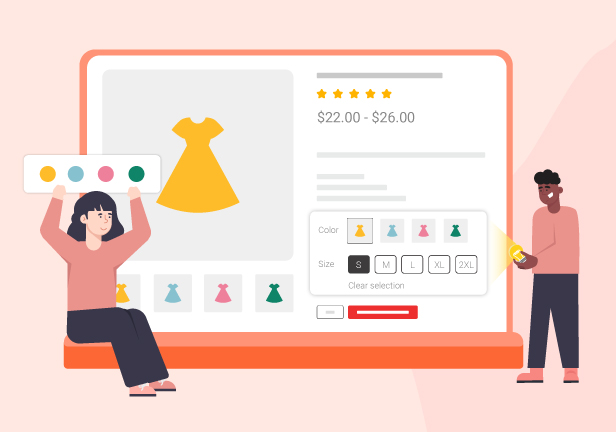
Displaying variation swatches for WooCommerce is a very helpful and necessary feature for a WooCommerce website. Do you want your variations to look more decorated, with different styles, and you can even customize them? A plugin that helps you create and customize variation swatches for WooCommerce websites makes the variations of your items look impressive and professional. Customers find it more comfortable and convenient to view variations of products as swatches. It catches their eyes, therefore, they decide to purchase more quickly.
What are WooCommerce Product Variations Swatches?
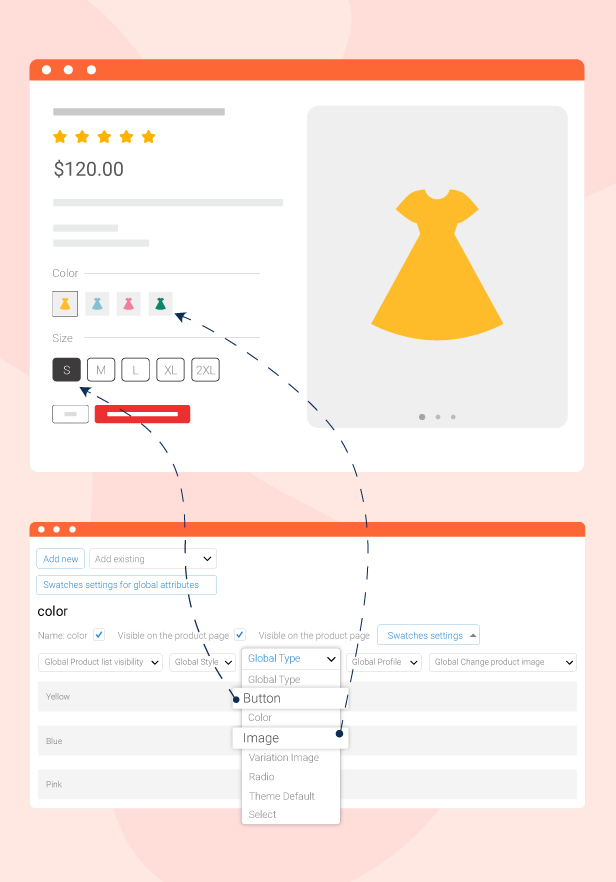
WooCommerce Product Variations Swatches is a variation swatches for the WooCommerce plugin that allows you to show the product attributes in the front end the way you design them in the back end. It contains multiple options for the admin to manage the settings of global attributes and make them display in different types, styles, or profiles. The admin can decide to show them on a single product page, or the Product list. You can also customize the swatches profile, enable showing variation swatches for WooCommerce on the widget, add custom CSS to design variation swatches for WooCommerce, and do many more things with our plugin.
Important note:
The plugin supports displaying swatches of product lists on specific pages by using WP’s Conditional Tags.
To handle WP’s Conditional Tags, this plugin uses eval() which is very dangerous because it allows the execution of arbitrary PHP code. Therefore, please only fill this field with proper conditional tags that are validated and/or provided by trusted developers.
Make Product Pages More Eye-Catching With Variation Swatches
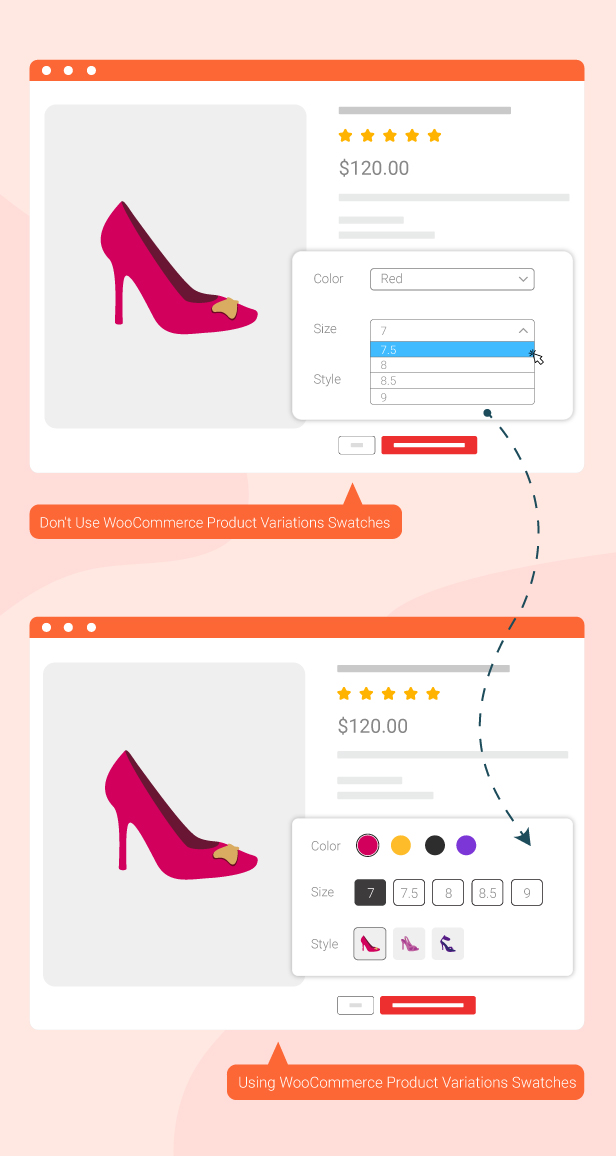
Display product variations using visual swatches such as colors, images, buttons, or labels instead of the default WooCommerce dropdowns. This makes product pages more engaging, professional, and visually appealing while helping customers select variations more quickly and easily. The feature enhances the shopping experience and helps customers make purchasing decisions faster.
Display Variation Swatches Everywhere
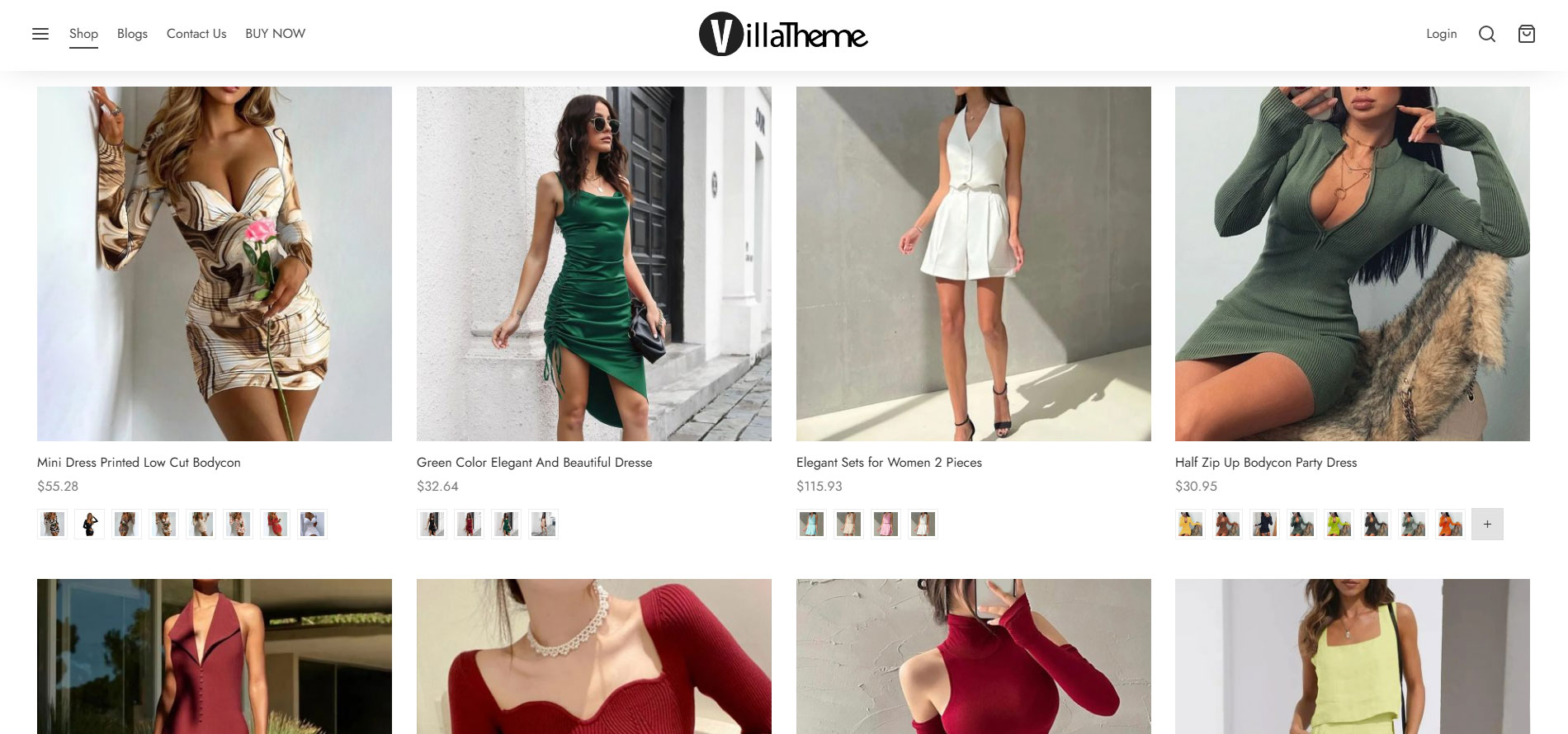
Show variation swatches across different areas of your website such as shop pages, product pages, quick view popups, and other product display sections, allowing customers to view and select variations instantly. This feature creates a more intuitive and convenient shopping experience while increasing customer interaction with products directly from listing pages.
Shop Page
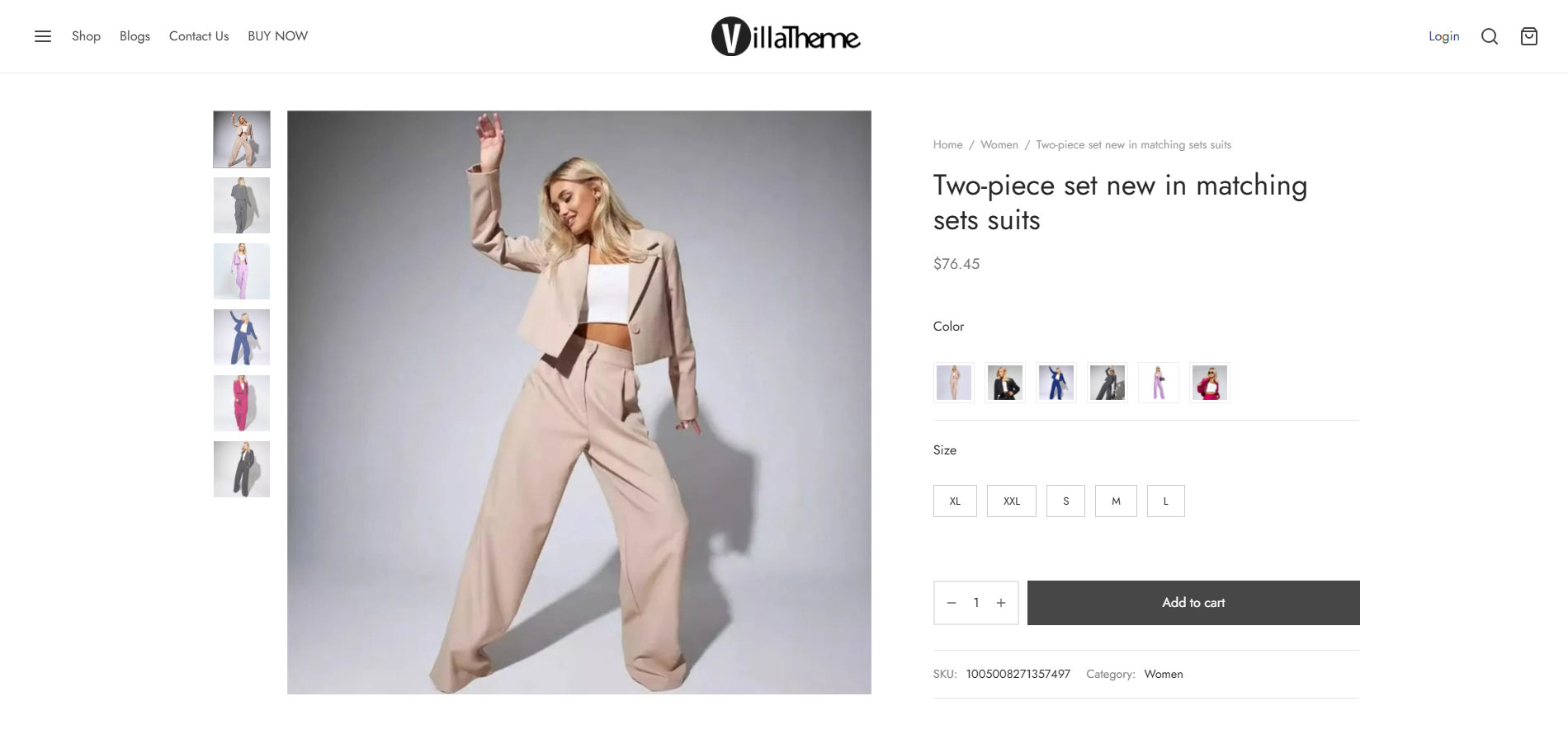
Single Product Page
Filter Widgets for Easier Product Discovery
Provide intuitive filter widgets that allow customers to quickly filter and search products by colors, sizes, attributes, or other variation options directly on your WooCommerce store. This feature makes product discovery more convenient, improves the shopping experience, and helps customers find the products they want faster.
Unlimited Variation Swatch Types
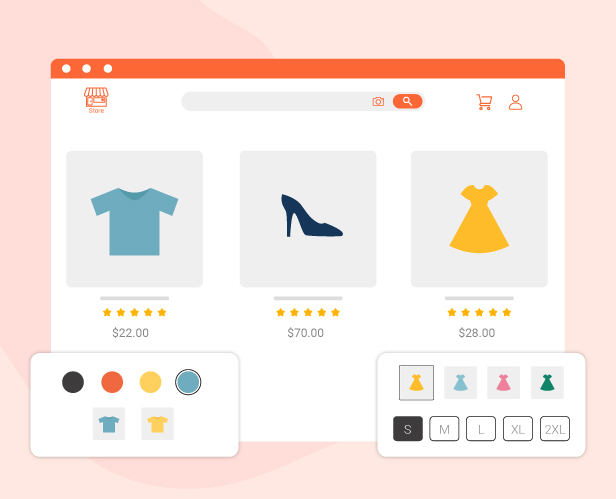
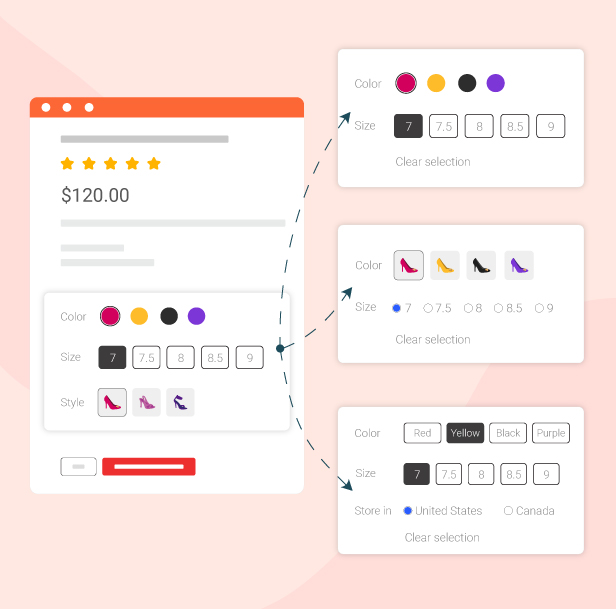
Easily replace default WooCommerce dropdowns with various swatch types such as buttons, select boxes, radio buttons, images, variation images, or color swatches to create a more modern and intuitive variation selection experience. This feature makes products more visually appealing, helps customers choose variations faster, and enhances the overall look of your product pages.
Create Unlimited Swatch Profiles
Create unlimited swatch profiles with unique styles to apply flexibly across different product groups or display layouts on your website. You can customize each profile’s appearance, including colors, sizes, display styles, and other design elements to ensure variation swatches perfectly match your store branding and shopping experience.
Flexible Swatch Configurations for All Attributes
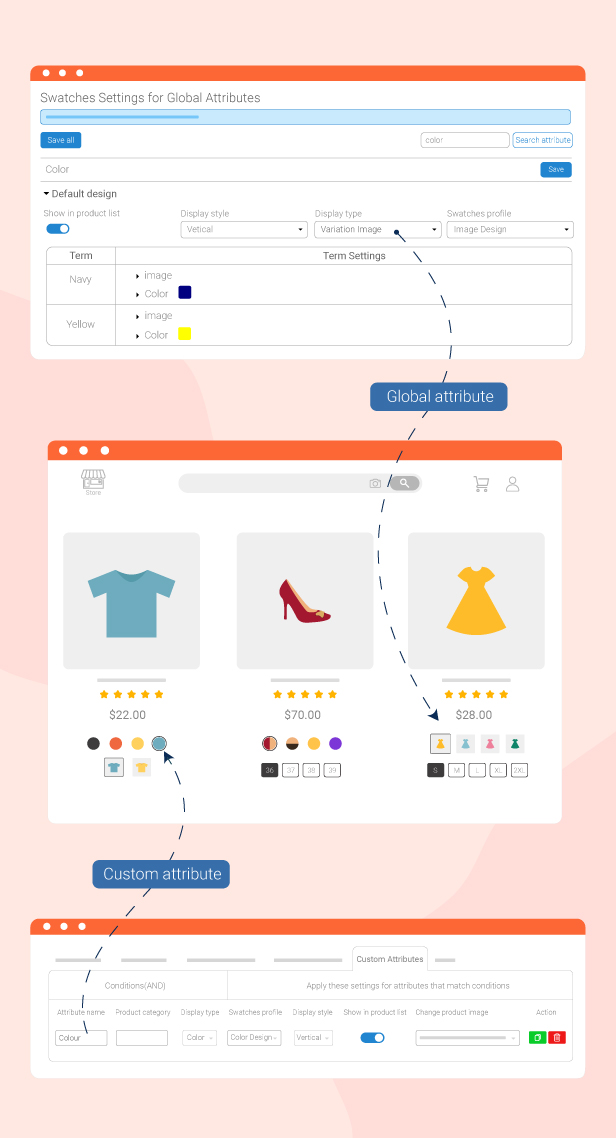
Easily configure variation swatches for global attributes, custom attributes, or individual products to match your store’s display needs. This feature provides greater flexibility in managing product variations, allowing each product to have the most suitable and visually optimized swatch presentation for customers.
Flexible Swatch Configurations for All AttributesSwatches Settings
What the plugin can do?
Convert any variations into variation swatches for WooCommerce with a couple of clicks.
When you activate the WooCommerce Product Variations Swatches plugin, the variations that were displayed in the drop-down menu will be converted into the variation swatches for WooCommerce.
You can add the name of the custom attribute, and the assigned categories to apply the settings of Types, Styles, Swatches Profiles, Change product images, and Show on the product list.
If the custom attribute matches the condition in the “Attribute name” and the “Product Category” fields – The custom attribute has the same name as the field “Attribute name” and products that contain this custom attribute, belong to one of the selected “Product categories” – The swatches settings of the current rule will be applied.
Attribute name: Enter the name of the custom attribute.
Assign category: Choose which product categories the attribute will be applied to.
Display Style: You can select the style to display custom attributes: Horizontal or vertical.
Display Type: You can select the type to display custom attributes: Button, Color, Image, Variation Image, Radio, and Select.
Swatches profile: Select to show the custom attributes as swatches with one of the available swatches profiles.
Show on product list: This allows you to show/hide a particular custom attribute on the product list.
Change product images: You can select the option you want, to change product images when switching among attributes.
Other action: Clone/Remove the custom attributes.
Create unlimited Swatches profiles
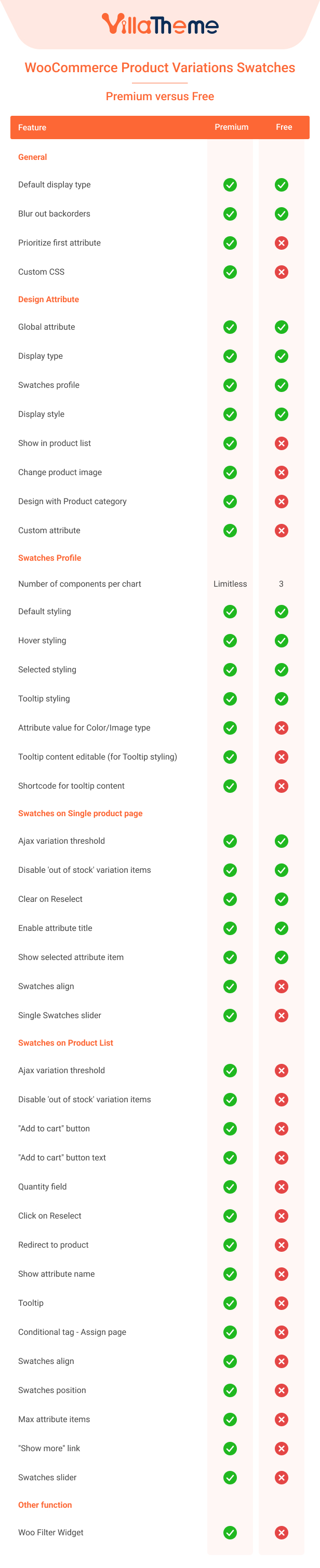
The WooCommerce Product Variations Swatches plugin allows you to create and customize variation swatches for WooCommerce. There are always 3 available swatch profiles for you to use, but by duplicating/removing them, you can create as many swatch profiles as you want or delete the one that is not appropriate anymore. You can also customize them to make them your ideal swatch profiles with:
Default status: Customize how each swatch is displayed in default status with name, size, color, background, border …
Hover status: You can customize each swatch when hovering over the Color, Background, Border, and Box-shadow effects.
Selected status: You can customize how each swatch is displayed when selected. The customization includes Color, Background, Border, Box-shadow effect
Tooltip: You can customize the tooltip which is shown when hovering over a variation swatch. including Color, Border, Font size, and Positions of the tooltip.
Cloning/removing profile: You also can duplicate the current swatch profile, or remove it.
Display variation swatches for WooCommerce on the product list and assigned pages.
You can manage to show/hide the variation swatches for WooCommerce by some options in the Swatches on Product List tab.
Show Add to Cart button: You can enable this option to show the Add to Cart button and it will show up after selecting attributes.
Show attribute name: This option is to show/hide the attribute name.
Position/Custom position: Select a position for variation swatches for WooCommerce on the shop page, category page, and product list. Or you can add your own custom position.
Enable tooltip: This allows you to show or hide the tooltip of variation swatches for WooCommerce.
Maximum attribute items: You can manage how many items of an attribute will be displayed.
OTHER FEATURES OF WOOCOMMERCE PRODUCT VARIATIONS SWATCHES
Auto-update: Enter your purchase code and the plugin will update automatically whenever there is a new version.
Works on mobile: The WooCommerce Product Variations Swatches plugin works perfectly on mobile devices.
*** WooCommerce Product Variations Swatches Premium Changelog ***
2026.08.20 - version 1.1.16
- Updated: Optimize code
- Updated: Compatibility with WC 11.0 and WP 7.1
- Updated: Compatibility with Flatsome
2026.08.12 - version 1.1.15
- Update: Security
2026.06.19 - version 1.1.14
- Update: VillaThem support
- Updated: Compatibility with WP 7.0 and WC 10.8.1
2026.06.12 - version 1.1.13
- Fixed: Variant images are not switching on selection.
- Updated: Compatibility with WC 10.8.1
2026.03.06 - version 1.1.12
- Fixed: Cannot select attributes on mobile
2026.02.06 - version 1.1.11
- Updated: Only specific conditional tags are supported in the “Assign page” option.
- Fixed: Can not show more attributes after adding to cart on the shop page
2026.01.23 - version 1.1.10
- Update: VillaThem support
2025.11.21 - version 1.1.9
- Added: Option to set the separator and color for the selected attribute label
- Added: Option to show the selected attribute label on the product page for each Swatches Profile
- Updated: Compatibility with PHP 8.2 and WC 10.3
2025.09.11 - version 1.1.8
- Updated: Compatible with VARGAL pro - allow setting the gallery to attribute items
2025.05.08 - version 1.1.7
- Updated: Compatible with VARGAL - Additional Variation Gallery for Woo plugin
- Updated: Compatible with Dokan - vendors can easily edit product swatches from the product edit page on their vendor dashboard
2025.02.27 - version 1.1.6
- Fixed: Can not show the variation image on swatches
- Fixed: Can not click the 'Save attributes' button
- Updated: Option to use variation swatch images as default display for products with multiple attributes.
2025.02.13 - version 1.1.5
- Updated: Option to use variation swatch images as the default display type
- Updated: setting swatches on the product edit page
2024.12.27 - version 1.1.4
- Added: Option 'Redirect to product' on the archive page
2024.10.11 - version 1.1.3
- Added: shortcode [viwpvs_swatches_archive] to show product swatches on the archive page
- Updated: VillaTheme support
- Updated: Compatible with WooCommerce Composite Products plugin
2024.04.23 - version 1.1.2
- Fixed: fixed show all attribute in product loop
- Updated: Compatibility with WP 6.5 and WC 8.7
- Updated: Update file support
2023.10.10 - version 1.1.1
- Fixed: Fixed Custom attribute special charset
- Updated: Compatibility with WP 6.3 and WC 8.0
2023.08.08 - version 1.1.0
- Updated: Update file support
- Updated: Option show all attribute in product loop
- Updated: Compatibility with HPOS-WC 7.9
- Fixed: Type button and radio not change image
2023.06.20 - version 1.0.19
- Updated: Compatibility with WC 7.8
2023.05.15 - version 1.0.18
- Updated: Compatibility with WC 7.7
2023.05.03 - version 1.0.17
- Fixed: Fixed error display
2023.04.28 - version 1.0.16
- Fixed: Can not save attributes for simple products
- Fixed: Slider not working in product loop
- Updated: Compatibility with WC 7.6
2023.04.06 - version 1.0.15
- Fixed: Variable Slider in product page not working
2023.03.23 - version 1.0.14
- Updated: Updated show all items of the attribute in a slider on Product Detail Page
- Updated: Compatibility with WP 6.2 and WC 7.5
2022.12.21 - version 1.0.13
- Added: Compatibility with Oxygen builder
2022.12.21 - version 1.0.13
- Added: Compatibility with Divi theme
- Added: Added filter hook to sort option before limit apply_filters( 'vi_wpws_sort_options_before_limit', $options, $product, $attribute_name );
- Updated: Update optimize loading global attributes in Global Attributes settings
2022.11.18 - version 1.0.12
- Updated: Update file languages
- Updated: Updated to allow display of images in tooltip custom attribute with button and color display type
- Updated: Compatibility with WP 6.1 and WC 7.1
- Added: Compatibility with 'Germanized für WooCommerce' plugin
2022.07.29 - version 1.0.11
- Fixed: Tooltip covered by out-of-stock attributes if Position is set to Right
- Fixed: Initialize swatches after a request to admin-ajax.php but not an ajax request
- Added: Prioritize first attribute
2022.06.15 - version 1.0.10
- Fixed: CSS of out-of-stock icon when enabling option to show attribute value for Color/Image type
- Fixed: Custom attributes not saving correctly if name contains quote sign
2022.06.13 - version 1.0.9
- Fixed: "Change the size of attribute items" not applied to Select type
- Improved: Values of Global attributes are paginated
- Improved: Remove empty css
- Added: Preview of attribute image and color on Global attributes page
- Added: Ability to modify tooltip content, show attribute image/variation image in tooltip
- Added: Option to show attribute value for Color/Image type
2022.03.29 - version 1.0.8
- Fixed: Swatches sometimes not initialize on product page built with Elementor
- Fixed: Small bug causes Elementor Hamburger menu not working when using along with WP rocket
- Updated: VillaTheme support
2022.03.23 - version 1.0.7
- Fixed: Out-of-stock visual issue
- Improved: Use srcset for attribute image when available
- Updated: VillaTheme support
- Added: Option to only use Custom position for swatches on product list
2022.03.11 - version 1.0.6
- Fixed: Zoom image not changing accordingly for "Change product image" option when using with Woodmart theme
- Fixed: Impeka theme - product item height on archive not auto correcting after variation swatches init
- Fixed: Tooltip not showing for out-of-stock attributes
- Added: Action hooks viwpvs_before_loop_variation_swatches and viwpvs_after_loop_variation_swatches
2022.01.15 - version 1.0.5
- Fixed: Deprecated is_ajax in WC6.1
- Fixed: Backorder status condition check
- Fixed: Swatches not working with Woodmart theme's quickview
- Fixed: Some fields of global attributes(Edit screen) are duplicated when WPML is active
- Fixed: "Change product image" option not working if a product has more variations than "Ajax variation threshold"
- Updated: Make "Out of stock" design(Swatches profile) apply no matter "Disable 'out of stock' variation items" option is on or off
2021.11.16 - version 1.0.4
- Fixed: Custom attribute not saving the value 0
- Fixed: "Change product image" option overrides variation image when a variation is selected
- Added: Custom hook for swatches position
2021.10.15 - version 1.0.3.2
- Fixed: Missing variation price on product list if swatches position is before/after title
- Fixed: Custom attributes not saving correctly if attribute name is in non-latin language
- Updated: Load images/colors(filter by attributes) from original language if not set in a second language(WPML)
- Added: Option to set maximum items shown by default for WooCommerce filter widget
2021.09.15 - version 1.0.3.1
- Fixed: Change attribute select when an attribute does not exist in any variations
- Fixed: Swatches in product list not working if Default Form Values do not exist in any variations
- Fixed: Custom attributes not saving correctly if attribute name contains special characters
- Fixed: Out-of-stock attributes not blur out when turning off "Disable Out of stock variation items" option if Default Form Values are set
- Fixed: "Show selected attribute item" not working with products that have more variations than the Ajax variation threshold
- Updated: Remove Ajax variation threshold limitation
- Optimized: Do not print css with empty style
- Added: Compatibility with JetSmart filters plugin
2021.04.22 - version 1.0.3
- Fixed: Show selected attribute item on single
- Fixed: Variation image in product list not change when selecting an attribute with image caused by some lazyload functionality of some plugins/themes
- Fixed: Swatches type Variation image not working with translated product variations(WPML)
- Fixed: Conflict with Contact form
- Updated: Hide 'out of stock' variation item option for Product list
- Updated: Product edit page: button "Add new" -> "Add", add button "Add new" like WooCommerce which is to create a new term for global attributes
- Updated: “Out of stock” products are still selectable
- Added: Option to change product image according to attribute/variation image when selecting an attribute value
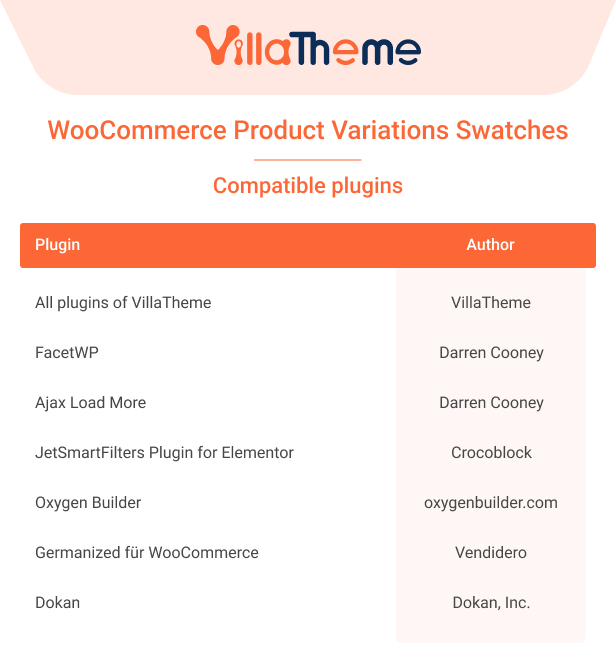
- Added: Compatibility with FacetWP, Ajax load more(Darren Cooney)
- Added: Add to cart button text on product list can be translated with WPML, Polylang
- Added: Swatches align for single product
2020.12.18 - version 1.0.2.6
- Added: Reset settings general
- Added: Attribute image size
- Fixed: Auto update
2020.12.12 - version 1.0.2.5
- Fixed: Swatches select revert to attribute slug after add to cart
- Fixed: Color separator selection changes not reflecting
- Fixed: Display swatches slider
- Fixed: Save attribute on product editor page
- Updated: Delete image for attribute item
- Updated: Style quantity on product list
- Updated: Compatibility with WP 5.6 and WC 4.8
- Added: New position on Product List - before product title, after product title
- Added: Enable/disable attribute title on single
- Added: Show selected attribute item on single
- Added: Import/ export settings general
2020.08.15 - version 1.0.2.4
- Added: Compatibility with WP 5.5 and WC 4.3
– Fixed: 'Out of stock' Swatches - namesake
- Fixed: Check update request
2020.07.01 - version 1.0.2.3
– Fixed: Design 'Filter Products by Attribute' WooCommerce
2020.06.29 - version 1.0.2.2
– Updated: Class support
– Added: Add Quantity field in Product list
– Added: Add default Swatches profile
– Added: Add ajax variation threshold
– Added: Select multi value for global in the product edit page
– Added: Custom design Global Attribute for Product category
– Added: Design 'Filter Products by Attribute' WooCommerce
– Added: Carousel format for a large number of variations in Product list
– Added: filter 'viwpvs_variation_option_tooltip' to change content of the tooltip
2020.05.09 - version 1.0.2.1
- Fixed: 'Out of stock' Swatches in single product page
- Fixed: Show in product list for custom attribute
- Fixed: Display color type and image type for custom attribute
2020.04.18 - version 1.0.2
- Fixed: 'out of stock' Swatches in Product list
- Added: Text of 'add to cart' button in Product list
- Added: Hide 'out of stock' variation item
2020.04.04 - version 1.0.1
- Fixed: Function prefix
- Fixed: Horizontal style
2020.04.02 - version 1.0.0
~ The first released
We use cookies to personalise content and ads, to provide social media features and to analyse our traffic. We also share information about your use of our site with our social media, advertising and analytics partners. View more