Description

WooCommerce Boost Sales – Cross-sell and Upsell is a straightforward and effective sales strategy. WooCommerce Boost Sales is a popular marketing technique. The technique used in WooCommerce Boost Sales Cross Sell and Upsell is wisely suggesting or recommending products, stimulating customer purchases, and assisting shop owners in increasing sales. Grasping these demands of online businessmen, VillaTheme developed a special tool for WooCommerce Boost Sales that promises to create WooCommerce Boost Sales Cross-Sell and Upsell quickly, effectively, and optimally. Let’s find out about this plugin.

WooCommerce Boost Sales stimulates the purchase of customers by up-selling, and cross-selling. Increase revenue as well as profitability for your website, and stores. WooCommerce Boost Sales allows you to add WooCommerce Cross-sell and Upsell products in an independent system of WooCommerce.

Up-selling is the practice in which a business tries to persuade customers to purchase a higher-end product, an upgrade, or an additional item to make a more rewarding sale. For instance, a salesperson may influence a customer into purchasing the newest version of an item, rather than the less-expensive current model, by pointing out its additional features.

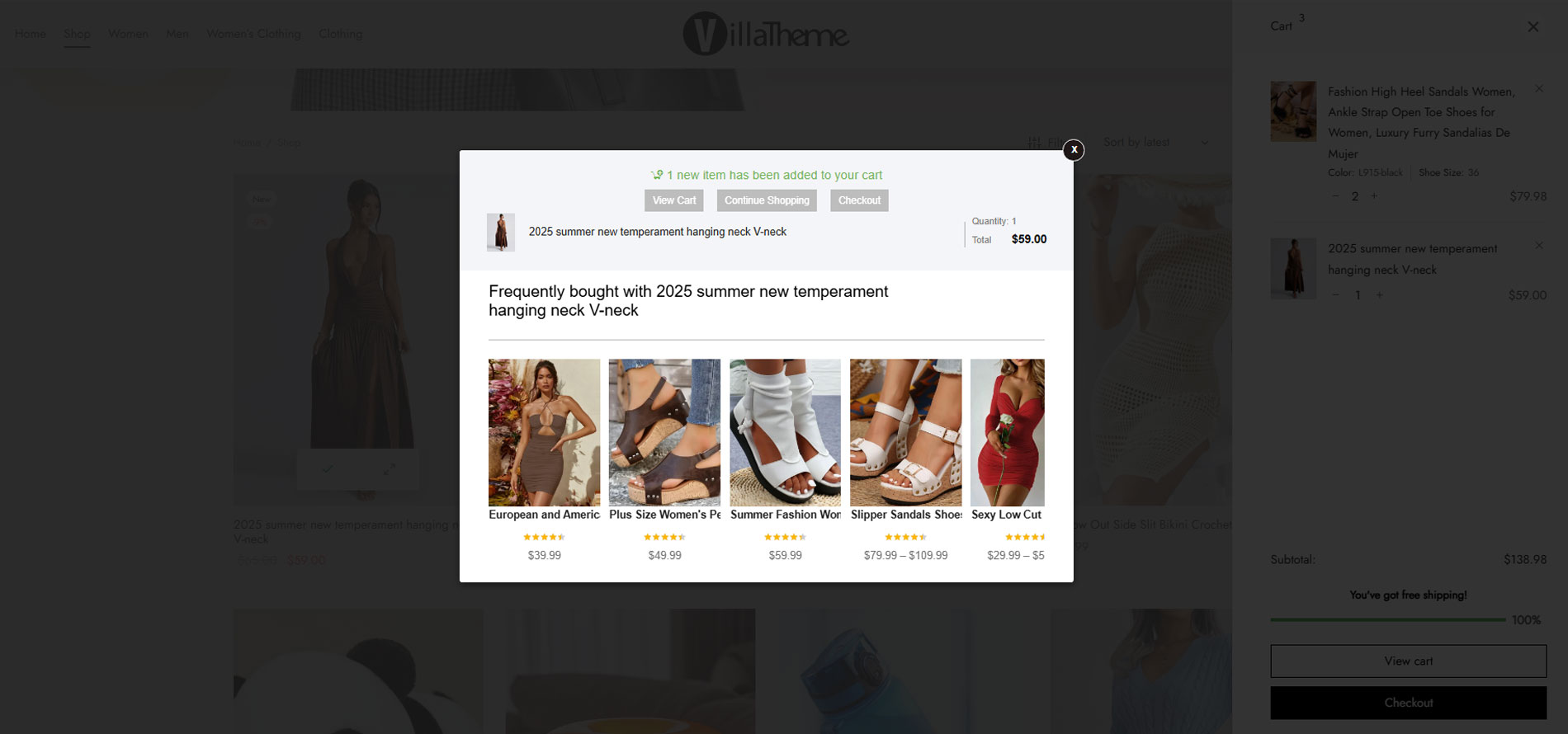
  • WooCommerce Upsell: The Woocommerce Upsell pop-up appears after customers click on the Add to Cart button, suggesting customers buy up-sell products that give them more profit.
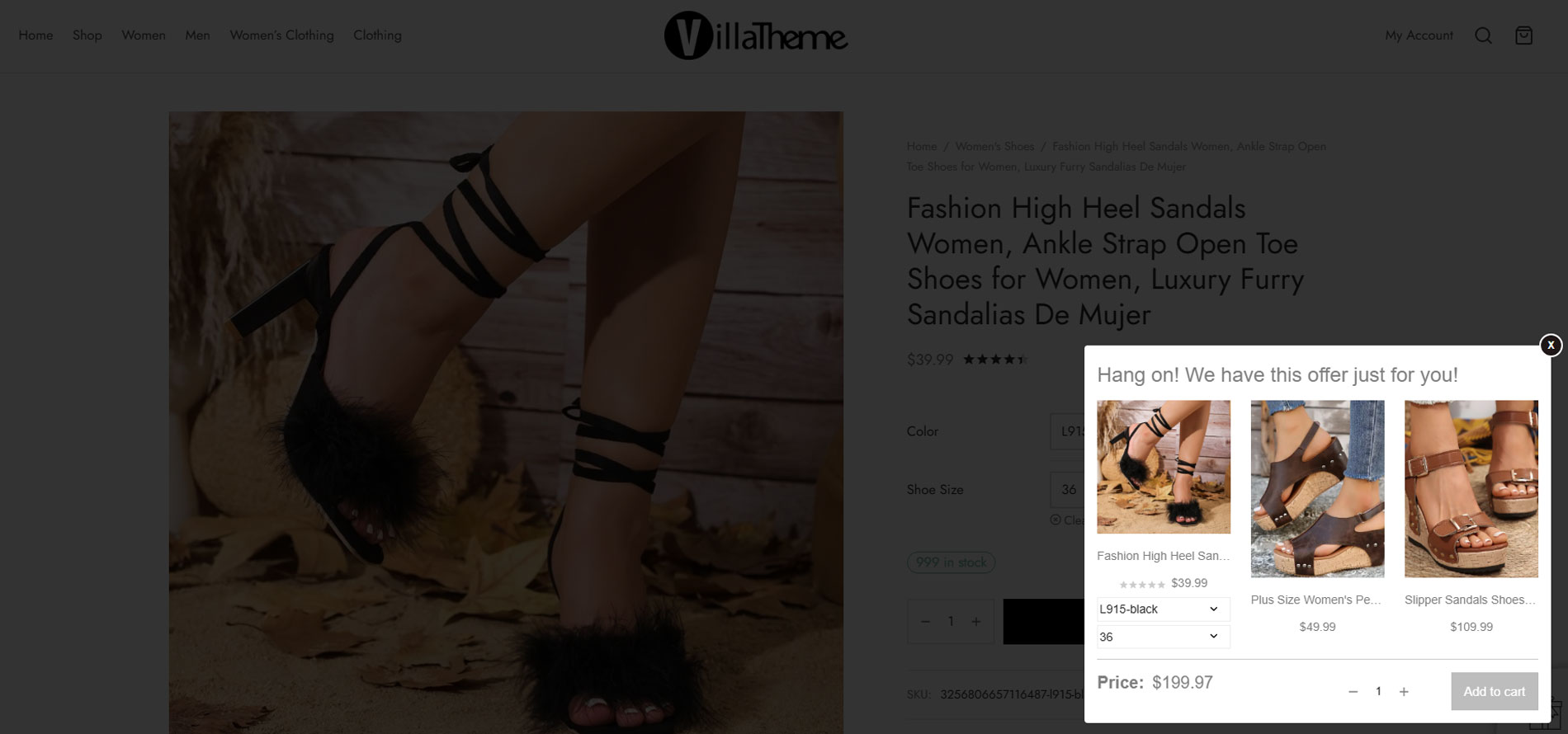
  • WooCommerce Cross-sell: Display cross-sell pop-up on the single product page, cart page, and check-out page. Suggest customers buy a bundle product that has a lower price.
  • Discount Bar: Displays how much you need to spend to get a discount. Stimulate customers to buy more products.
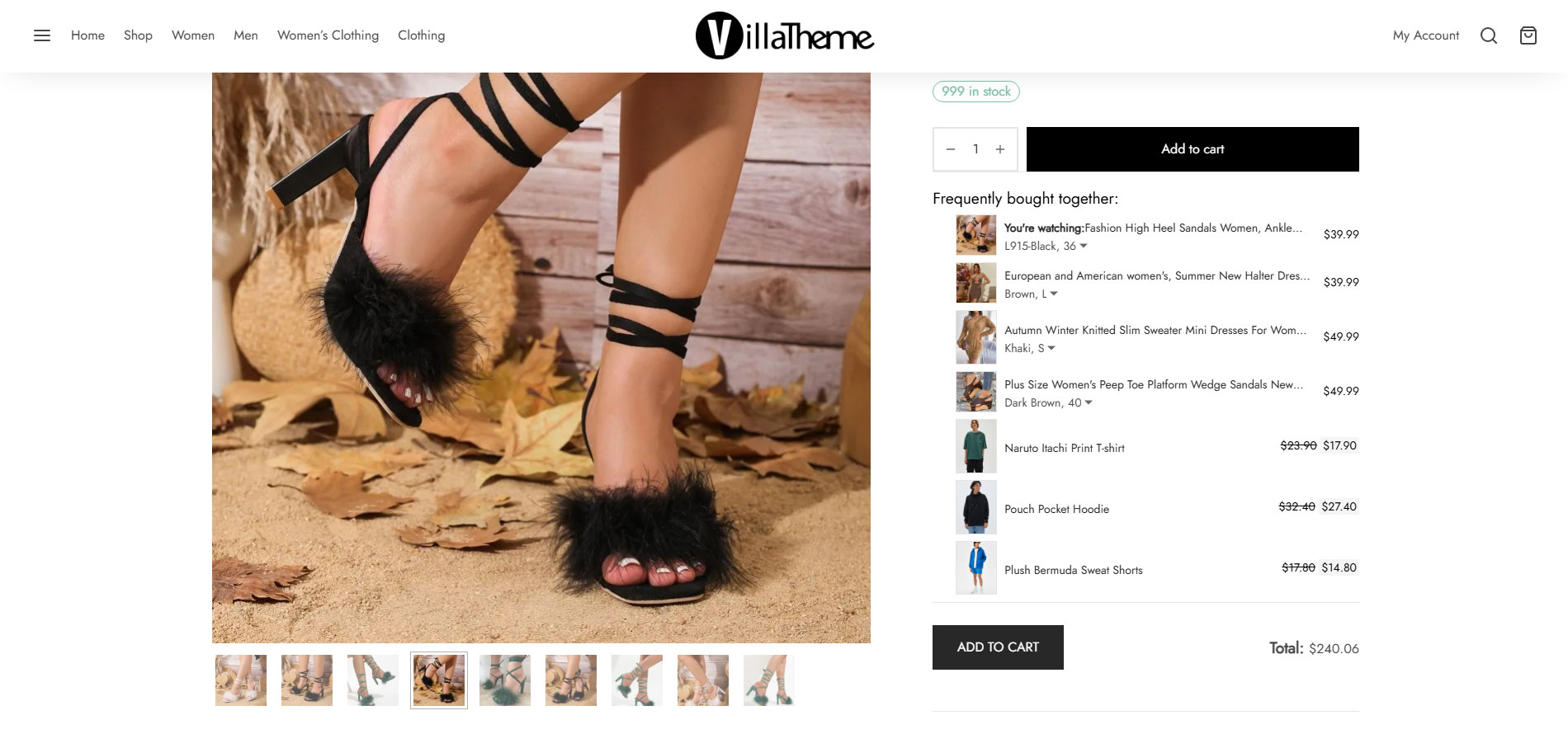
  • Frequently bought together: Frequently bought together is a feature that helps you flexibly choose to display WooCommerce Cross-sell and Upsells on the single product page.
  • Design Upsells, Cross-sells, and the Discount bar on the front end.

Increase Order Value With Smart Upsell Suggestions

Recommend related, premium, or frequently purchased products throughout the shopping journey to encourage customers to spend more effortlessly.

Show Smart Upsell Popups When Customers Add Products to Cart

Boost sales with upsell popups that recommend recently viewed products, products from the same category, or manually selected products.
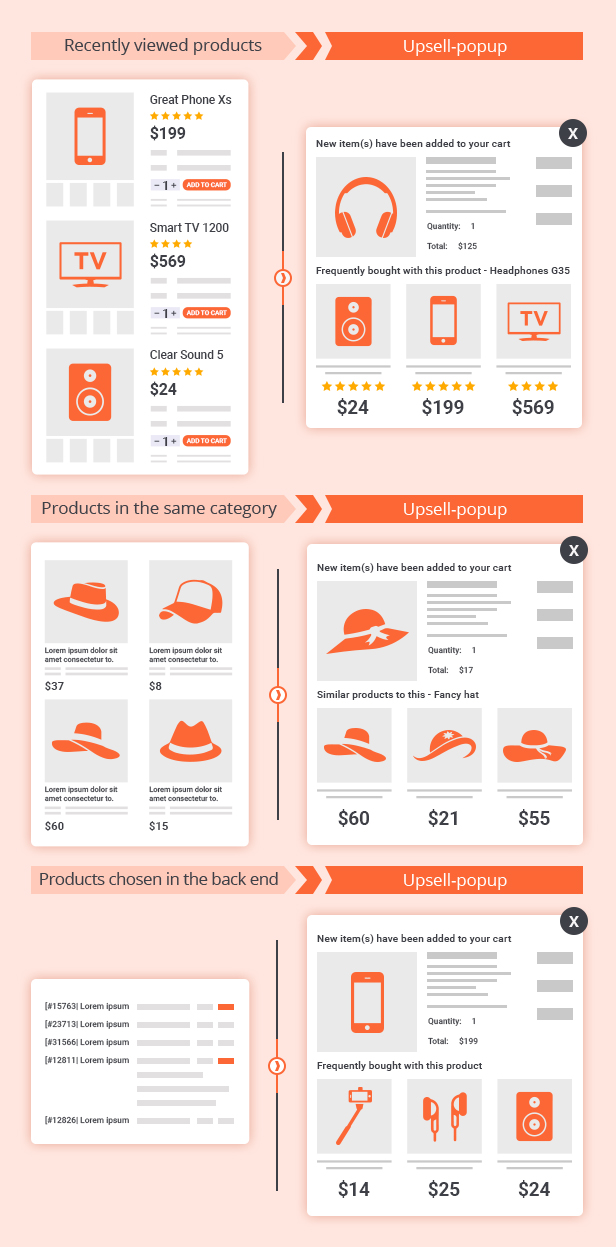
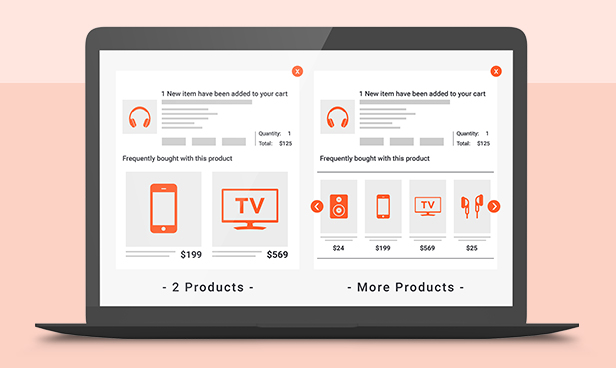
Customize the Number of Products in Upsell Popups

Control how many recommended products appear inside the upsell popup to match your store layout and maximize customer engagement.
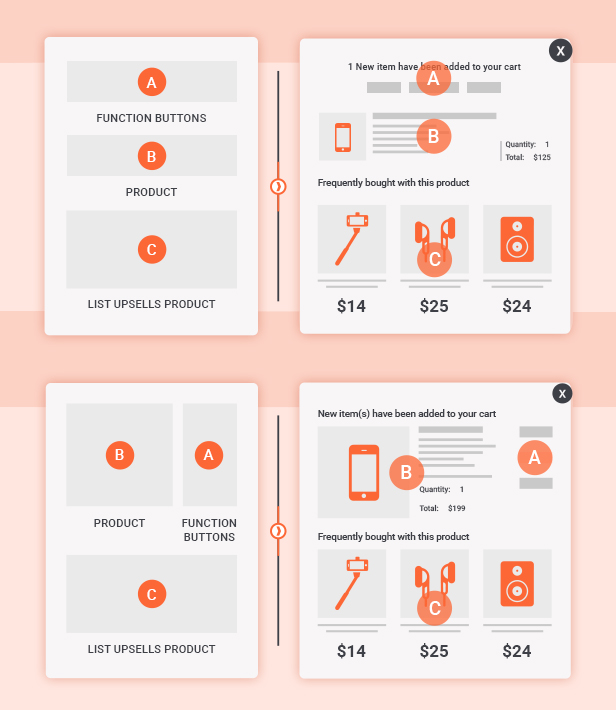
Choose the Perfect Upsell Popup Style for Your Store

Select from different upsell popup styles to create a more engaging shopping experience that matches your store branding and layout.
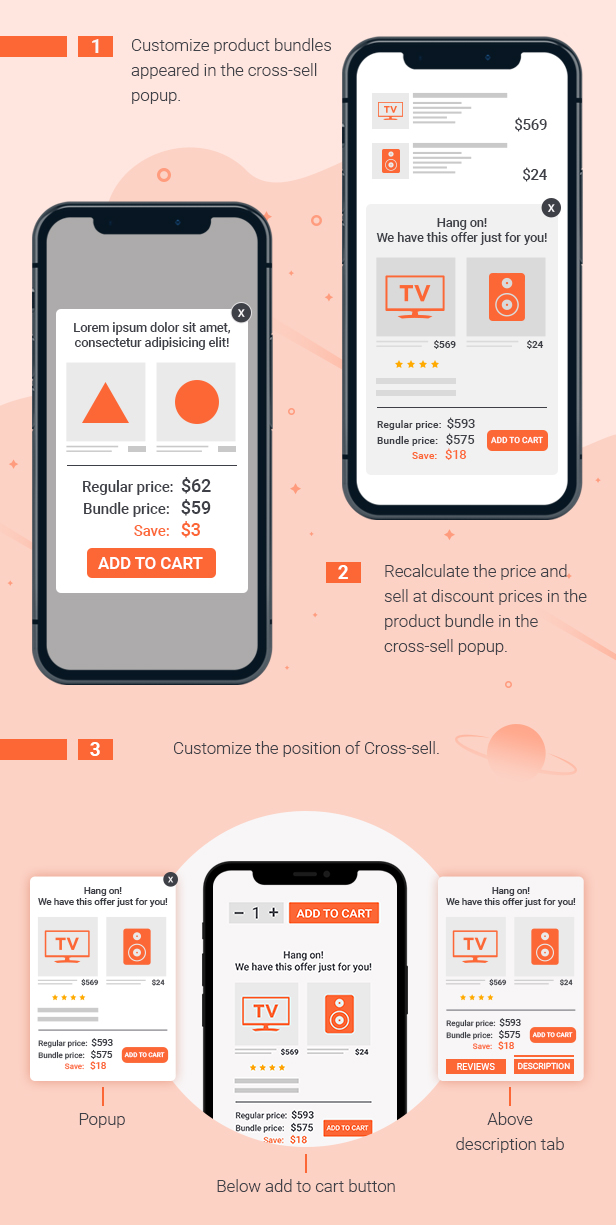
Boost Sales With Smart Cross-sell Popups

Display attractive product bundles inside cross-sell popups with automatically recalculated bundle prices and discounts to encourage bigger purchases. You can also customize where cross-sell offers appear, including popups, below the Add to Cart button, or above the product description tabs.
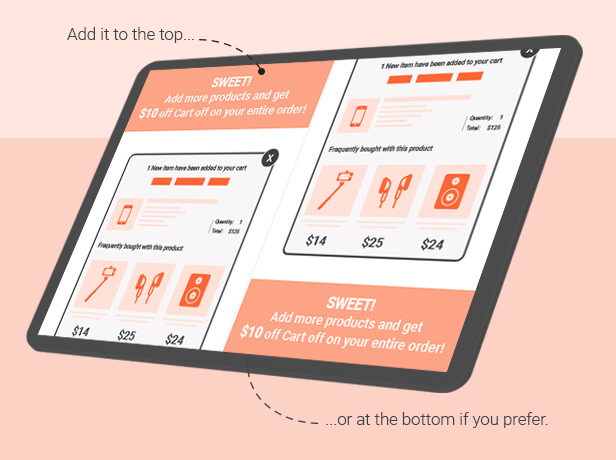
Encourage Bigger Purchases With Coupon and Discount Bars

Show discount bars to let customers know how much more they need to spend to unlock special offers, free shipping, or discounts. Easily place the bar at the top or bottom of the page to match your store layout and shopping experience.
When customers reach the target order amount, they will receive a coupon as a reward to encourage larger purchases. Store owners can freely customize the conditions, coupon value, and discount type to fit their marketing campaigns
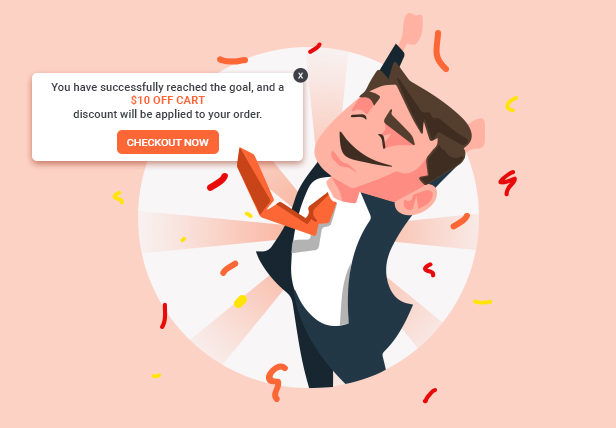
Fully Responsive on All Devices and Screen Sizes

The plugin interface and features are fully optimized to work smoothly across desktop, tablet, and mobile devices, ensuring a consistent shopping experience everywhere.
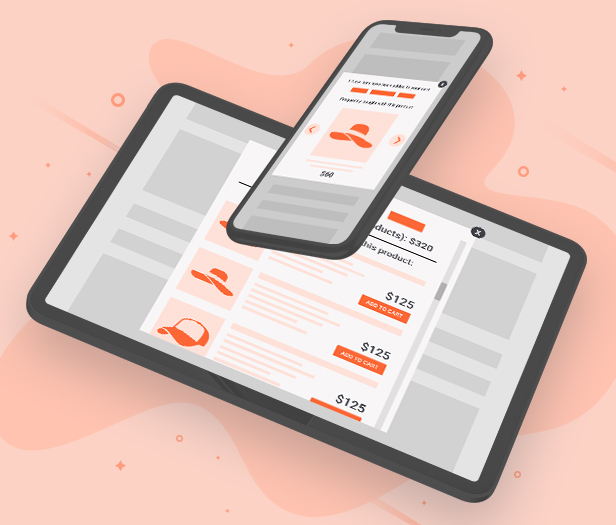


PLUGIN FEATURES:

WOOCOMMERCE UPSELL

  • Display up-sells pop-up: Display a WooCommerce upsell popup which introduces up-sell products when customers hit the Add to Cart button. Up-sell products are similar products but give you more profit.
  • Sync data with WooCommerce: If you have created WooCommerce upsell products before, the plugin allows you to sync and use these products to WooCommerce Boost Sales.
  • Add up-sell products to each product: Configure which products will appear on the up-sell pop-up of each product.
  • Hide on single product pages: Enable/disable the pop-up on single product pages
  • Show all products in the category: Display all products in the category of the product customers just add to the cart in the up-sell pop-up.
  • Exclude product: Select products you don’t want to appear on the up-sell pop-up.
  • Customize up-sells pop-up: Select the pop-up style, customize how many products appear on the pop-up, and customize the message.
  • AJAX Add to Cart: Add up-sell products to the cart without reloading the page.


WOOCOMMERCE CROSS-SELL

  • Product Bundles: Creating product bundles and then selling them at discounted prices.
  • Show Cross-sells popup: Display WooCommerce cross-sell pop-up with a bundled product that includes the product that customers are going to buy.
  • Display under Add to Cart button: Display the WooCommerce cross-sell bundle under the Add to Cart button on the single product page.
  • Configure which page to appear: Select which pages will the WooCommerce cross-sell pop-up appear on.
  • Select the product bundle to display: In case a product is in 2 or more bundles, you can select to display the highest price or just random.
  • Variation products: It is available to add variation products to cross-sell bundles, customers can also choose the variable option right in the pop-up.
  • Customize the message: Customize the cross-sell pop-up message (Hang on we have this offer just for you)
  • Unlimited design: Customize the cross-sell bundle with background, text, icon, and initial delay.
  • Position: Choose to display the cross-sell bundle under the add to cart button, above the product description, or on a pop-up.
  • Bundle name: By default, the bundle will be named “Bundle of …” you can change this name.
  • Discount rule: Set up the default discount price of the bundle using rules. Each rule will be applied for a price range.
  • Sync Cross-Sell from WooCommerce: Sync cross-sell bundles from WooCommerce cross-sell.
  • AJAX Add to Cart: Add bundles to the cart without reloading the page.
  • Use bundle for other products: After creating a bundle, you can display it on many other products.


FREQUENTLY BOUGHT TOGETHER FEATURE

  • Frequently bought together is a feature that helps you flexibly choose to display WooCommerce Cross-sell and Upsells on the single product page.
  • Source: There are many sources that you can choose to display on the Frequently bought together:
    • Upsells – Same as Up-sells products
    • Cross-sells – Same as Cross-sells products
    • Woo Upsells – Products set in Edit product/Link products/Upsells.
    • Woo Cross-sells – Products set in Edit product/Link products/Cross-sells.
  • Position: You can choose where the Frequently bought together appears on the single product page
    •  After adding to the cart form
    • After product summary
    • After product tabs
  • Style: How the Frequently bought together appears on the single product page
    • Vertical
    • Horizontal
  • Shortcode: Frequently Bought Together shortcode is used to display Frequently Bought Together products of a product and insert every you want.

DISCOUNT BAR:

  • Discount progress bar: The discount progress bar displays how much customers need to spend to get the discount. (Based on the discount coupon of WooCommerce system).
  • How much more: Support users know how much they need to spend more to achieve the discount.
  • Sync data with WooCommerce: The plugin syncs data with WooCommerce. You can select the coupon created in the WooCommerce system to display on the discount progress bar.
  • Thanks to customers: When a customer achieves a minimum for the discount, a THANK YOU message will be displayed to congratulate them.
  • Customize discount progress bar: You can customize the position, color, background, description, and messages of the progress bar.
  • Automatically direct to the checkout page: Allow automatic redirect to the checkout page after reaching the discount.

DESIGN UPSELL AND CROSS-SELL ON THE FRONT END

  • Design Upsell:
    • Item per row: Select the number of items per row on the upsell popup.
    • Item per row for mobile: Select the number of items per row on the upsell popup on mobile mode.
    • Max items: Fixedly assign the maximum number of items on the upselling popup if used: “Products in category”
    • Popup style: There are 2 display styles of the upsell popup.
    •  Message in popup: Customize messages in the upsell popup.
    • Add-to-cart style: You can choose how the add-to-cart button appears on the upsell product on the popup, it can be: Hide; Show on hover, Theme default, or Visible below product detail.
    • Customize the “Continue shopping” button on the upsell popup: You can customize the text and select an action when clicking on the Continue Shopping button.
    • Hide View More button: Enable the option to hide the View More button on the upsell popup.
  • Design Cross-sell: 
    • Initial time: WooCommerce cross-sell will show with a popup or gift icon. If you want to time randomly, 2 numbers are separated by a comma. E.g.: 3,20. It is random from 3 to 20.
    • Auto popup: Enable to let the WooCommerce cross-sell popup to appear automatically
    • Hide gift icon: Enable to hide the gift icon which is used to call the WooCommerce cross-sell popup.
    • Design icon: Select icon styles; Icon color; Icon background color; and Icon position.
    • Design cross-sell popup: Customize background color; Background image; Text color; Price color; Save price Color.
    • Cross-sell popup template: You can choose a slider; Vertical with checkboxes; or Horizontal with checkboxes.
    • Template on mobile: You can choose available templates for mobile: Slider; Scroll or Vertical with checkboxes.
  • Discount bar: 
    • Discount bar position: On the top or bottom.
    • Design the discount bar: Text color, process bar main color, process bar background color.
  • Custom CSS: Design upsell; cross-sell and discount bar as you want.

OTHER FEATURES

  • Auto-update: Enter your purchase code and the plugin will auto-update whenever there is a new version.
  • Support RTL website: The plugin supports RTL sites, back-end, pop-up… will be displayed right.
  • Works on mobile: Woocommerce Boost Sales works perfectly on mobile devices.
  • SPEED: Plugin uses Ajax technology. Pop-up will be loaded when customers add products to the cart
  • Easy to use: Friendly interface and easy to use.
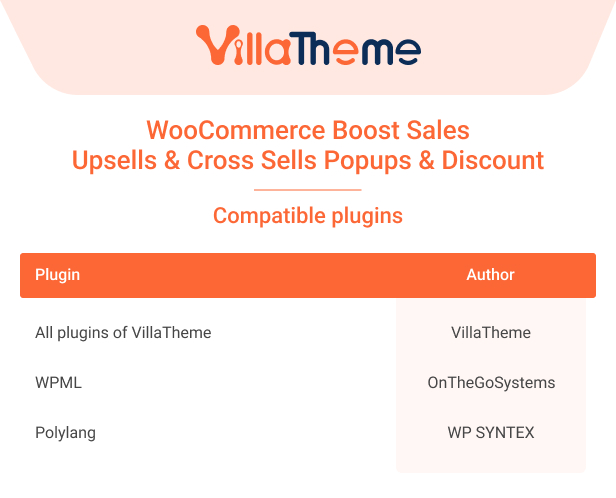
  • Compatible with WPML and Polylang: Display upsell and cross-sell popups in multiple languages.

COMPATIBLE PLUGINS
 

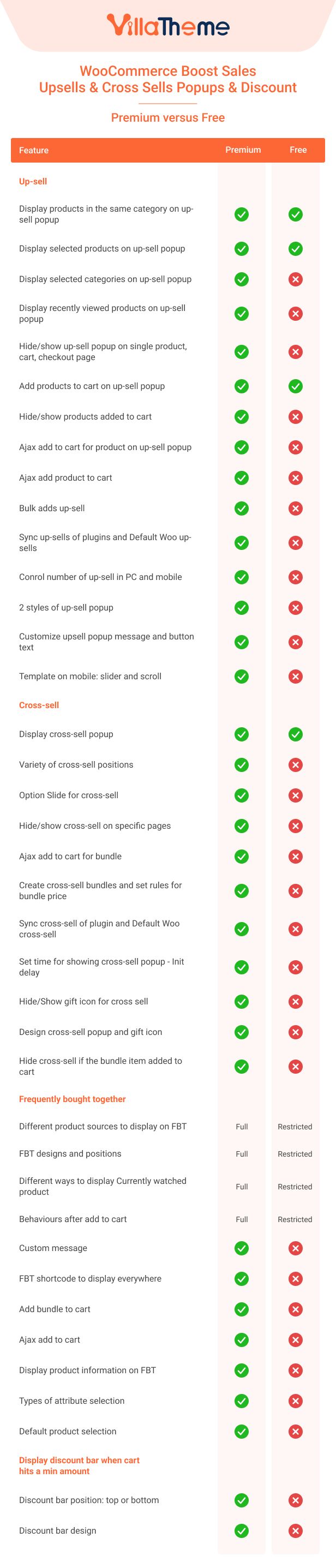
COMPARISON TABLE BETWEEN THE FREE AND PREMIUM VERSION
 

Watch this video to review our plugin

Let’s follow this video guide about Marketing strategy using WooCommerce Boost Sales.
 

Additional information

License Time

12 months for 1 website, 6 months for 1 website

/**1.6.7 - 2026.06.19**/ - Updated: VillaTheme support /**1.6.6 - 2026.05.15**/ - Fixed: Upsell price format in popup - Updated: Upsell Product variation name in popup /**1.6.5 - 2026.02.27**/ – Updated: Compatible with WP 6.9 WooCommerce 10.5 /**1.6.4 - 2025.11.26**/ - Fixed: PHP 8.1+ deprecated warning "preg_match(): Passing null to parameter #2 ($subject)" /**1.6.3 - 2025.11.24**/ - Added: Sort products by time (newest, oldest) in upsell – Updated: Support version to 1.1.14 /**1.6.2 - 2025.08.15**/ - Updated: Minify some source code - Updated: Add Option show Product with related attribute in Upsell - Updated: Edit Option Go to cart page to Redirect after add to cart in Upsell - Updated: Add Option Redirect after add to cart in Cross sell /**1.6.1 - 2025.04.11**/ - Fixed: Slider up-sell popup - Fixed: Upsell product item click issue - Tweak: Cross-sell hide on single product page option /**1.6.0 - 2025.02.25**/ - Added: New cross-sell popup - Updated: Frequently bought together UI - Updated: Upsell popup /**1.5.6 - 2024.10.21**/ - Added: Option show/hide cross-sell when bundle item in the cart - Fixed: Wrong bundle item subtotal in cart when increasing quantity /**1.5.5 - 2024.10.05**/ – Added: Default product selection option – Removed: Only select the first product option - Tweak: Frequently Bought Together selection behavior - Added: Coupon Exclusion for Bundles option /**1.5.4 - 2024.04.23**/ – Updated: Compatible with WP 6.5 and WC 8.7 – Updated: Update support class /**1.5.3 - 2023.10.10**/ – Updated: Support version to 1.1.7 /**1.5.2 - 2023.07.31**/ – Updated: Compatible with WooCommerce HPOS(COT) /**1.5.1 - 2023.03.28**/ - Fixed: Exclude product in upsells popup /**1.5.0 - 2023.03.28**/ - Updated: Select variations with button template - Updated: Change trigger 'wc_fragment_refresh' to trigger 'updated_wc_div' - Updated: Show upsell popup for grouped product /**1.4.14 - 2022.12.19**/ - Fixed: When an order that contains a bundle is placed, attributes of variable bundled item are saved to the simple bundled item after it - Fixed: Conflict with other plugins that hook into woocommerce_add_to_cart_redirect filter - Fixed: Default {number_of_items} and FBT total price when "Only select the first product" is enabled /**1.4.13 - 2022.11.02**/ - Updated: Compatibility check with WP 6.1 and WC 7 - Optimized: Product search for upsells, cross-sells - Added: Options to exclude products/categories that Frequently bought together will work for /**1.4.12 - 2022.10.13**/ - Fixed: Compatibility issue with Woodmart theme's lazy loading images - Fixed: Variation selection in Frequently bought together not working properly when "Load with Ajax" option is enabled - Updated: Move Upsell popup html to a template file so that it can now be overridden by theme - Added: Option "Item link behavior" for Upsells and Frequently bought together - Added: Vietnamese translation /**1.4.11 - 2022.06.15**/ - Fixed: Added amount in upsells popup not showing correctly according to tax settings - Fixed: Bundle price and tax settings - Fixed: Upsells not showing with xoo_wsc_add_to_cart - Added: Option to only select the first product by default(Frequently bought together) /**1.4.10 - 2022.03.29**/ - Fixed: Conflict with Assorted products - Fixed: Sanitize attribute value correctly - Updated: VillaTheme support /**1.4.9 - 2022.03.23**/ - Fixed: Some issues with non-latin attribute name/value - Fixed: Upsells not showing after adding a variable product to cart on product list via WooCommerce Cart All In One plugin - Fixed: Upsells not showing after adding a product to cart on product list on single product page - Updated: VillaTheme support - Added: Button to delete upsells /**1.4.8 - 2022.03.02**/ - Updated: Make [wbs_frequently_product] shortcode work regardless of the value of the "Enable Mobile" option - Fixed: Frequently bought together not working correctly for variable products whose attributes are set to Any /**1.4.7 - 2022.01.15**/ - Fixed: Deprecated is_ajax in WC6.1 - Added: Option to hide quantity of up-selling products /**1.4.6 - 2021.11.25**/ - Fixed: Bundle subtotal and saved amount in cart when quantity is greater than 1 if using dynamic price - Updated: Prevent bundle item quantity from being changed via cart update - Added: Support of overriding templates /**1.4.5 - 2021.11.08**/ - Fixed: Some strings on upsells are not in correct language if loaded via ajax - Fixed: Cross-sells discounted price and saved amount display incorrectly if using "Horizontal/Vertical with checkbox" templates - Fixed: Unable to manually change price of bundle if using quick edit on the Cross-sells page /**1.4.4 - 2021.10.22**/ - Fixed: Rounding issue in upsells popup - Improved: Working flow of Upsells - Added: Button to sync upsells from default language to others - Added: Ability to use dynamic price/discount for bundle - Added: More options for add-to-cart styles of upsells /**1.4.3.2 - 2021.05.12**/ - Fixed: Total price not changing according to sum price of selected items in the frequently bought products - Fixed: Bundle original price and saved amount in cart not changing according to bundle quantity /**1.4.3.1 - 2021.03.25**/ - Fixed: Cross sells popup showing empty if enabling "Hide if added" option and main product is already in the cart - Fixed: Last item in "frequently bought together" is hidden - Added: Show saved amount of bundle in the cart /**1.4.3 - 2020.01.12**/ - Fixed: Shipping issue with WooCommerce Table Rate Shipping - Fixed: Responsive for very small devices - Fixed: Bulk adding upsells - Updated: Compatibility with WP 5.6 and WooCommerce 4.8 - Updated: Reload discount bar when updating number of products in cart - Added: Upsell by tags - Added: Option to show upsell popup even if there's no upsells - Added: Option Frequently bought together and its shortcode [wbs_frequently_product] - Added: New style for cross sells - Added: More options to show cross sells on cart/checkout /**1.4.2.1 - 2020.08.14**/ - Fixed: Conflict with WooCommerce Product Bundles from SomewhereWarm - Updated: Compatibility with WP5.5 and WC4.3 - Improved: Product Upsells/Crosssell management page /**1.4.2 - 2020.06.12**/ - Fixed: Error on Edge, Safari - Fixed: "Hide out of stock" option not working on cart/checkout page - Fixed: Conflict with Yith WooCommerce Product Bundles - Fixed: Conflict with WooCommerce Product Add-on required fields - Fixed: Support class request - Updated: Discount bar can now be used without Upsells - Added: Option to always display discount bar when customers have not reached the minimum amount /**1.4.1 - 2019.12.27**/ - Updated: Compatibility with WP 5.3 and WooCommerce 3.8 - Added: Exclude categories to enable Upsell - Added: Exclude categories to display in Upsell - Added: Options to change title and action of button "Continue Shopping" - Added: Multilingual support(WPML and Polylang) /**1.4.0 - 2019.07.12**/ - Fixed: Variations selection problem of Upsell - Fixed: Rearrange bundle items - Fixed: Conflict with Contact form 7 - Fixed: Error on IE11 - Fixed: Conflict with Yith Bundle - Optimize: Cache data to improve performance - Added: Exclude products that use upsell - Added: Options to select template for upsells/crosssell on mobile - Added: Options to hide crosssell if one item of bundle is out of stock - Added: Default categories for cross-sell bundle - Added: Able to rearrange upsell products display order - Updated: Add product link to product title and image - Updated: Use <span> instead of <h2> for product title in upsell popup for SEO purpose - Updated: Show image of add to cart variation instead of variable - Updated: Hide out of stock variation of bundle if "Hide out of stock items from the catalog" in WooCommerce settings is enabled /**1.3.9.2 - 2019.02.25**/ - Fixed: Problem when turn on option Add to cart button with WooCommerce product bundle - Fixed: Warning with function scandir - Fixed: Variation error when using nice attributes feature of AliDropship Woo Plugin - Fixed: Cannot close discount bar message - Fixed: Overlay not close on archive page when adding products that do not have upsells to cart - Fixed: Conflict JS Product thumb of Flatsome - Fixed: Too many alert when no variation selected and add to cart button clicked - Fixed: Mobile CSS - Fixed: Add text add to cart to compatible with Facebook pixel - Updated: Able to get key in WooCommerce Boost Sales Settings /**1.3.9.1 - 2019.02.02**/ - Fixed: Remove ajax add to cart for upsell/crosssell on checkout/cart page - Fixed: Remove queued add to cart messages /**1.3.9 - 2019.02.01**/ - Optimize: Up-sells speed load in single product page. - Fixed: Up-sells everywhere - Fixed: Up-sells alert product variations - Fixed: Remove JS libraries in setting page backend - Fixed: Check update - Fixed: WP admin bar broken layout with discount bar - Fixed: Tab JS in backend - Fixed: Exclude products - Fixed: Cross-sell: remove products which are already in bundle - Updated: Class support - Updated: Remove slider for upsell/crosssell on mobile - Added: Slide for Cross-sells below add to cart button, above Description tabs - Added: Hide cross sell on Single product page - Added: Recently viewed products on upsells - Added: Hide products if added to cart on upsells - Added: Able to set product bundle name - Added: Set bundle discount rules - Added: Ajax add to cart for products on upsell/crosssell popup - Added: Sync cross-sell products from WooCommerce - Added: Use a bundle of other products /**1.3.8.5 - 2018.08.06**/ - Fixed: Flex library - Fixed: List external products show on cross-sells page - Fixed: Show save price of cross-sells on mobile - Fixed: Ajax add to cart on cross-sells conflict with WooCommerce Side Cart - Fixed: Show next/prev flex slider on mobile - Fixed: Class add to cart button - Fixed: Show Overlay when Upsells empty - Compatible: Woo Floating Cart /**1.3.8.4 - 2018.07.19**/ - Fixed: Load JS product variations - Fixed: Upsell page rule - Fixed: Show thank you page. /**1.3.8.3 - 2018.07.06**/ - Fixed: Message thank you html - Fixed: Loading JS /**1.3.8.2 - 2018.06.23**/ - Added: Category class - Updated: Check update - Fixed: Button on upsells - Fixed: Overlay Upsell - Fixed: CSS max width image size - Fixed: Scroll with discount bar without upsells - Fixed: CSS with font size /**1.3.8.1 - 2018.06.14**/ - Fixed: CSS on mobile - Fixed: CSS Price - Fixed: Subcatgory with Ajax add to cart /**1.3.8 - 2018.06.13**/ - Fixed: Remove esc_html with title - Fixed: Quantity field on upsell and cross sell - Fixed: Conflict CSS flex view port - Fixed: Auto detect RTL - Added: Hide product out of stock - Added: Go to cart page when product is added cart on upsells - Added: Get product from subcategory - Added: Override the same product of combo on cart /**1.3.7 - 2018.05.18**/ - Fixed: Add notify when add product by ajax add to cart button - Fixed: Button flex on Mobile - Fixed: Add first cross-sell product - Fixed: Thumb and Title on upsells /**1.3.6.2 - 2018.05.12**/ - Fixed: Hide Add to cart button on upsells, cross-sells /**1.3.6.1 - 2018.05.11**/ - Fixed: No scroll with product that has not upsells - Fixed: Hide add to cart button when turn on ajax add to cart /**1.3.6 - 2018.05.11**/ - Fixed: Show ajax add to cart button - Fixed: Update mini cart by add to cart ajax button - Fixed: Not scroll when show cross-sells - Fixed: Show alert with Variaton Id is Null - Added: Show Saved Type option - Added: Addons page /**1.3.5 - 2018.05.09**/ - Fixed: CSS Upsells - Fixed: JS send after Add to cart - Fixed: Ajax Add to Cart - Fixed: Class Support - Fixed: Add to cart on Shop page(Flatsome theme) - Added: Removable parent product in Cross-sells /**1.3.4 - 2018.04.20**/ - Fixed: Select width in upsells, cross-sells - Fixed: Products in cross-sells backend. - Fixed: Translate - Removed: Some hook in bundle. /**1.3.3 - 2018.04.11**/ - Fixed: Removed bundle in cross-sells - Fixed: CSS element with box sizing - Fixed: Show bundle in checkout, cart page with Bundle below add to cart button /**1.3.2 - 2018.03.23**/ - Fixed: CSS - Fixed: Removed other JS in Setting page - Fixed: Total tax on discount bar - Fixed: Max price of product variation - Fixed: JS Add to cart on archive page /**1.3.1 - 2018.03.02**/ - Fixed: RTL Upsells template - Fixed: Data init - Fixed: Upsells with bundle - Fixed: Ajax URL - Fixed: Compatible with Flatsome theme - Fixed: Rename overlay class - Fixed: Add to cart template - Fixed: Field of variable product - Added: Custom CSS - Added: Custom Icon color /**1.3.0 - 2018.02.21**/ - Fixed: Upsell template - Fixed: Ajax callback upsell - Added: Search products in upsells and cross-sells page - Added: Cross-sell on product single page - Added: The same bundle not show in cart page, check out page - Added: RTL support - Added: New Icon /**1.2.2 - 2017.11.30**/ - Fixed: Responsive /**1.2.1 - 2017.11.25**/ - Fixed: Remove class bounce - Fixed: Thank you page - Fixed: Default color - Fixed: Load items of manager cross-sells page backend /**1.2.0 - 2017.11.20**/ - Fixed: Out of stock - Fixed: Button Ajax - Fixed: Button Color - Fixed: Price with tax - Added: More options - Rebuild: All options /**1.1.5 - 2017.10.16**/ - Fixed: Get coupon in fields file. - Fixed: Remove view cart button on Upsells - Fixed: CSS of boost sales - Added: Coupon with multi currency /**1.1.4 – 2017.09.18 **/ - Added: Option label related products in up-sells popup - Added: Variation on Cross-sells - Added: Auto update - Fixed: Discount process bar - Optimized: Get option /**1.1.3 – 2017.09.07 **/ - Fixed: Responsive popup up-sell and cross-sell on mobile. - Fixed: Image product holder deprecated. - Added: Custom background and color for cross-sells popup /**1.1.2 – 2017.07.01**/ - Fixed: Remove navigation popup of up-sells product when number of product is not enough to fit slide - Fixed: No product chosen in exclude product when select show upsell product according to category - Fixed: Conflict CSS Flex slider - Fixed: Reset query /**1.1.1 – 2017.06.14**/ - Fixed: Ajax search Exclude product option in Upsell setting page - Fixed: List name product in cross-sell and up-sell /**1.1 – 2017.06.13**/ - Updated: Add cross-sells product directly on cross sell page and automatic generate product Bundle - Added: More style for popup up-sells product - Fixed: Exactly cross-sells product price on cart page - Fixed: Remove deactive free version - Updated: Support link in setting page - Fixed: Item per row and max item per row on up-sells product. - Fixed: show product of category (up-sells product) in single product page. /**1.0.5– 2017.05.16**/ - Fixed: Display ID for select up-sells product. - Fixed: Variable product on up-sells popup. - Updated: Cross-sells on checkout page. - Fixed: Variable products in cross-sells product. /**1.0.4 – 2017.05.08**/ - Added: Cross-sells on cart page – Updated: More option for message purchased. - Fixed: Bundle in bundle /**1.0.3 - 2017.4.24 **/ - Update: Select all products to add up-sells with 1 click. - Update: Choose all products in category to show up-sells instead of chose each product up-sells. - Fixed: Deactivate free version when activate premium version. - Fixed: Cross-sells slider /**1.0.2 - 2017.4.15 **/ - Fixed: Updated icon discount progress bar - Fixed: Image thumbnail up-sell - Fixed: Add up-sells admin page - Fixed: Responsive popup up sells product - Fixed: Pagination cross-sells admin page /**1.0.1 - 2017.4.7 **/ - Fixed: Cross sell /**1.0.0 - 2017.4.5 **/ ~ The first released