S2W – Import Shopify to WooCommerce helps you to import data from Shopify to WooCommerce easily. With only 2 steps your Shopify store data will be imported including store settings, shipping zones, taxes, pages, blogs, coupons, customers, products, and orders. The plugin uses the Shopify API key to transfer data from Shopify to the WooCommerce store directly, your data is kept private.
Unlimited import with no extra pay:
With our plugin, you can import all your data from Shopify to WooCommerce without any limits. There are no additional fees for using the plugin; it’s a one-time purchase.
*Important Note: While you can freely import products, orders, and other data, please be aware that importing customer details requires your store to be on the Shopify plan or higher (more details in this article). This plan is necessary to access the relevant data permissions, but there are no additional costs associated with our plugin.
Commit import successful:
We commit that you will import data successfully. Please follow our guiding document and video to learn how to use the plugin to import data from Shopify to WooCommerce. If you have any trouble with the import progress, feel free to contact us.
S2W – Import Shopify to WooCommerce – Migrate from Shopify to WooCommerce
All-in-one solution to migrate data from Shopify to WooCommerce.
Using Shopify API or manual import
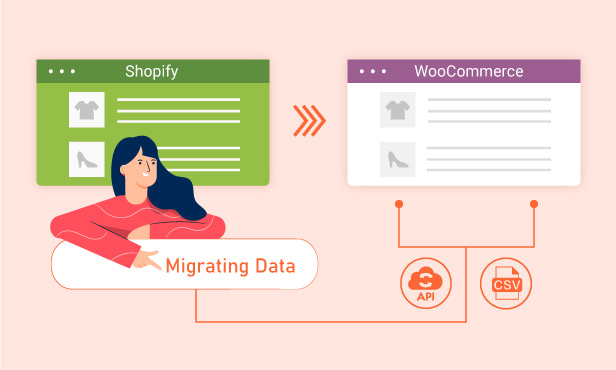
There are 2 methods for migrating data from Shopify to WooCommerce: using the Shopify API for a fast, automated transfer that keeps your data synced and accurate, or importing manually via CSV files for more control and flexibility over how your data is structured and uploaded.
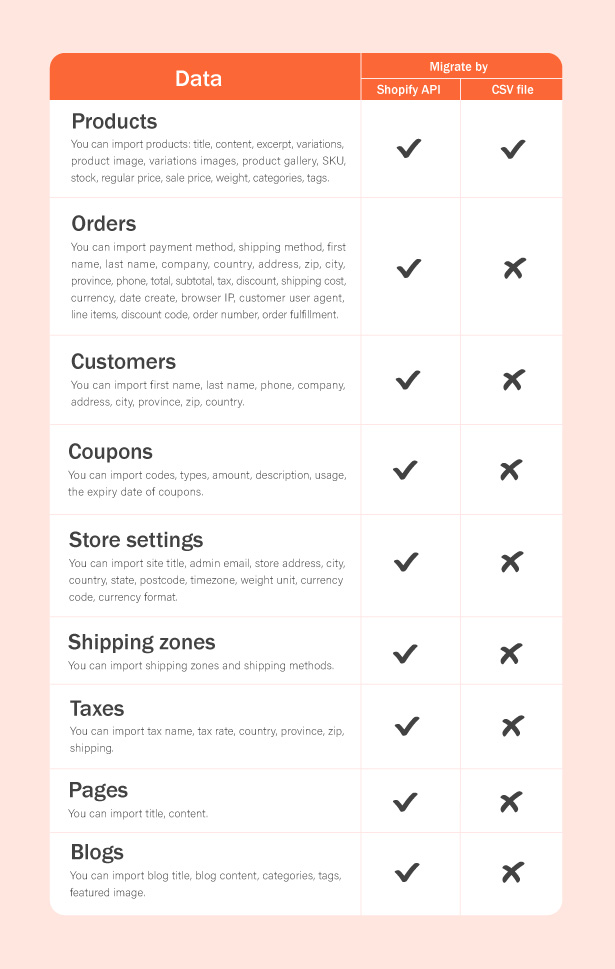
Shopify Data Migration Coverage
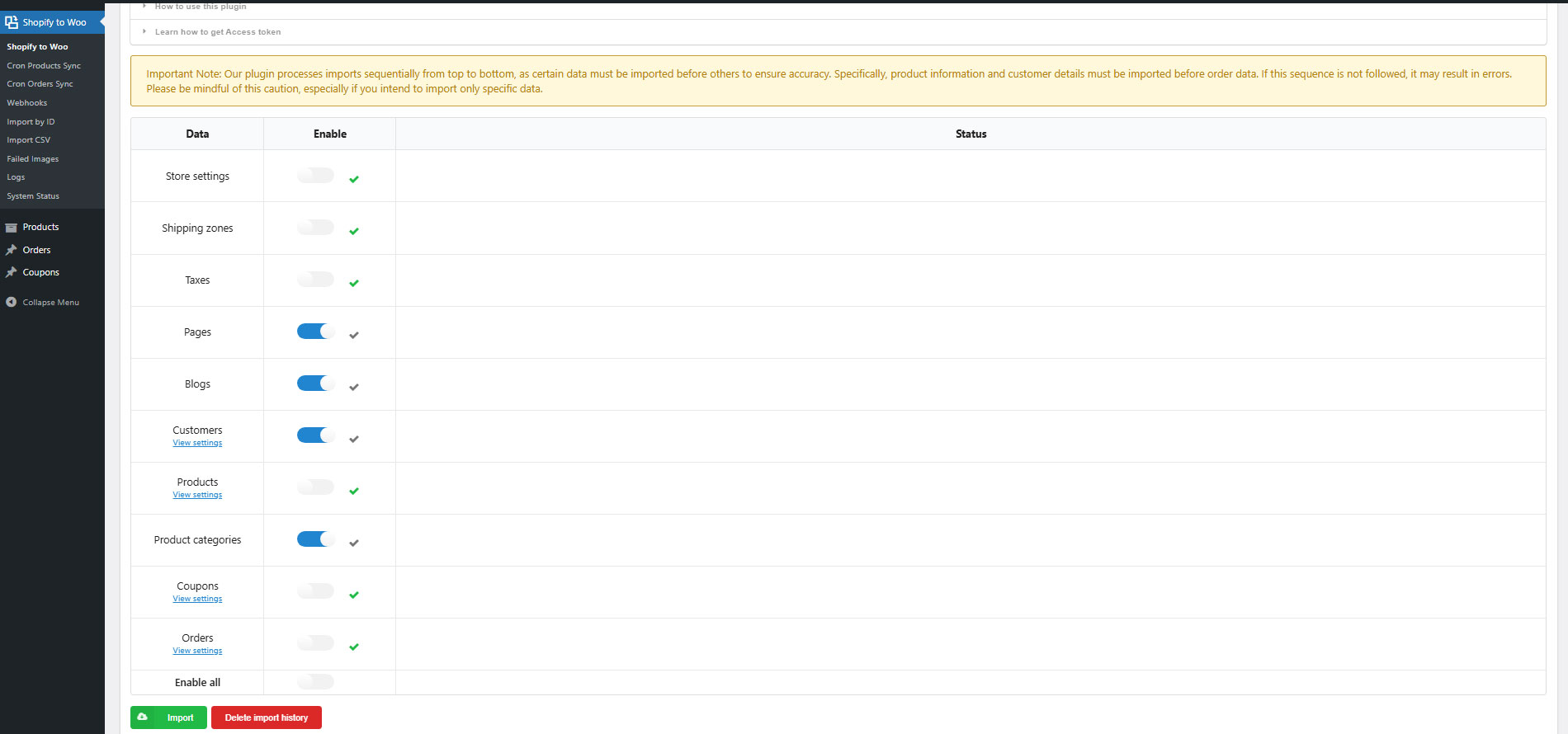
S2W allows you to import 9 essential data types, ensuring a complete and seamless migration of your store. These include store settings, shipping zones, taxes, pages, blogs, coupons, customers, products, and orders so you can quickly rebuild your Shopify store structure inside WooCommerce without missing important data.
Sync Imported Products and Orders
You can easily update imported products and orders whenever changes are made in Shopify. The system allows you to configure update options so your WooCommerce store always stays in sync with the latest data from Shopify, helping you avoid manual work and keep everything accurate and up to date.
Automated Update Scheduling
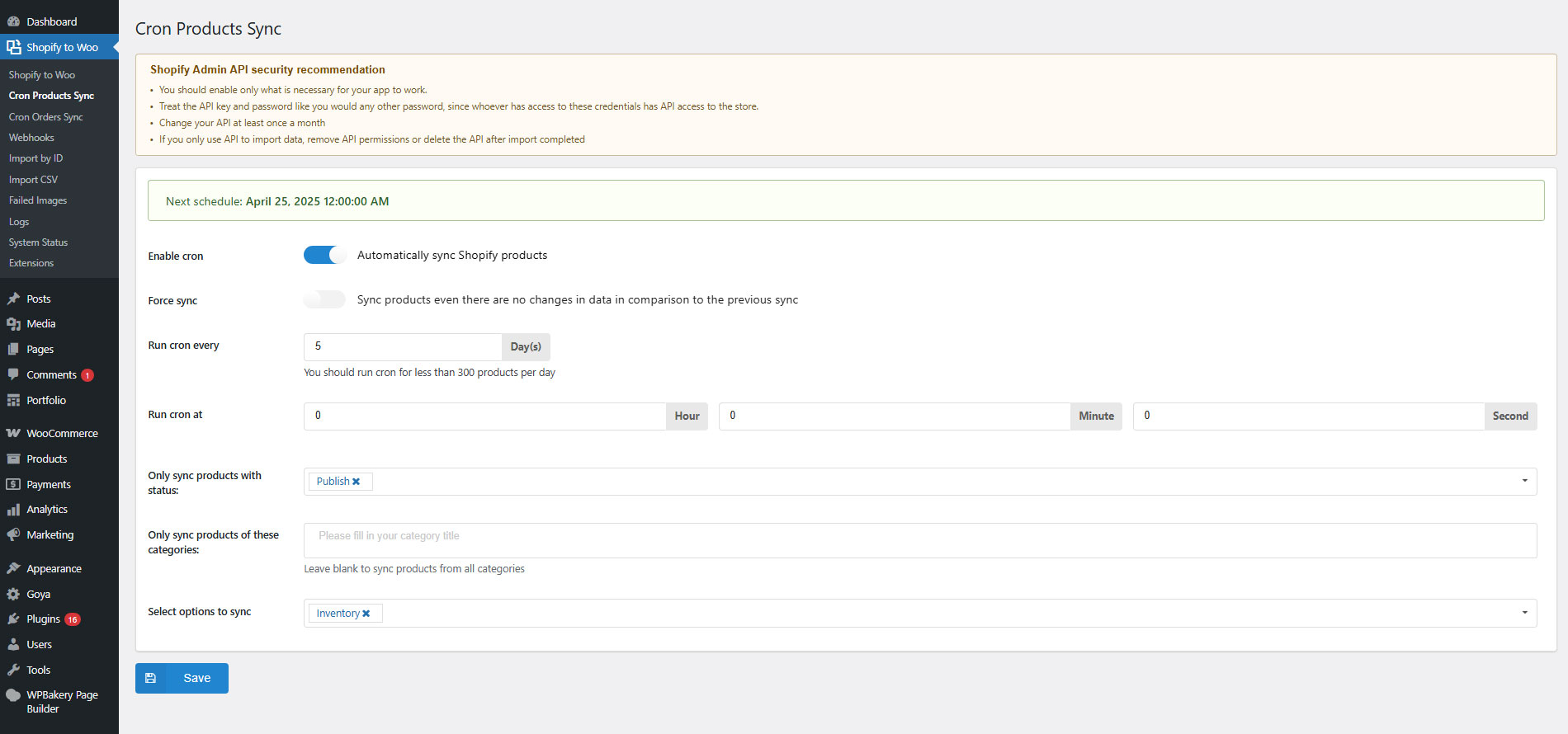
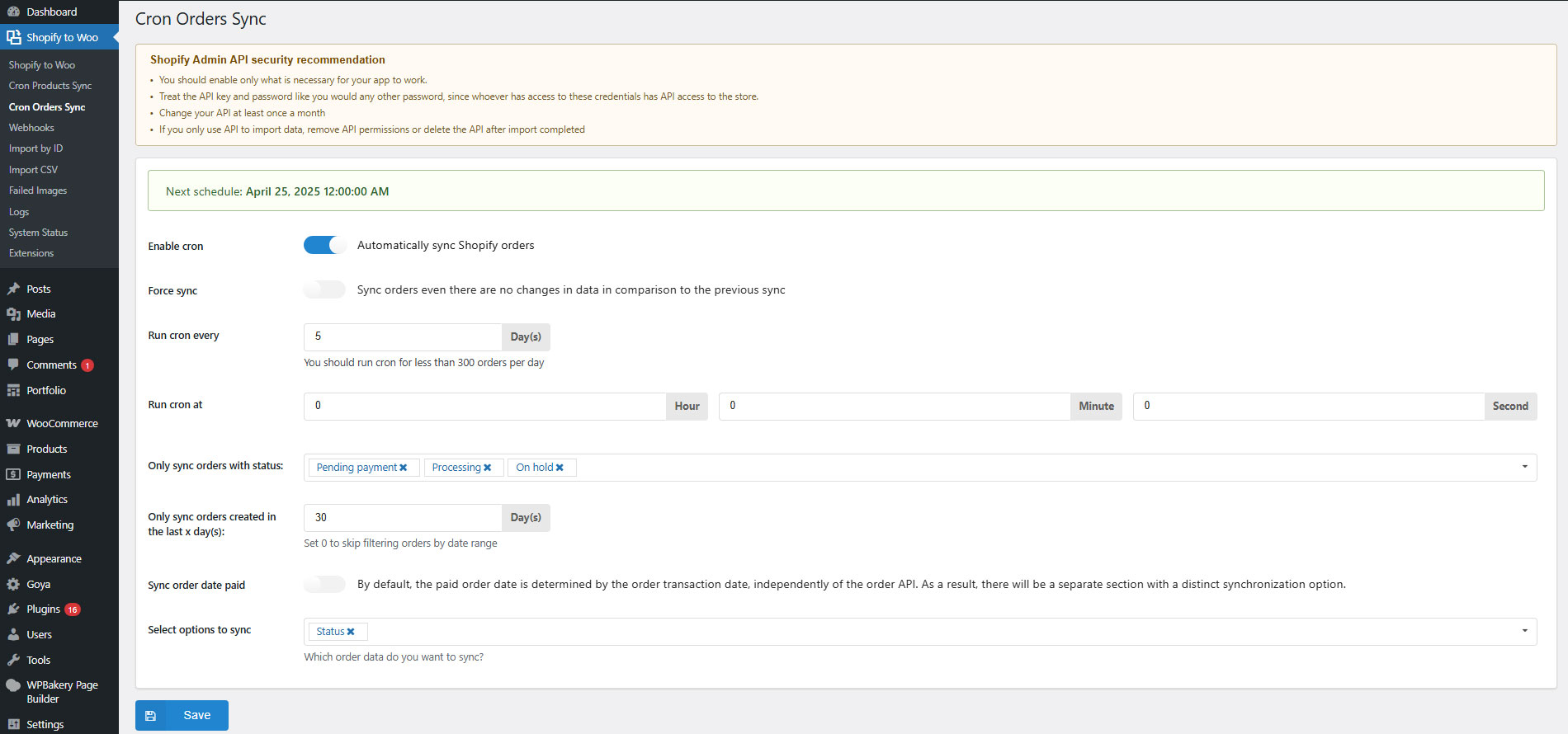
S2W allows you to set up automatic schedules to regularly update products and orders. Once configured, the system will automatically sync your latest Shopify data to WooCommerce at defined intervals, helping you save time and ensure your store data is always up to date without manual intervention.
IMPORT 9 DATA TYPES FROM SHOPIFY TO WOOCOMMERCE
You can select to import 9 types of data from Shopify to WooCommerce. Including STORE SETTINGS, SHIPPING ZONES, TAXES, PAGES, BLOGS, COUPONS, CUSTOMERS, PRODUCTS and ORDERS.
STORE SETTINGS: Site title, admin email, store address, city, country, state, postcode, timezone, weight unit, currency code, and currency format.
SHIPPING ZONES: Shipping zones and shipping methods.
TAXES: Tax name, tax rate, country, province, zip, and shipping.
PAGES: Title, content.
BLOGS: Blog title, blog content, categories, tags, and featured image.
COUPONS: Coupon types that WooCommerce supports, coupon amount, usage limit, expiry date, and minimum amount.
CUSTOMERS: First name, last name, phone, company, address, city, province, zip, and country.
Important note: Shopify controls access to specific information types, particularly when it comes to apps that handle Personally Identifiable Information (PII). The restriction primarily affects the import of customer details (more details in this article). To properly import customer details, your Shopify plan must be Shopify or higher, otherwise you won’t have access to Custom Level 2 PII apps.
PRODUCTS: Title, content, excerpt, variations, product image, variations images, product gallery, SKU, stock, regular price, sale price, weight, and tags.
PRODUCT CATEGORIES
ORDERS: Payment method, shipping method, first name, last name, company, country, address, zip, city, province, phone, total, subtotal, tax, discount, shipping cost, currency, date created, browser IP, customer user agent, line items, discount code, order number, and order fulfillment.
Metadata
IMPORT PRODUCTS FROM SHOPIFY TO WOOCOMMERCE
Importing products may be the most important part when migrating from Shopify to WooCommerce. The plugin allows you to import all your products from Shopify to WooCommerce with titles, prices, descriptions, variations, images, and categories.
Restrict results to after the specified ID: Choose to import only a product with an ID greater than a specified ID.
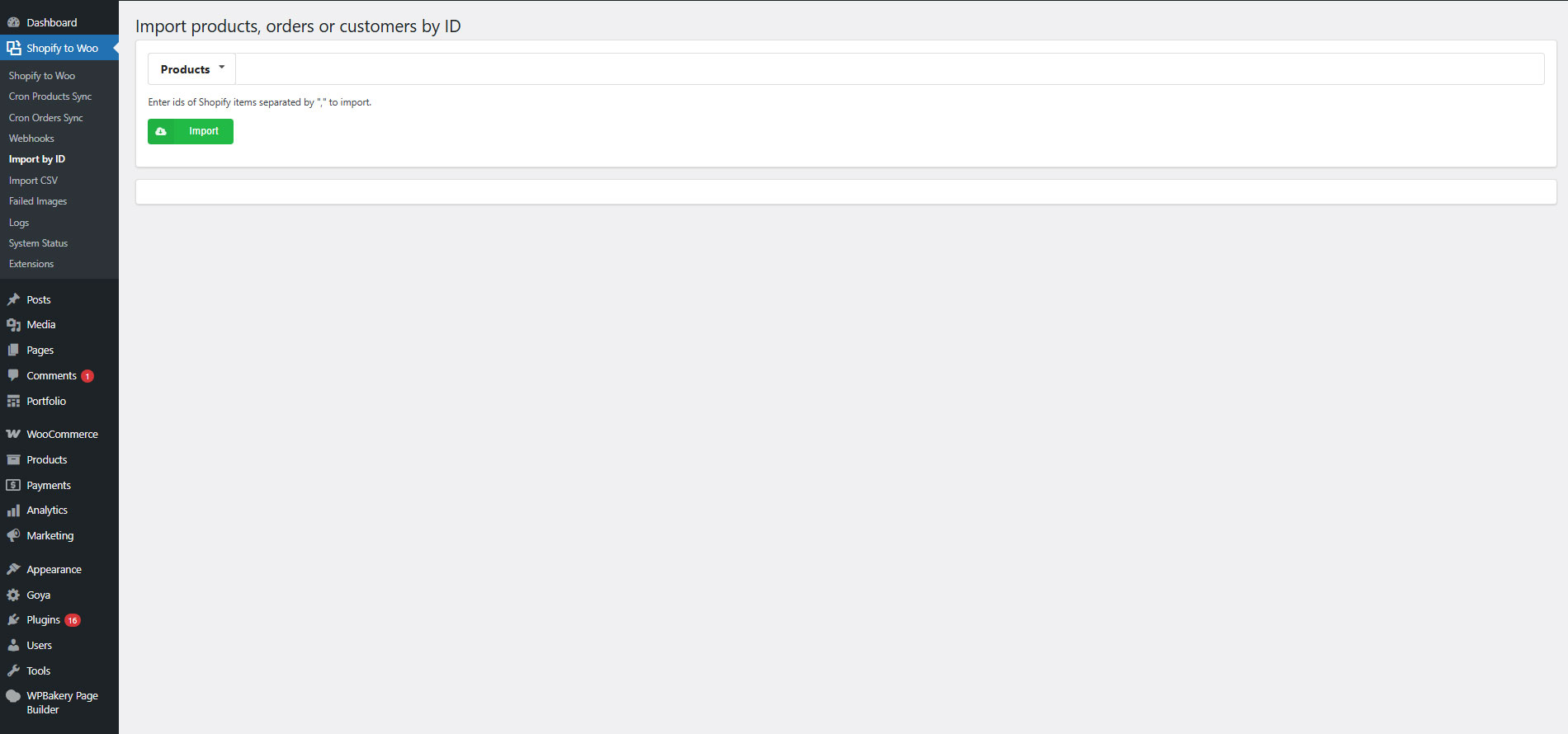
Import by ID: Enter the IDs of Shopify products separated by “,” to import.
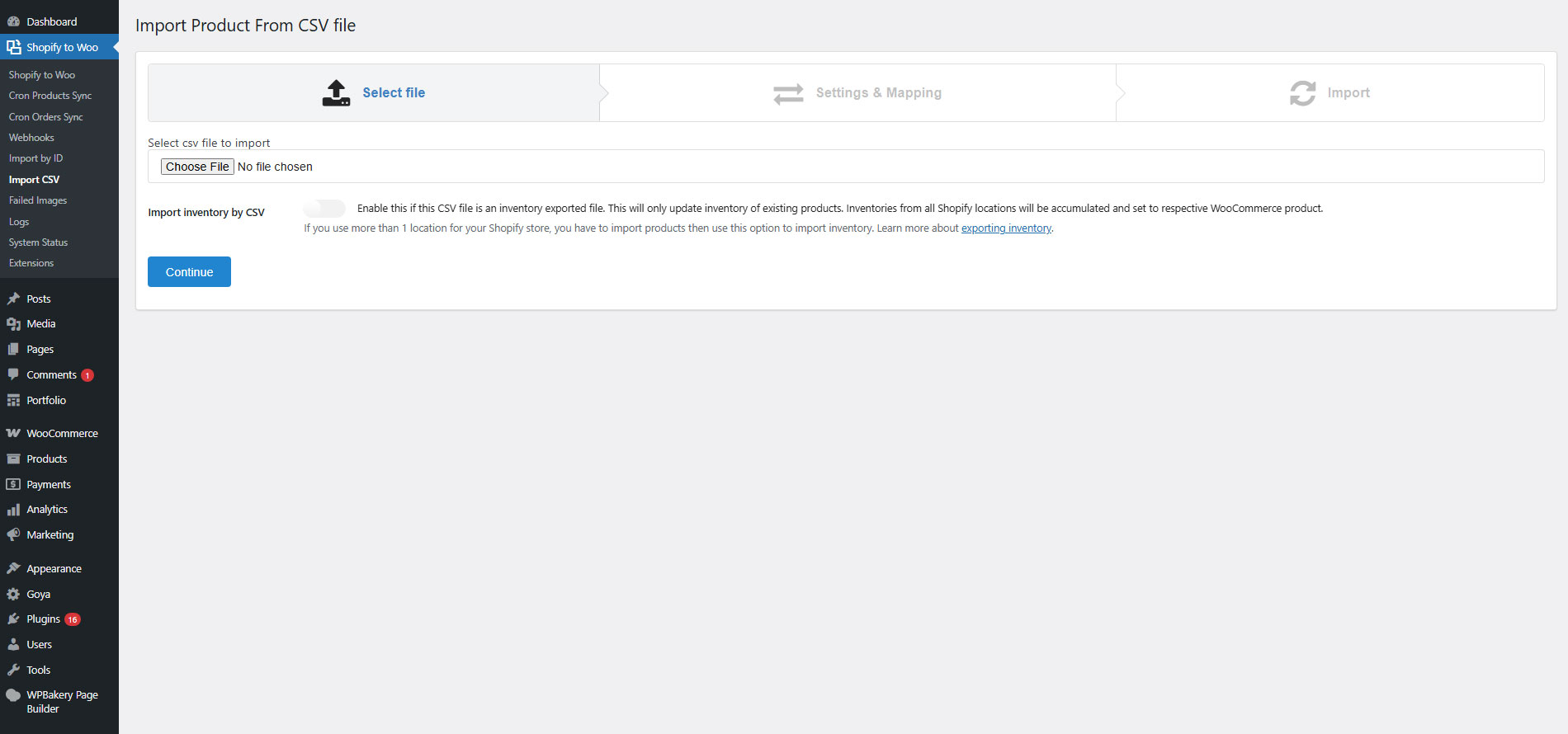
Import by CSV file: The plugin allows you to import products using the product CSV file export from Shopify.
Filter results by product type: Import only products in a Shopify product type.
Filter results by collection ID: Import only products in a Shopify collection ID.
Import products by published date: Choose to import products published before/after a specified date.
Products sequence: Choose the sequence for imported products. There are 6 options to select orders by Title Ascending, by Title Descending, by Created Date Ascending, by Created Date Descending, by Updated Date Ascending, and by Updated Date Descending.
Imported product status: Choose to set imported product status as published, draft, or pending.
Product categories: The plugin will create the same categories as Shopify and add the imported products. You can also add all imported products to a specific category, like “imported Shopify products”.
Download images: Choose if you to download product images to your WooCommerce store. Product images will be downloaded in the background. You can also download images after importing all products by going to Products.
Import progress bar: The plugin displays the import progress bar which informs you of the import progress.
UPDATE IMPORTED PRODUCTS
After successfully importing products from Shopify to WooCommerce. If there is any change in the Shopify store, you can use the update option to update it in the WooCommerce store.
Import new products: When you have new products in Shopify, just import the whole store again in WooCommerce. The plugin will automatically skip imported products and import your new Shopify product.
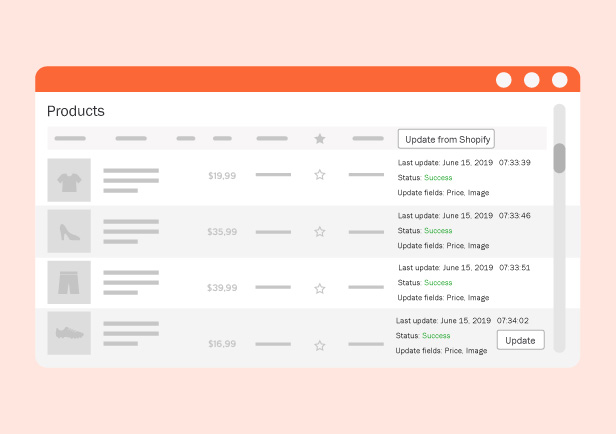
Update imported products manually: If you change product details in Shopify, you can easily update the changes in WooCommerce. The update option allows you to update multiple products at once.
Schedule update: The plugin allows you to schedule a time to update product prices and inventory from Shopify.
Webhook: If you connect Shopify Webhook, you can sync product data right once it changes on Shopify.
Update fields: Choose to update necessary fields among products including Title; Inventory; Status; New variations; Variation SKU; Tags; Metafields; Price; Description; Images; Variation attributes; product slug; and Published date.
Status: The plugin provides you information about the updated time, status (success or failed), and updated field.
IMPORT ORDERS
Orders keep your customer and sale information. It is really necessary to save the orders when migrating. The plugin helps you to move your order to WooCommerce with customer name, billing address, shipping address, email, phone numbers, purchased time, products, shipping option, billing total
Restrict results to after the specified ID: Import orders with an ID greater than a specific ID (newer orders).
Import orders by date: Import orders created/imported before/after a specific date.
Import orders sequence: Set up the sequence for imported orders. From latest to oldest or from oldest to latest.
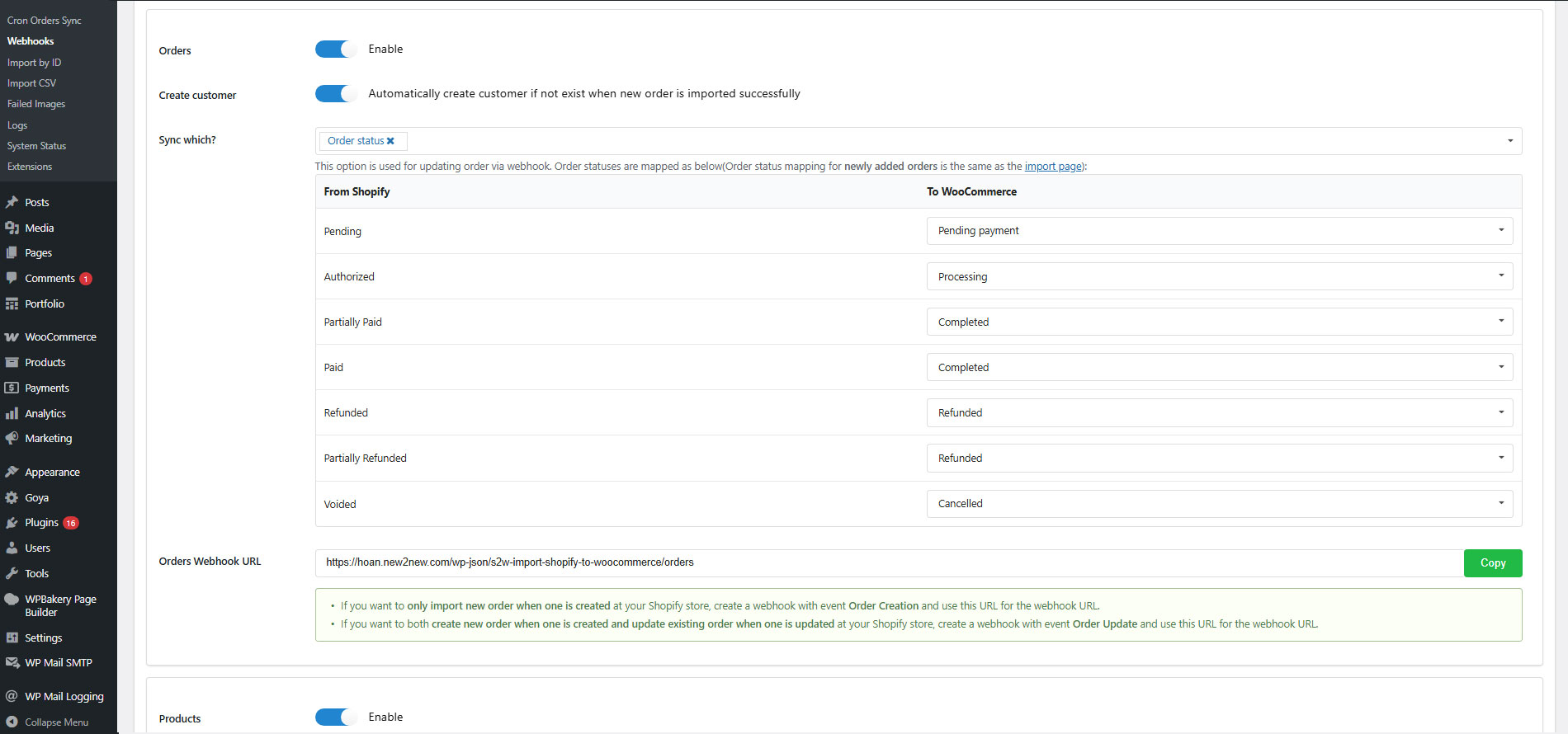
Order status mapping: Map your Shopify order to your WooCommerce order using order status. For example: “Voided” orders in Shopify will appear as “Cancelled” orders in WooCommerce.
UPDATE IMPORTED ORDERS
Similar to imported products, you can update the imported orders.
Update imported orders: update the order information including order status, order date, and order fulfillment.
Update status: Display the updated time, updated fields, and status (success or failed)
ADDITIONAL FEATURES
Security: Your data is transferred directly from Shopify to WooCommerce without any intermediate server.
Easy to use: The import process is very simple to use. First, you need to create a Shopify Custom App using an Access token in the back-end. And finally, just click the “Import” button.
Unlimited import: The plugin does not have any limitation on how many products, orders, or customers… that you can import.
Logs: S2W – Import Shopify to WooCommerce provides log files to check the import history.
Auto-update the plugin: you can automatically update the plugin during your support period.
*** S2W - Import Shopify to WooCommerce Premium Changelog ***
2026.08.20 - version 1.4.7
- Updated: Compatible with WP 7.1
- Updated: Compatibility check with WC 11.0
- Updated: Update support class
2026.06.19 - version 1.4.6
- Updated: Support for AVIF image format
- Updated: Villatheme support
- Updated: Compatibility check with WP 7.0 and WC 10.8.1
2026.03.20 - version 1.4.5
- Updated: Support importing all blogs regardless of status or creation date
2026.02.10 - version 1.4.4
- Updated: Instructions on how to get the Client ID & Secret
2026.01.26 - version 1.4.3
- Updated: Villatheme support
2026.01.26 - version 1.4.2
- Updated: Villatheme support
2026.01.24 - version 1.4.1
- Fixed: Settings saving issue
2026.01.16 - version 1.4.0
- Updated: Support the new Shopify Dev App, adding 2 fields of new required API credentials - Client ID and Secret
- Updated: File support
2025.12.26 - version 1.3.9
- Updated: Save price when the base price is lower than the sale price
- Updated: Add some detail log when import
- Updated: Sku search query when import
- Updated: Compatibility check with WP 6.9 and WC 10.4.3
- Fixed: Issue with customer address when import
- Fixed: Issue when importing orders with more than 10 items.
2025.09.12 - version 1.3.8
- Fixed: Issue with customer count based on filters in settings
- Updated: Improved compatibility with EXMAGE – WordPress Image Links Premium
- Updated: File support
2025.08.29 - version 1.3.7
- Fixed: Issue with product/order count based on filters in settings
- Fixed: Blog import failed when description field was empty
- Updated: Updated version API
- Updated: Compatibility check with WC 10.1.2
2025.08.15 - version 1.3.6
- Fixed: Resolved several issues with retrieving data via GraphQL.
- Fixed: Corrected the update of Shopify metadata to the product short description.
- Updated: Improved compatibility with WooCommerce Brands.
- Updated: File support
2025.08.01 - version 1.3.5
- Fixed: Line item price of Order
- Fixed: Count Orders, Products, Customer, Page via GraphQL
- Updated: Compatibility check with WP 6.8.2 and WC 10.0.4
2025.07.11 - version 1.3.4
- Updated: Compatibility check with WC 9.9.5
- Updated: Notification error from Shopify
- Fixed: Import product category
- Fixed: Count Orders, Products,Customer, Page via GraphQL
2025.05.30 - version 1.3.3
- Updated: Compatibility check with WC 9.8.5 and WP 6.8.1
- Updated: Add special metakey {{update_product_excerpt}} to update Shopify metadata to product short description
- Fixed: Fixed sync products sku
- Fixed: Fixed sync products inventory via webhooks
2025.04.17 - version 1.3.2
- Fixed: Import customer issue
- Fixed: Import orders per request issue
- Fixed: Cron sync products and orders
- Updated: Compatibility check with WC 9.8 and WP 6.8
2025.03.20 - version 1.3.1
- Fixed: Unhandled require required access scopes error
- Fixed: Import order query missing arguments
- Fixed: Update products inventory from webhook issue
- Added: Log for products skipped when importing by ids
- Updated: Update blog image when reimport
2025.02.13 - version 1.3.0
- Fixed: Updated product's variations via webhook working not properly
- Fixed: Sync Order transactions working not properly
- Updated: File support
- Updated: Add filter 's2w_import_payment_gateway_name'
- Updated: Changed to GraphQL API
2024.09.18 - version 1.2.6
- Updated: File support
- Updated: Compatibility check with WC 9.3.1 and php 8.2 and wp 6.6.2
- Fixed: Fixed the incorrect product import/sync cost amount in orders when the 'Import price with tax' setting is enabled.
2024.03.23 - version 1.2.5
- Updated: Updated version API
- Updated: Compatibility check with WP 6.5
2024.03.14 - version 1.2.4
- Fixed: Fixed cron product get product by language
- Fixed: Fixed cron product inventory update error
- Fixed: Fixed sync simple product inventory
- Fixed: Option keep variable product when it only has 1 option and 1 option value
- Updated: Update option sync order date paid via cron and manual
- Updated: Compatibility check with WC 8.6.0
- Updated: File support
2023.10.10 - version 1.2.3
- Updated: Compatibility check with WC 8.1.0
- Updated: Option import customer by last X date
2023.09.11 - version 1.2.2
- Fixed: Fixed issue with S2W_Error_Images_Table
2023.09.08 - version 1.2.1
- Updated: Compatibility check with WC 8.0 and WP 6.3
- Added: Added option only sync product exist via webhooks
- Fixed: Fixed issue with auto-sending order emails after migrating order data.
2023.07.31 - version 1.2.0
- Updated: Compatibility check with WC 7.9
- Updated: Compatibility check with W2S by Villatheme - Update product and order to shopify
2023.05.27 - version 1.1.15
- Fixed: Fixed mismatch inventory status
- Updated: Compatibility check with WC 7.7
- Updated: Add more message to debug
- Updated: Support latest Shopify API version 2023-04
2023.04.28 - version 1.1.14
- Fixed: Import re-import blog
- Fixed: Cron update order and product not working
- Fixed: Fixed import product csv
- Updated: Compatibility check with WC 7.6 and WP 6.2
2023.03.08 - version 1.1.13
- Added: Option to import inventory from a CSV file
- Added: Ability to import orders/customers by ID besides products
- Updated: Compatibility check with WC 7.4
2023.01.06 - version 1.1.12
- Updated: Support latest Shopify API version 2023-01
- Updated: Customer registered date is kept when migrating
- Updated: Use WC logger instead of PHP error_log to log errors
- Added: Ability to choose to skip or override a product if it exists when importing via CSV
- Added: Options to update existing products, existing customers when importing from main settings page
- Added: Logs for CSV import
- Added: More options to sync products via cron and webhooks
- Added: "Force sync" option for Cron Products sync and Cron Orders sync
2022.12.19 - version 1.1.11
- Fixed: Import pages
- Fixed: Wrong detection of images from product/post description if there are embedded youtube video
- Fixed: Error importing orders when new WooCommerce feature "Enables WooCommerce Analytics"(since WC 7.2) is off
- Optimized: Failed images deletion
- Updated: Support latest Shopify API version 2022-10
2022.11.25 - version 1.1.10
- Fixed: Inventory policy mapping
- Added: Option to sync barcode for imported products
- Added: Possibility to choose a taxonomy to import Shopify product type/vendor to
2022.11.02 - version 1.1.9
- Updated: Compatibility check with WP 6.1 and WC 7
- Added: Button to empty failed images list
2022.09.01 - version 1.1.8
- Fixed: Product sync - Images
- Fixed: Import shipping zones
- Fixed: Import refunds in some cases
- Updated: Deleted Shopify variations will also be deleted from WooCommerce when syncing product variations
- Added: Option to change user capability to use the plugin
2022.06.22 - version 1.1.7
- Fixed: Import description images when Use external links for images option is enabled
- Fixed: Multiple order refunds/adjustments
- Updated: VillaTheme support
- Updated: Support latest Shopify API version 2022-04
- Added: Map quantity for importing csv
2022.03.29 - version 1.1.6
- Updated: VillaTheme support
2022.03.23 - version 1.1.5
- Fixed: Filter products by product type not working properly if product type contains special characters
- Updated: VillaTheme support
- Added: Sync metafields of variations
- Added: Option to sync new variations for cron
- Added: Option to use original Shopify cdn image URLs when using with our EXMAGE – WordPress Image Links plugin
2022.02.08 - version 1.1.4
- Updated: Support Shopify custom apps as Private apps are deprecated and can't be created as of January 2022
2022.01.15 - version 1.1.3
- Fixed: Incorrect some customer data in some cases
- Updated: Support latest Shopify API version 2022-01
- Added: Sync product status
2021.09.17 - version 1.1.2
- Fixed: Webhook product update
- Updated: Support latest Shopify API version 2021-07
- Added: Product status mapping option
- Added: Sync new variations
- Added: Sync tags via webhooks
- Added: Option to chose to import Shopify product type as a category, a tag or a post meta
- Added: Option to chose to import Shopify product vendor as a category, a tag or a post meta
- Added: Option to chose to import Shopify product barcode as a post meta
- Added: Option sync product metafields by mapping to post metas
2021.02.24 - version 1.1.1
- Fixed: Orders imported via webhook
2021.02.18 - version 1.1.0
- Fixed: Imported customers not showing in WooCommerce/customers
- Fixed: Refunded orders
- Updated: Import categories images + description
- Updated: Compatibility with WP5.6 and WC5.0
- Updated: Use latest API version 2021-01
2020.08.15 - version 1.0.9.6
- Fixed: Download description images
- Added: Update tags, product date
- Added: Support order refund items
- Updated: Compatibility with WP5.5 and WC4.3
2020.05.09 - version 1.0.9.5
- Fixed: File not exists bug when importing CSV
- Fixed: Can not set product attributes/variations correctly when attributes is in non-latin languages
- Updated: Compatibility with WooCommerce 4.1
2020.04.25 - version 1.0.9.4
- Fixed: Webhook verify issue
2020.04.21 - version 1.0.9.3
- Fixed: Cron update
- Fixed: Download images in product description
- Added: Options to update existing blogs
2020.04.06 - version 1.0.9.2
- Fixed: Auto update function
2020.04.03 - version 1.0.9.1
- Updated: Support latest Shopify API version 2020-04
- Added: Option to download images in product description
- Optimized: Download images in the background
2020.03.31 - version 1.0.9
- Fixed: Import blogs, pages
- Fixed: Order line item product quantity and subtotal
- Fixed: Download duplicated images
- Fixed: Conflict usage of accordion
- Updated: Compatibility with WP5.4 and WC4.0
- Updated: Support latest Shopify API version 2020-01
- Improved: Import speed
- Added: Option to update order line items in admin orders
- Added: Support Webhooks to import/update products/orders/customers automatically when new data is available from Shopify store
- Added: Filter Orders by financial status, fulfillment status
- Added: Option to set role when importing customers
2019.11.26 - version 1.0.8.1
- Added: Import smart collections to categories
2019.11.12 - version 1.0.8
- Added: Filters for importing coupons
- Added: Filter products to import by vendor
- Added: Log for "Import by ID" function
- Added: Support WooCommerce 3.8
2019.10.17 - version 1.0.7
- Fixed: Function to download error images
- Fixed: Function to update variation attributes
- Fixed: Sanitize email when Shopify API returns special character in order's billing email
- Optimized: Reduce bad request rate
- Optimized: Reduce error images rate
- Optimized: Import speed
- Optimized: UI/UX
- Added: Option to update billing address and shipping address
- Added: Option to import and update product slug
- Added: Option to use global attributes instead of custom attributes so that attributes can be used for WC filters plugin...
- Added: Cron update Products/Orders
- Added: Import product from CSV
- Added: Import coupons settings
2019.08.10 - version 1.0.6
- Fixed: Error download product gallery if a product has too many images
- Fixed: Conflict with some plugins or theme that use accordion
- Added: Update product URL, variations SKU
- Added: Able to view images that were not downloaded successfully to download again
2019.07.12 - version 1.0.5
- Fixed: Validate input ids when importing products by ID
- Fixed: Error matching variation attributes when attribute name is not in English alphabet
- Updated: Replace "Save & update all" with "Update selected"
- Added: Update product attributes
- Added: Shortcut to products and orders import settings
2019.06.13 - version 1.0.4
- Added: Import product by ID
- Added: Set request timeout
- Added: Import product options: products per ajax request, product type, collection ID, published before date, published after date, order by
- Added: Import order options: orders per ajax request, Import orders created/imported at or before/after date, Import Orders sequence
- Added: Import customers per ajax request
- Added: Options to update product images, title, inventory, description, price
- Added: Options to update order status, order date, order fulfillments
2019.05.30 - version 1.0.3
- Fixed: Order status, order date
- Fixed: CURL error timeout
- Updated: Set Shopify product type as a WooCommerce category
- Added: Display Shopify order number instead of WooCommerce order number, able to search by Shopify order number
- Added: Order status mapping option
2019.05.16 - version 1.0.2
- Fixed: Some sites can not send API correctly
- Fixed: Search categories: empty categories are excluded
- Fixed: Assign wrong product to order when product sku, product id or variation id is empty
2019.05.08 - version 1.0.1
- Updated: Support
- Updated: Auto get key