
The email contents from third-party plugins can be incorporated into the email templates of the WooCommerce Email Template Customizer plugin (WETC plugin) in various ways. This depends on how the third-party plugin is designed. They can either utilize the WooCommerce Hooks in the default order emails of WooCommerce or go through the default email of the WETC plugin, or design new email types.
In this guide, we will instruct you on how to display the email contents of 3rd plugins on the template of the WETC plugin in each situation.
1. Using WC Hooks or shortcodes to display additional information
This feature is quite familiar to many users, and we have provided ample detailed guidance below:
This method is widely used when the email contents of third-party plugins are initially already displayed in default WooCommerce emails. Below, we present case studies that demonstrate how this approach can be applied. You can refer to these examples if you encounter similar plugins.
| Plugin | author |
|---|---|
| WooCommerce Orders Tracking | VillaTheme |
| WooCommerce Subscriptions | WooCommerce |
| Checkout field editor for WooCommerce | Themehigh |
Besides using WC Hooks, to display additional information on the templates of WETC plugin, you can use the shortcode for subject and for content: [wec_order_meta key="" ] or write custom shortcode
Case studies:
| Plugin | author |
|---|---|
| Extra Shipping Options for WooCommerce | Ace Plugins |
| WooCommerce Shipment Tracking | WooCommerce |
| Dianxiaomi | |
2. Emails going through the default template:
If you are using a 3rd plugin but they not attached in WooCommerce default emails, but they create their own email templates. In this case, you can use the default template type.
This template can help to keep the email form of the email template plugin including the header, footer, suggested products and socials, and load all email contents of the 3rd plugin inside.
All email contents of the 3rd plugin will keep it initial format and can not be customized by WooCommerce Email Template Customizer plugin.
We have a detailed guide to demonstrate this feature here.
Case studies:
| Plugin | author |
|---|---|
| Yith WooCommerce Points and Rewards | YITH |
3. Creating new email types by 3rd plugin.
From version 1.1.15, we removed all the email types which are not created by WooCommerce because many customers may get confused with different email types between the WooCommerce email types and 3rd plugin email types, this can cause unexpected problems.
However, we already supported the hooks for the previous customers whose email types can be workable by adding the email type ID and name.
In this case, we’ve reverted the “viwec_accept_email_type” filter hook and you can use that hook to add email IDs. You can follow this guide to insert PHP snippets.
Example:
add_filter( 'viwec_accept_email_type', function ($email_types) {

$email_types[] = 'email_id_1';

$email_types[] = 'email_id_2';

return $email_types;

}, 9999 );
To find the email ID you can refer to this example, or contact the 3rd plugin’s author for further assistance.
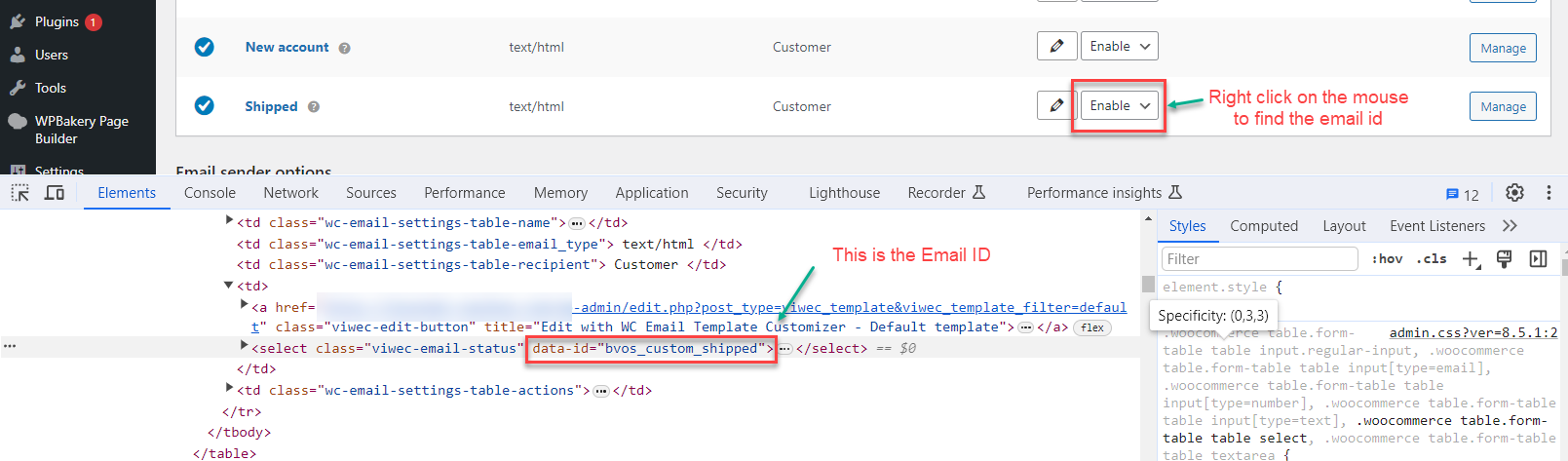
Case studies:
| Plugin | author |
|---|---|
| Custom Order Status Manager | Bright Plugins |
| WooCommerce Photo Reviews | VillaTheme |
| WooCommerce Lucky Wheel | VillaTheme |
| WooCommerce Orders Tracking | VillaTheme |
| WooCommerce Abandoned Cart Recovery | VillaTheme |
| WooCommerce Coupon Box | VillaTheme |
| Advanced Shipment Tracking for WooCommerce | Zorem |
| Dokan | weDevs |
If it is not possible to use the hook to add email IDs as described in the third method, then it is necessary for the code implementation to be done by the author of the third-party plugin. We strongly suggest reaching out to the author of the third-party plugin and referring to our developer documentation to ensure compatibility from your end. By collaborating with the third-party plugin author and following our guidelines, you can achieve the desired functionality seamlessly.
For more detailed instructions and support, please refer to the developer support guides provided by the respective plugins.
To witness a visible demonstration of the compatibility scenarios between the WooCommerce Email Template Customizer plugin and third-party plugins, please refer to the instructional video below:
We hope this knowledge base helps clarify the compatibility situations with 3rd party email plugins when using the WooCommerce Email Template Customizer. If you have any further questions or require assistance, please don’t hesitate to contact our support team.