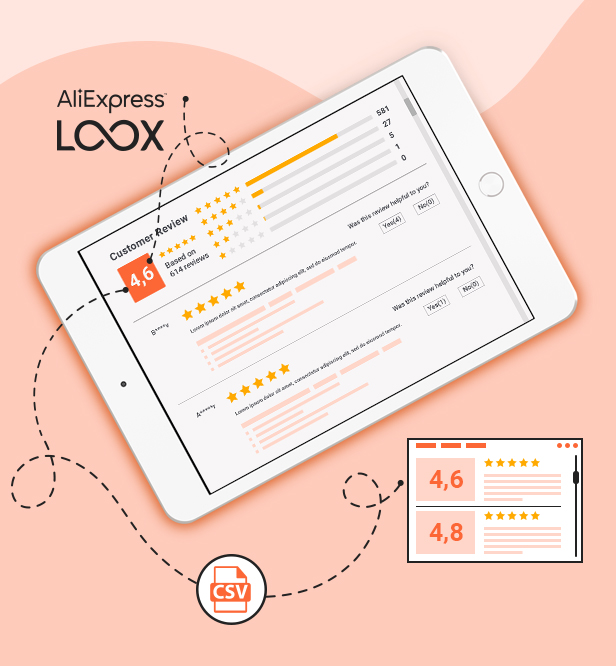
Your product reviews now can include product pictures. It helps you create social proof about your site and your products. With WooCommerce Photo Reviews, you can import reviews with product pictures from AliExpress, send review reminder emails to customers, and give coupons to customers who posted reviews.
If you want to make customer reviews for WooCommerce more reliable in your store, WooCommerce Photo Reviews is what you are looking for. WooCommerce Photo Reviews is an ultimate review plugin for WooCommerce which helps you to send review reminder emails, allows customers to post reviews including product pictures, and sends thank you emails with WooCommerce coupons to customers. Not only let customers post a review with pictures, and send a review reminder email, but you can also import reviews from Temu, AliExpress and Amazon, as well as export reviews
IMPORTANT NOTE:
The plugin supports displaying reviews being displayed by shortcodes on specific pages by using WP’s Conditional Tags.
To handle WP’s Conditional Tags, this plugin uses eval() which is very dangerous because it allows execution of arbitrary PHP code. Therefore, please only fill this field with proper conditional tags that are validated and/or provided by trusted developers.
Photo Reviews, Review Reminders, and Smart Review Filters
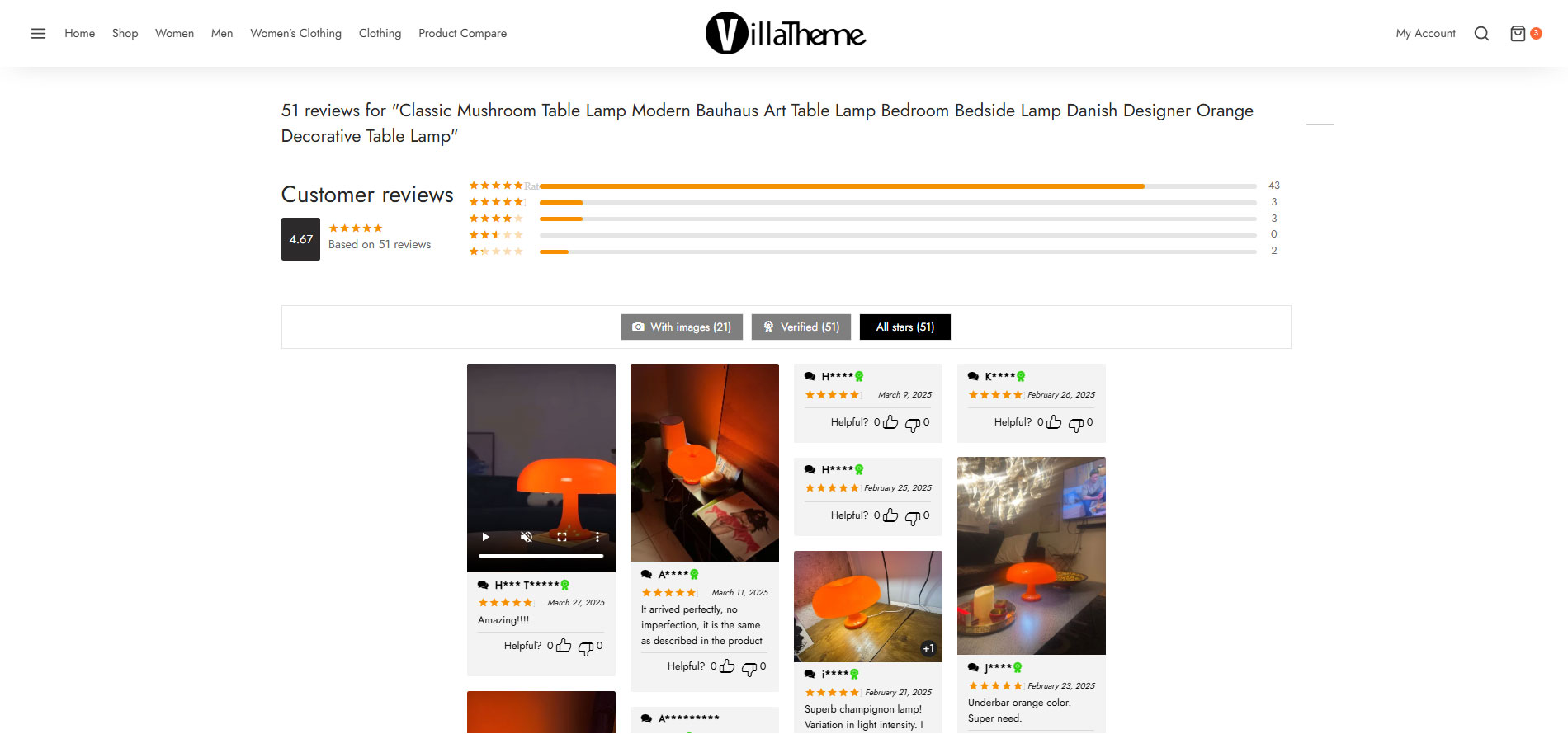
Automatically send review reminder emails after customers make a purchase to help generate more high-quality reviews for your WooCommerce store. Customers can upload real product photos along with their reviews and receive rewards or coupons as incentives, helping increase engagement and strengthen social proof. The plugin supports beautiful photo review displays in multiple layouts, visual rating statistics, and smart review filters that make it easier for customers to find relevant reviews. This helps improve product trustworthiness and boost conversion rates.
Display Rating Statistics and Smart Review Filters
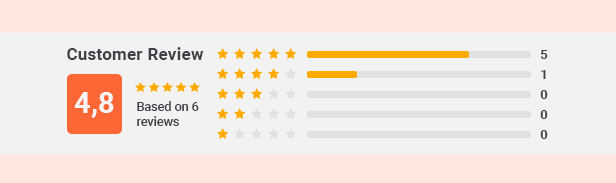
Allow visitors to view rating statistics and use smart review filters to quickly find the most relevant customer feedback. Shoppers can easily filter reviews by star ratings, photos, or specific content to make more informed purchasing decisions. This feature improves product transparency, enhances the shopping experience, and increases trust in your WooCommerce store.
Automatically Reward Customers With Coupons After Reviews
Automatically send coupons to customers after they complete a product review, encouraging more users to leave feedback and engage with your store. This feature not only helps build a stronger review system but also encourages repeat purchases through attractive post-review rewards.
Microdata Support for Better SEO and Click Rates
The plugin supports displaying microdata for product reviews and ratings, helping search engines better understand your WooCommerce content. This can make your products stand out in search results with visible star ratings and richer review information. The feature helps improve SEO performance, increase click-through rates from Google, and attract more potential customers to your store.
Create and Edit Product Reviews Easily
Store owners can easily create or edit product reviews manually for more flexible review management on WooCommerce. This helps admins better control review quality, add necessary information, and build a more professional review system for the store. The feature is especially useful for adding sample reviews, editing review content, or managing product feedback more effectively.
Compatible With WPML and Polylang
The plugin is fully compatible with WPML and Polylang, allowing you to send multilingual review reminder emails and coupons based on the language customers use on your website. This feature helps WooCommerce stores create a more professional experience for international customers while supporting effective review and customer engagement campaigns across multiple markets.
Flexible Review Import and Export
Easily export reviews from one website to CSV files or import reviews from CSV files into another WooCommerce store for more convenient review management and migration. The plugin also supports importing reviews from AliExpress and Loox Shopify to help stores quickly build social proof and product credibility. This feature saves time on review management, supports store expansion, and helps improve product trust more effectively.
Fully Responsive on All Devices
The plugin is fully optimized to ensure reviews, ratings, review photos, and related features display beautifully across desktop, tablet, and mobile devices. Customers can easily view, filter, and submit product reviews on any device while enjoying a smooth and user-friendly experience.
ADD REVIEWS WITH PHOTOS ON THE WOOCOMMERCE WEBSITE
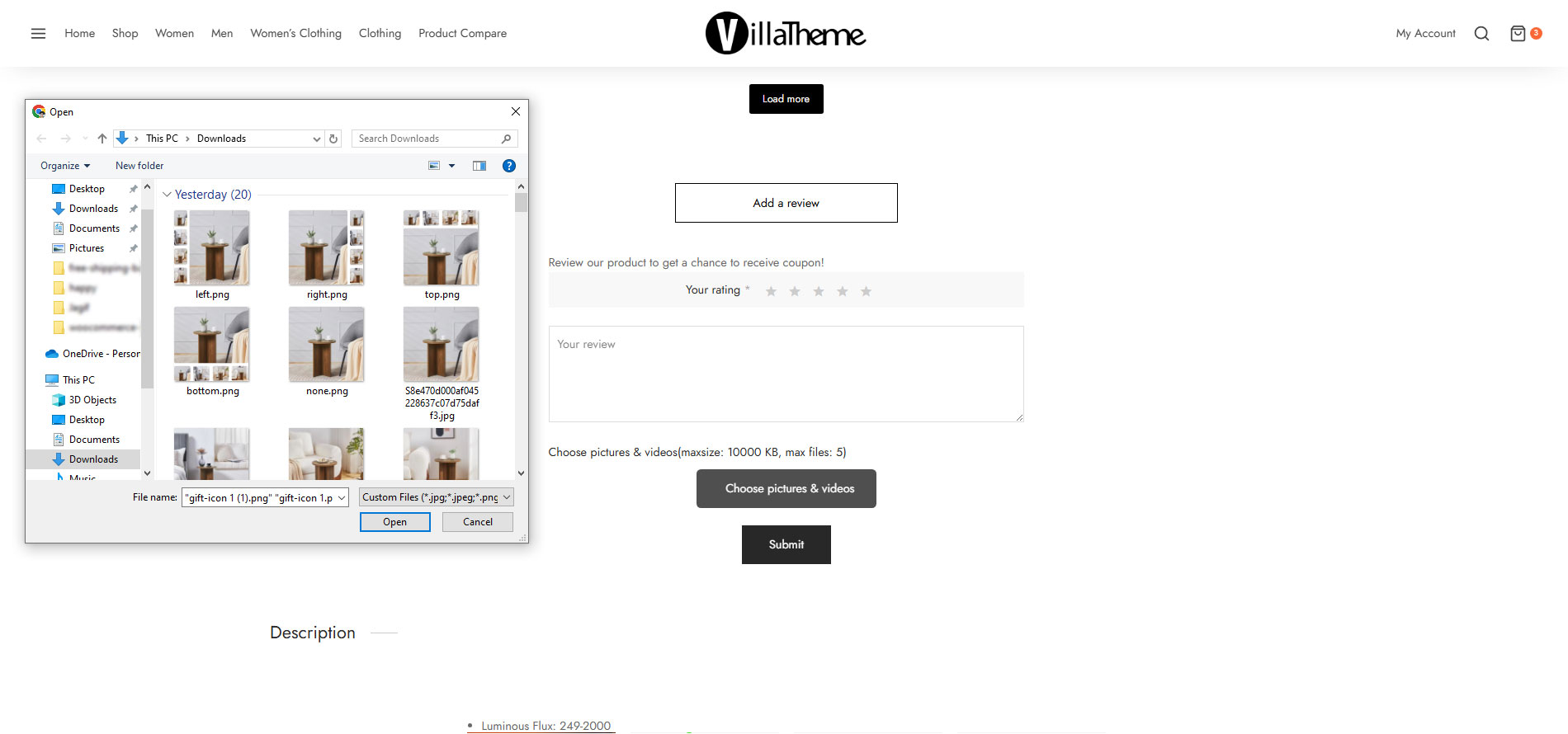
The plugin allows customers to post reviews including photos. This feature will help you to create a social proof of your product and increase the conversion rate.
Photo review: Post customer reviews for WooCommerce with photos and videos and show it on the front end.
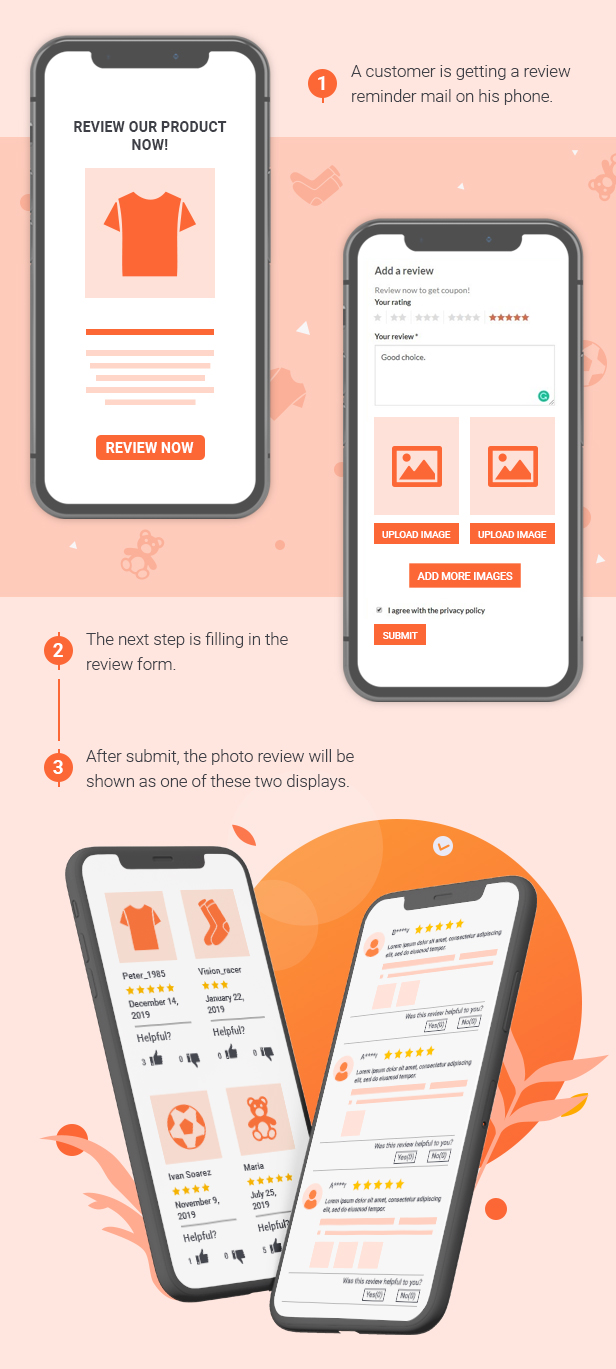
Anchor link: Support the anchor link which redirects to the review form to leave a review when the customers click on the Review Now button on the review reminder email or review filters.
Maximum picture size: You can set a maximum picture size that customers can attach to their reviews.
Maximum picture quantity: You can set a maximum number of photos that can be attached to a review.
Sort reviews: You can select to sort reviews by the Newest or Oldest.
Review Filter: This option filters customer reviews for WooCommerce by rating, and containing pictures.
GDPR compliance: The plugin will display a message and a checkbox on the review form that allows customers to agree to share the review on your page.
Ajax pagination: This allows customers to move to the next reviews without reloading the page.
Verified badge: Displays a verified badge on customer reviews for WooCommerce next to their name, the admin can customize the badge with text/sample/icon.
Hide review author name: Displays the author name of the review with asterisks, which can be displayed as N***.
Image caption: Allows review authors to add a caption to each review picture.
Edit reviews: The admin can edit review text, and rearrange or change review images.
Helpful button: This option allows users to mark reviews as “helpful” or “unhelpful”. The result will be displayed on the front end under each review.
Additional fields on the review form: Create multiple optional fields and set values for those fields. Then customers can select these values when they leave a review. The Optional Fields option helps to provide more information about the product.
FRONT-END DESIGNS
The plugin provides many design options for you to change customer reviews for WooCommerce to fit your website interface.
Front-end style: there are 2 front-end styles for you to select. The Grid style and the default style.
Number of columns: select how many columns to display customer reviews for WooCommerce with the Grid style.
Background color: This helps you to change the background color of the review section.
Text color: You can change the color of the review text.
Review date: Choose to display the review date on the front end.
Display Review Tab first: In some cases, the product description tab is displayed as default instead of the review tab. This option helps to display the review tab as default.
Review Rating Count: Display the overall rating on the front end.
Full-size images: This allows customers to display images full-size.
Upload file button: Customize the upload file button on the review form.
Custom CSS: You can add your own CSS code to change the front-end design.
SHARE REVIEWS
The share reviews feature is an advanced feature that allows you to share the same reviews for a range of products in the same list.
REVIEW REMINDER EMAIL
You can set up email reminders to remind customers to leave reviews after they have purchased the product. The plugin will send a review reminder email to the customer, asking them to leave a review of the product. To encourage the customer to take pictures of the product and leave a review, the plugin will offer them a discount coupon.
Set a schedule after the order changes to specific statuses, emails will be sent to remind customers to review the product.
Options to ignore sending review reminder emails to specific products/categories.
Custom sender email address.
Customize review reminder email templates: There are 2 types of email templates you can use to send review reminder emails, you will customize the review reminder email templates using the WooCommerce Email Template Customizer plugin or the original review reminder email template in the WooCommerce Photo Reviews plugin.
The auto-login feature helps to log in to the website automatically when clicking from the Review Now button on the review reminder email.
RESEND REVIEW REMINDER EMAIL
In case you sent a Review Reminder email to customers to ask for a review, but they have not left any yet, this feature would be helpful. It helps if you want to remind them of leaving reviews for the items they purchased, by resending the email in case they somehow did not leave one.
Set up a schedule to resend reminder emails: Repeat sending reminder emails after certain days, at certain hours.
Customize the resend reminder email templates: There are 2 types of email templates you can use to resend review reminder emails, you will customize the resend review reminder email templates using the WooCommerce Email Template Customizer plugin or the original resend review reminder email template in the WooCommerce Photo Reviews plugin.
COUPON FOR REVIEWS
Coupons can be given to customers who have purchased and reviewed your products.
Send coupon email: The plugin will send an email with a coupon whenever a review that matches the requirements is published.
Multiple rules to receive a coupon: You can make rules to receive coupons, if a review is eligible for a certain rule, the user/customer will receive a respective coupon.
Conditions in each rule to receive a coupon: Set specific conditions in each rule to obtain a coupon.
Registered account email is required: Activate this setting if you want coupons to be sent only if the author’s email address is registered with an account.
Upload required: Coupons will be offered only if the customer review contains photos or videos.
Verified owner is required: Coupons will be offered only if the reviews are rated by purchased customers.
Minimum required rating: A coupon will be offered only if the rating is equal to or greater than this value.
Required categories: Coupons will be offered only if the reviewed products are in these categories.
Exclude categories to give coupons: Coupons will not be offered for the reviewed products in these categories.
Required products: In this field, coupons can only be received by reviewing the selected products. Leave blank to apply for all products
Exclude products to give coupons: Reviewing the selected products will not receive coupons.
Use existing coupons: The admin can select to send existing WooCommerce coupons as a prize.
Auto-generate coupons: The admin can set it to generate unique coupons and send them along with the coupon emails, with all WooCommerce Coupon settings.
Configure coupon email: There are 2 types of email templates you can use: the WooCommerce Email Template Customizer plugin or the original coupon email template of the WooCommerce Photo Reviews plugin.
EXPORT/IMPORT CUSTOMER REVIEWS FOR WOOCOMMERCE IN CSV FILE
The plugin allows you to import/export customer reviews for WooCommerce using CSV files.
Export review: You can export existing customer reviews for WooCommerce to a CSV file. The exported file includes author, author email, comment date, comment content, rating, review image links, user ID…
Date: Select a time range to export customer reviews for WooCommerce.
Products: Select the products that you want to export customer reviews for WooCommerce.
Categories: Select the categories to export customer reviews for WooCommerce.
Rating: Select the review with the rating you want to export. For example, you want to export only 4-star and 5-star reviews.
Comment status: Select the comment status of the review you want to export. For example, you want to export only approved reviews.
Import Review: You can import customer reviews for WooCommerce using CSV files as well. The imported CSV file has the same configuration as the exported CSV file.
CHROME EXTENSION
Since version 1.1.4.8, the plugin has included a new feature: You can directly import customer reviews from Temu, AliExpress and Amazon into WooCommerce using the Import AliExpress/Amazon Reviews to Woo Extention. You can quickly import reviews using the Temu, AliExpress and Amazon product IDs with this feature, and you can import reviews to any particular product on your WooCommerce website.
Connect the extension and import unlimited reviews with photos, videos on any products on Temu, Aliexpress and Amazon pages.
Import reviews to a product that has the SKU the same Temu, Aliexpress or Amazon product ID.
Import reviews to specific products on your WooCommerce website.
Set a status for the reviews imported through the Chrome extension, you can choose approved or pending.
Set the reviews imported by the Chrome extension as verified reviews.
Import the vote up/down count of reviews
Option to upload review images to your server instead of using the original image URL.
Option to upload reviews with videos.
Import reviewers’ order info (except for logistics info) such as Color and size… to Optional fields.
ALIEXPRESS REVIEWS
The plugin allows you to import customer reviews for WooCommerce from AliExpress by using AliExpress product IDs.
Import using product ID: Using an AliExpress product ID to import reviews from that product to a selected WooCommerce product.
Selected Ratings: Import reviews with expected rating: All reviews, only 5-star reviews, only 4-star reviews, only 3-star reviews, only 2-star reviews, or only 1-star reviews.
Included pictures: Select to import only reviews that include pictures
Mark imported review as Verified owner: The imported reviews will be marked with a “Verified owner” badge.
Download picture: If you select the download picture option, pictures will be downloaded to your website database. If not, the plugin will use the AliExpress pictures (with URLs to AliExpress.com) to display review pictures.
Country: Select a particular country and import only reviews from that selected country.
Number of reviews: Select several reviews that will be imported. A product on AliExpress.com can have thousands of reviews and you may not want to import all of those reviews. So this option will help you to set a limit on how many reviews will be imported.
SUPPORT ELEMENTOR WIDGETS
WooCommerce Photo Reviews is available 4 widgets in Elementor:
Photo Reviews: To display a list of reviews on your website.
Review form: To display the review form for customers to post their reviews.
Rating: To display the product rating.
Overall rating: To display the last average rating of the product.
* Note: This feature is only available in the WooCommerce Photo Reviews plugin premium version.
SHORTCODES
The plugin provides 4 shortcodes.
Overall rating shortcode[wc_photo_reviews_overall_rating_html product_id="" overall_rating_enable="on" rating_count_enable="on"]: This shortcode is used to display the overall rating
Product rating shortcode[wc_photo_reviews_rating_html product_id="" rating="" review_count="on"]: This shortcode is used to display the rating of a product
Review form shortcode[woocommerce_photo_reviews_form product_id="" hide_product_details="" hide_product_price="" type="popup" button_position="center"]: This shortcode can be used for a single product page or review page of the reminder email.
Reviews shortcode (Usage with all available arguments)[wc_photo_reviews_shortcode comments_per_page="12" cols="3" cols_mobile="1" use_single_product="on" cols_gap="" products="" grid_bg_color="" grid_item_bg_color="" grid_item_border_color="" text_color="" star_color="" product_cat="" order="" orderby="comment_date_gmt" show_product="on" filter="on" pagination="on" pagination_ajax="on" pagination_pre="" pagination_next="" loadmore_button="off" filter_default_image="off" filter_default_verified="off" filter_default_rating="" pagination_position="" conditional_tag="" custom_css="" ratings="" mobile="on" style="masonry" masonry_popup="review" enable_box_shadow="on" full_screen_mobile="on" overall_rating="off" rating_count="off" only_images="off" image_popup="below_thumb"]: This shortcode is to display all reviews or specific reviews of some products or categories
To learn more about How to use these shortcodes, please visit this documentation.
ADDITIONAL FEATURES
Multiple Language: WooCommerce Photo Reviews allows you to display different front-end messages, and emails in different languages. This feature works with WPML and Polylang.
Preview: You can preview the emails created by WooCommerce Photo Reviews in the back-end.
Automatically update: You can update the plugin from your Dashboard during your support period. This option requires you to authenticate your purchase.
*** WooCommerce Photo Reviews Premium Changelog ***
2026.08.17 - version 1.4.16
- Updated: Optimize code
- Updated: Compatibility with WC 11.0 and WP 7.1
2026.06.19 - version 1.4.15
- Update: VillaThem support
- Updated: Compatibility with WP 7.0 and WC 10.8.1
2026.03.20 - version 1.4.14
- Fixed: Mobile responsive display for Review shortcode columns (Load More style)
2026.03.06 - version 1.4.13
- Fixed: Display shortcode review as a slide on mobile
- Updated: Compatibility with TranslatePress
2026.01.16 - version 1.4.12
- Update: VillaThem support
2026.01.09 - version 1.4.11
- Fixed: Can not import review from the extension
- Update: VillaThem support
2025.12.19 - version 1.4.10
- Fixed: Incorrect review display on the shortcode if the load-more button is enabled
- Updated: The new design for grid 1, grid 2, list 1, list 2 style
- Updated: Add 'upload_button_style' attributes to the Review form shortcode
- Updated: Add 'average_rating_style' attributes to the Overall rating shortcode
- Updated: Add 'pagination_end' , 'pagination_style', and 'average_rating_style' attributes for the Reviews shortcode
- Updated: Add list 1, list 2 styles to the 'style' attribute for the Reviews shortcode
- Updated: Delete 'conditional_tag' attribute of the Reviews shortcode
- Updated: Compatibility with WC 10.4
2025.10.18 - version 1.4.9
- Fixed: Incorrect filter rating display on shortcode.
2025.09.12 - version 1.4.8
- Fix: Item vulnerabilities
- Fix: Wrong review template when loading more
- Fix: Import review images from CSV
- Fix: Display number column in mobile
- Update: Support class
2025.09.05 - version 1.4.7
- Updated: Option show product gallery
- Updated: Updated file language
- Updated: Updated support class
- Updated: Compatibility with WC 10.1.2
2025.08.15 - version 1.4.6
- Fixed: Incorrect filter count display on single product page.
- Fixed: Resolved an issue where photo upload captions were often mismatched with the corresponding images.
- Fixed: Resolved an issue where the comment author name was not showing/hiding correctly.
2025.08.04 - version 1.4.5
- Fixed: Item Vulnerabilities - IS0168
- Fixed: Display list 2 template
- Fixed: Only include the single product post type and exclude all other custom post types.
- Updated: Compatibility with WP 6.8.2 and WC 10.0.4
- Added: Import review from Temu
- Added: File wpml-config.xml
2025.06.26 - version 1.4.4
- Fixed: Some issues Customer report
- Updated: Compatibility with WP 6.8.1 and WC 9.9.4
- Updated: Update support class
2025.04.11 - version 1.4.3
- Fixed: Some issues with Front-end style settings
- Updated: Compatibility with WP 6.8 and WC 9.8.1
- Updated: Update support class
2025.03.28 - version 1.4.2
- Fixed: Incorrect display issue in the new template
- Updated: Compatibility with WC 9.7.1
- Updated: Update support class
- Updated: Improved "Front-end Style" setting layout for better feature visualization.
2025.02.28 - version 1.4.1
- Fixed: Shortcode compatibility issue with the WooCommerce Email Template Customizer Premium plugin by Villatheme.
- Updated: Compatibility with WC 9.7.0
- Updated: Update support class
2025.01.24 - version 1.4.0
- Dev: Add filter hook for email review reminder 'wcpr_review_reminder_product_title' and 'wcpr_review_reminder_product_price'
- Added: Option in Hide name - to display specific number of character from the beginning of reviewer's name
- Added: New layout photo review
- Updated: Compatibility with WC 9.6.0
- Updated: Update support class
2024.12.13 - version 1.3.16
- Added: Option in Hide name - to display specific number of character from the beginning of reviewer's name
- Updated: Compatibility with WC 9.4.3 and wp6.7.2
- Updated: Update support class
- Dev: Added the filter hook "viwcpr_hook_target_link_product" to customize the target attribute value of the <a> tag (default: _blank).
2024.11.07 - version 1.3.15
- Added: placeholders {product_title}, {customer_display_name} for review photos prefix
- Added: Option 'Disable opening the "Reviews" for orders in a new tab.
- Updated: Compatibility with WC 9.3.3 and wp6.7
- Updated: Update support class
2024.09.07 - version 1.3.14
- Fixed: Errors from customers' feedback
2024.07.16 - version 1.3.13
- Added: Option to display 1 random image of the product's gallery and the product's image if the review has no photos or videos
- Fixed: sort product review on the shortcode Ajax
2024.04.23 - version 1.3.12
- Added: option enable/disable auto play video
- Fixed: Error reported by customer
- Updated: Support upload video .mov
- Updated: Update support class
2023.10.12 - version 1.3.11
- Added: Allow your customer submit reviews for purchased products per order at one time
- Added: Show star rating in email
- Updated: Update support class
2023.04.20 - version 1.3.10
- Fixed: Can not add review on the dashboard
2023.04.11 - version 1.3.9
– Updated: Compatible with 'High-Performance order storage (COT)'
2023.02.16 - version 1.3.8
- Fixed: Translation of reviews from WPML/WCML does not show in reviews shortcode - masonry
2023.01.07 - version 1.3.7
- Updated: Compatibility with PHP 8.x.x
- Added: Option upload file via ajax
2022.11.02 - version 1.3.6
- Fixed: Conflict with Uncode theme causing pagination not working properly for Masonry style in some cases
2022.10.19 - version 1.3.5
- Fixed: Page scrolling after closing review popup in some cases
- Fixed: Submit review not showing in some cases
2022.09.29 - version 1.3.4
- Fixed: Translated review content from AliExpress to English on Product List
- Updated: Remove * for comment title if allow empty comment
- Updated: More ways to format reviewer's display name
- Added: Validate review content, customer information and restrict numbers of reviews without reloading the page
- Added: Option display full image size
- Added: Option create a new cropped “thumbnail” image
2022.09.09 - version 1.3.3
- Fixed: wpml_all_languages/pll_all_languages not working properly for reviews shortcode on single product
- Fixed: Translated reviews(WPML) not showing with masonry style
- Fixed: Redirect url after a review is submitted when Ajax pagination is enabled
- Fixed: SQL error in reviews shortcode when sorting reviews by vote while filter is disabled
- Fixed: Image of translated attributes(WooCommerce Product Variations Swatches) not showing inside review popup on single product page
- Added: Vietnamese translation
- Added: {last_valid_date} of coupon to use in email
2022.07.20 - version 1.3.2
- Fixed: WPML compatibility issue: product and review form links in review reminder email triggered when order status changes are not in correct language
- Updated: Compatibility with WC 6.7
2022.05.30 - version 1.3.1
- Fixed: Design of Upload button
2022.05.28 - version 1.3.0
- Fixed: Compatibility issue with Skeleton screen(Porto theme) in some cases
- Fixed: Image popup settings switch back from Lightbox to Below thumbnails
- Updated: Apply Max content length to review replies
- Updated: Compatibility with show reviews in all languages of WPML
- Updated: Make share reviews/rating count features work with "show reviews in all languages" of WPML
- Updated: Deprecated _register_controls notice from Elementor 3.6
- Updated: Allow to sort reviews by vote
- Updated: Display error message when customer add review via WC notice
- Updated: Display as slider for shortcode [wc_photo_reviews_shortcode]
- Updated: Support upload image .webp
- Added: Support upload video .mp4, .webm
- Added: Max content length for masonry style on mobile
- Added: Add ajax add to cart on masonry popup
- Added: Option to Require review characters not less than a certain
- Added: Allow setting multiple coupons for the reviews
2022.03.29 - version 1.2.0
- Updated: Update support class
2022.03.22 - version 1.1.10
- Updated: Update support class
2022.01.15 - version 1.1.9
- Updated: Compatibility with WC 6.1
- Fixed: Get the average rating for products that share reviews
/**v1.1.8 - 2021.11.22**/
- Updated: Allow customer to submit comments for review form shortcode if disabled 'Comment author must fill out name and email'
/**v1.1.7 - 2021.11.13**/
- Fixed: Popup review with only image
/**v1.1.6 - 2021.11.02**/
- Added: Resend review reminder email
- Added: Support Hide filters/overall rating if empty in reviews shortcode
- Fixed: Product average rating in masonry popup
/**v1.1.5.4 - 2021.08.03**/
- Fixed: masonry style with load-more button on Firefox
/**v1.1.5.3 - 2021.07.24**/
- Fixed: Error when enabling review country
/**v1.1.5.2 - 2021.07.07**/
- Updated: New masonry style if use load-more button
/**v1.1.5.1 - 2021.06.28**/
- updated: Allow customer to submit comments if disabled 'Comment author must fill out name and email'
- Added: Add option 'Use product SLUG instead of ID' to import CSV
- Added: Load-more button with ajax pagination
- Added: Shortcode [wc_photo_reviews_overall_rating_html]
- Added: Add “next” and “previous” links for shortcode pagination
/**v1.1.5.0 - 2021.05.07**/
- Added: Share reviews between different products
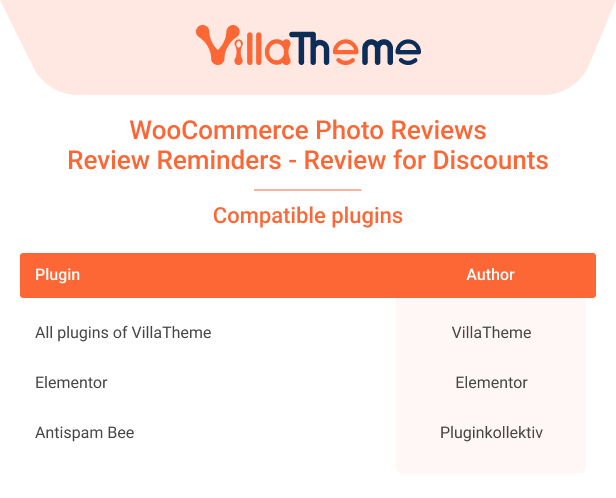
- Updated: Compatible with Antispam Bee plugin of pluginkollektiv
/**v1.1.4.9 - 2020.11.28**/
- Fixed: Placeholder in email subject
- Fixed: Coupon expiry date is not set when Advanced Coupons for WooCommerce Premium is active
- Fixed: Hardcode date in the sample email
- Added: Extension can now be used to import reviews from other amazon websites(by region) besides the international website amazon.com
- Updated: Compatibility with WP 5.6
/**v1.1.4.8 - 2020.10.17**/
- Fixed: Wrong page after customers leave a review
- Fixed: Some reviews is missing on Safari desktop when "Enable box shadow" option is on
- Fixed: Product images not showing on Safari mobile in some cases relating to the use of "use strict"
- Fixed: Replies do not show when a filter is selected
- Added: Option to select which order statuses that button review will be available on My account/orders
- Added: Ability to import AliExpress/Amazon reviews with chrome extension
- Added: Compatibility with WooCommerce Email Template Customizer/Email Template Customizer for WooCommerce plugin from VillaTheme
/**v1.1.4.7 - 2020.08.15**/
- Fixed: Can not set proper Maximum photo size if upload_max_filesize is set with unit
- Updated: Compatibility with WP 5.5 and WC 4.3
- Added: Option to Restrict number of reviews
/**v1.1.4.6 - 2020.07.30**/
- Fixed: Some images not showing on masonry view
- Fixed: Month- and year-based folders when using custom photos folder
- Added: Preview images when customers upload
- Update: Review form shortcode popup
/**v1.1.4.5 - 2020.06.12**/
- Fixed: Load reviews from all products when using ajax pagination and filter for single product page
- Added: Option to show review form shortcode as popup(type='popup')
- Improved: Button review on my account/orders
/**v1.1.4.4 - 2020.05.21**/
- Fixed: Can not click helpful button on popup
- Fixed: Review shortcode and Elementor reviews widget
/**v1.1.4.3 - 2020.05.20**/
- Fixed: Review form issue on single product page with some themes
- Fixed: Can not scroll review on mobile
- Added: Bulk action to apply Phrases filter to existing reviews
- Added: Option to turn Review title on/off
- Added: Import/export review title
- Added: Compatibility with Elementor
- Updated: Compatibility with WP 5.4 and WC 4.1
/**v1.1.4.2 - 2020.04.29**/
- Fixed: WPML issue with newly added options since version 1.1.4
- Fixed: Max content length issue when review contains html tags
- Added: Option to show/hide country for reviews imported from AliExpress
/**v1.1.4.1 - 2020.04.27**/
- Fixed: Firefox regex issue
- Added: Option to change Review title placeholder
/**v1.1.4 - 2020.04.24**/
- Fixed: Masonry issue on Iphone
- Fixed: Review reminder links
- Added: Review title
- Added: Option to select order statuses to trigger Review reminder
- Added: Option to allow empty review content
- Added: Option to select folder to store reviews uploaded by customers and reviews imported from AliExpress/CSV
- Added: Option to prefix photos of reviews uploaded by customers and photos of reviews imported from AliExpress/CSV
- Added: Add use_single_product attribute for reviews shortcode [wc_photo_reviews_shortcode]
- Added: More popup options: only image/off for masonry, lightbox for default view
- Added: Ajax pagination and filters, default active filters when Ajax pagination is enabled
- Added: Shortcode [wc_photo_reviews_rating_html]
- Added: Link to review products on My account/orders
- Added: Customize message after customers leave a review
- Added: Phrases filter for reviews imported from AliExpress
- Added: Options to select multiple ratings, multiple countries, review status when importing from AliExpress
- Added: Max review content for Masonry layout
/**v1.1.3.4 - 2019.10.24**/
- Fixed: Products in reminder emails
- Fixed: Structured data for masonry style
- Fixed: Link to reviews form
- Added: Exclude email addresses to receive reminder email
- Updated: Import csv function
/**v1.1.3.3 - 2019.08.08**/
- Fixed: Click on reviews does not popup on iphone if reviews do not have images
- Fixed: Import Reviews from Aliexpress function
- Added: Option to not show Filters, Rating count & Overall rating if a product does not have any reviews
- Added: Grid item border color for Masonry style
/**v1.1.3.2 - 2019.07.27**/
- Fixed: Use shortcode in single product page
- Fixed: Can not deselect Review page for Review reminder
- Added: Add product_id argument for new shortcode [woocommerce_photo_reviews_form]
/**v1.1.3.1 - 2019.07.25**/
- Fixed: Import reviews feature
/**v1.1.3 - 2019.07.24**/
- Fixed: WPML problem with past orders which have never used review reminder before
- Updated: Masonry style
- Added: Image caption
- Added: Click to view full image on masonry popup
- Added: Admin can rearrange images, click on image to edit or change in edit comment page
- Added: Reviews count, overall rating for shortcode
- Added: Reviews form shortcode [woocommerce_photo_reviews_form]
- Added: Review page for review reminder using reviews form shortcode
- Added: Import/export reviews
- Added: Upvote/downvote buttons
- Added: Optional fields
- Added: Custom "from" address for coupon email and reminder email
/**v1.1.2 - 2019.05.01**/
- Added: Auto get key
/**v1.1.1 - 2019.01.17**/
- Fixed: Warning message in version v1.1.0
- Fixed: Coupon not sent when turning on Verified owner is required
- Fixed: Bulk action Send reminder not working with unregistered customer
/**v1.1.0 - 2019.01.12**/
- Fixed: Check SSL
- Fixed: CSS
- Added: Compatible WPML & Polylang
- Added: One-time log-in review link: when customers click on button "Review now" for the first time in review reminder email, they will be logged-in if their billing email is registered to an account
- Added: Add multiple images at once in admin when editing review or adding a review
- Added: Option to display review author name as N***
- Added: Option to include/exclude products/categories on which reviews will receive coupon
- Added: Option to set unique coupon Exclude products, Included categories, Exclude categories
- Added: Exclude categories to send review reminder
- Added: Option to not send review reminder if reviews on a product do not receive coupon
- Added: Preview emails
- Added: Normal style for shortcode: [wc_photo_reviews_shortcode style="normal"]
- Added: Filter for review images name when uploading
- Updated: Only send review reminder with products in the order that the customer did not review
- Updated: How coupon is given: Option to not give coupon for emails that do not have an account; an user/email can only receive one coupon for his/her review on a product no matter how many times he/she reviews that product
- Optimized: Control image sizes: Only create custom size and remove other unwanted sizes for images uploaded when customers review, admins add/edit review in backend and images of reviews imported from AliExpress
/**v1.0.9.2 - 2018.10.18**/
- Fixed: Active purchased code
- Fixed: Some text not translated
- Fixed: Some import reviews images not downloaded
- Fixed: Product images and price in review reminder
- Added: Import reviews by country
- Added: Filter reviews by rating, product at admin panel
- Added: Admin can add reviews manually
- Added: Ajax pagination and images rotation for normal Front-end style
- Updated: Shorten unique coupon code
/**v1.0.9.1 - 2018.07.24**/
- Fixed: Disable mobile not working
- Added: RTL support
- Optimized: Filter reviews
- Added: Customizable gdpr checkbox message
- Added: Customizable verified owner text/badge
/**v1.0.9 - 2018.05.22**/
- Updated: Filter reviews
- Added: GDPR policy checkbox
- Added: Overall rating
- Updated: Class Support
/**v1.0.8.1 - 2018.05.09**/
- Added: Custom css for shortcode [wc_photo_reviews_shortcode]
/**v1.0.8 - 2018.05.08**/
- Added: Import reviews from Aliexpress
/**v1.0.7 - 2018.04.13**/
- Added: Shortcode to all reviews [wc_photo_reviews_shortcode]
- Added: Option display product summary(title, reviews, price, button add-to-cart) on masonry popup
/**v1.0.6 - 2018.03.17**/
- Fixed: masonry popup
- Fixed: Send manual review reminder
- Optimized: Photos uploaded, reduce unnecessary photos sizes
- Added: Grid layout options: column number, grid color/background color, grid item color/bacground color, rating stars color.
/**v1.0.5 - 2018.02.08**/
- Fixed: unique coupon settings, broken grid view when there's 1 review(on firefox and microsoft edge), 'select all' check box not show on Woo order page
- Added: custom css field for Reviews
/**v1.0.4 - 2018.02.03**/
- Updated: Admin can edit review images
/**v1.0.3 - 2018.01.31**/
- Fixed: coupon settings
- Added: sort review by time(backend)
- Updated: turn each filter button 'x stars' on/off, display photos and rating in comments list in backend, edit review reminder in order page
/**v1.0.2 - 2018.01.25**/
- Added: auto update, "Review Now" button style
- Changed: Coupon expiry date
/**v1.0.1 - 2018.01.23**/
- fixed: email settings save
- updated: products restriction in review reminder
/**v1.0.0 - **/
- The first release