WooCommerce Email Template Customizer is a helpful tool that helps you build and customize the Email templates for WooCommerce. The plugin provides sufficient base elements and WooCommerce elements as well as developmental tools for users to build a completed email.
If the default email template of WooCommerce looks plain to you, and you are looking for a way to customize WooCommerce emails, here is what you need. WooCommerce Email Template Customizer is a helpful tool that helps you build and customize WooCommerce emails. The plugin provides sufficient basic elements and WooCommerce elements as well as developmental tools for users to build a complete email. You can easily drag and drop, edit, and customize the layouts/contents inside the email templates with no coding knowledge required. Try our plugin to make the template look friendly and match your store design, and customize WooCommerce emails sending to customers all you want, effortlessly.
WooCommerce Email Template Customizer
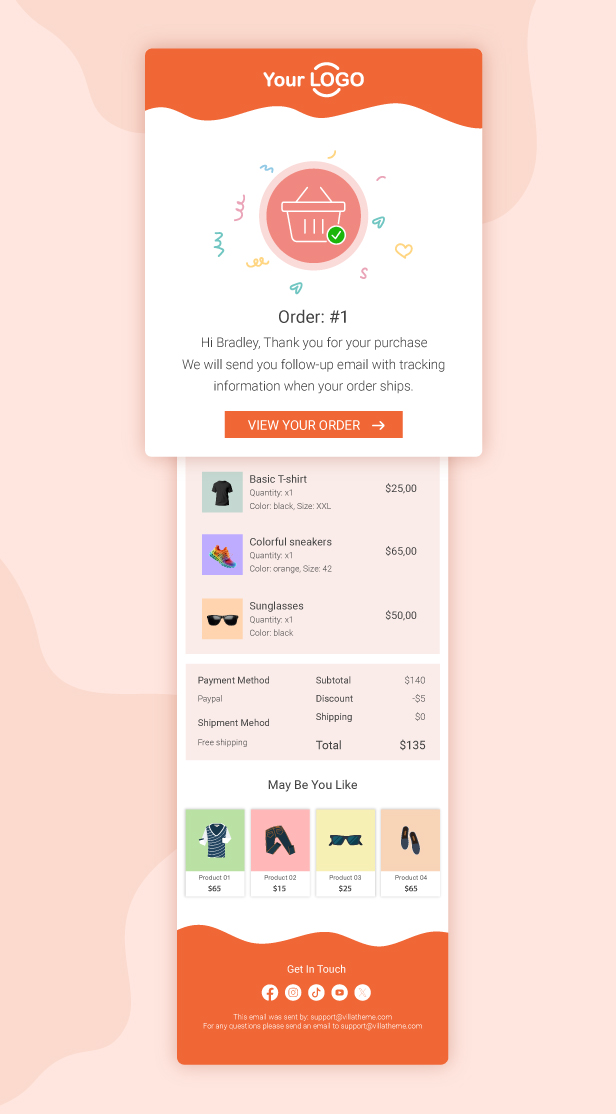
Transform your WooCommerce emails into beautiful, professional-looking templates that match your brand. With the Email Template Customizer, you can easily design and personalize order emails, notifications, and customer messages to create a more engaging and consistent shopping experience.
Full WooCommerce Email Support
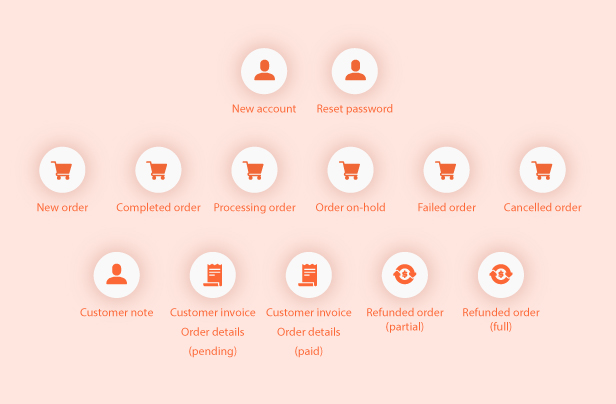
This feature supports all WooCommerce email types, including new account creation, password reset, new order, processing order, completed order, on-hold orders, and more. You can fully customize each email to match your brand style and improve communication with your customers at every stage of their journey.
Unlimited Email Templates
Create as many email templates as you need without any limitations. This feature gives you full freedom to design different templates for various WooCommerce emails, campaigns, or customer segments, helping you deliver a more personalized and consistent brand experience.
Drag & Drop Email Builder
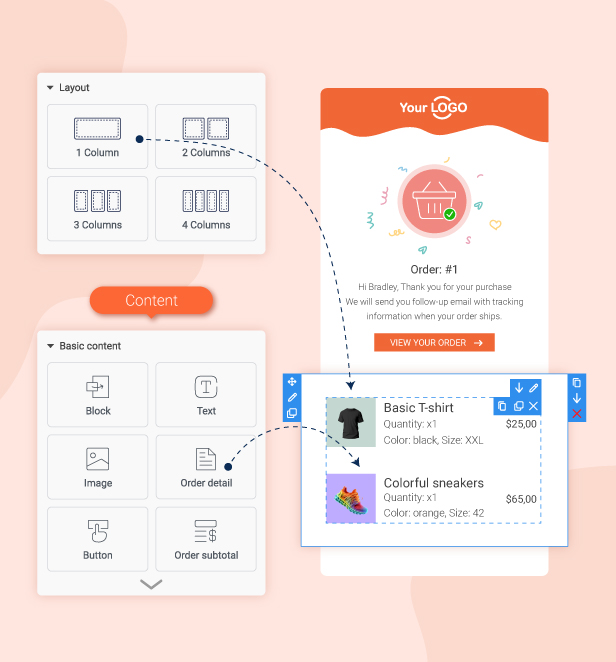
Easily customize your emails using a simple drag & drop interface. Add, remove, and rearrange elements like text, images, buttons, and sections without any coding skills. This helps you quickly create professional and visually appealing WooCommerce emails that look consistent and well-designed.
Rich Email Elements for Flexible Customization
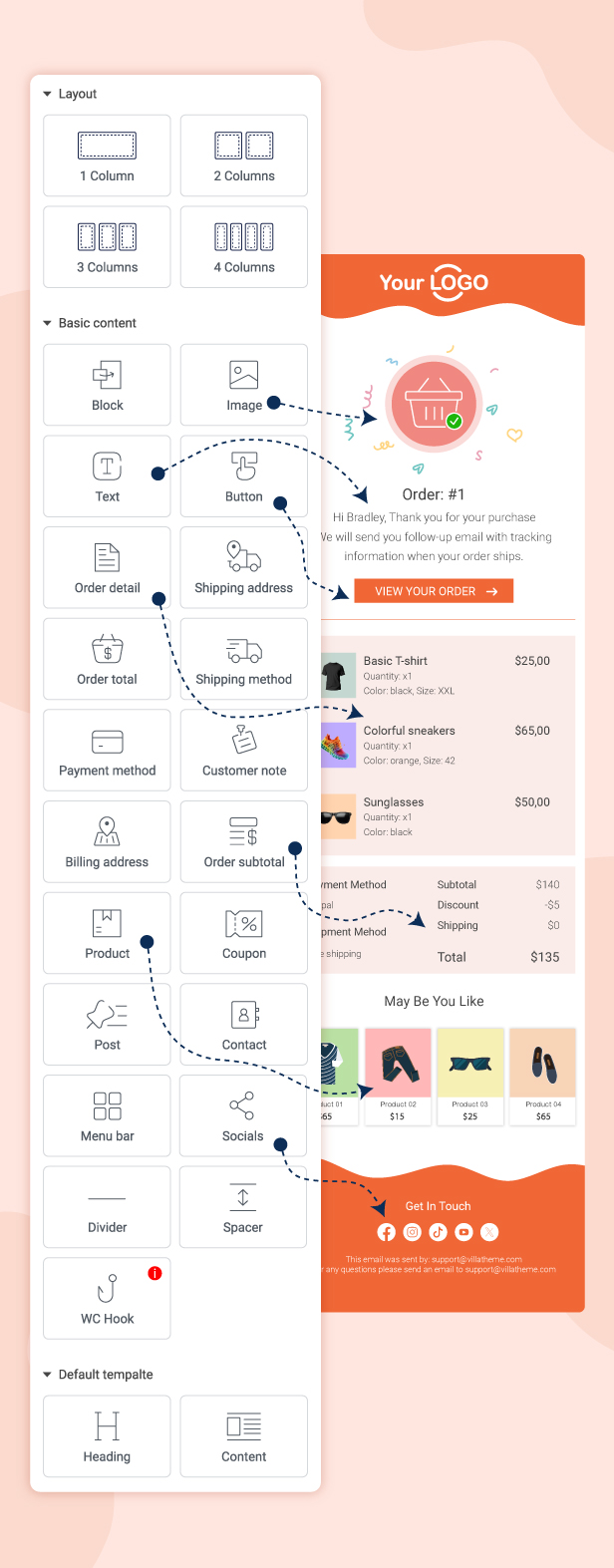
A wide variety of elements is available to help you fully customize your emails the way you want. You can easily add and arrange different components such as text blocks, images, buttons, dividers, product sections, and more, giving you complete control over the design and content of each WooCommerce email.
Smart Email Rules & Targeted Sending
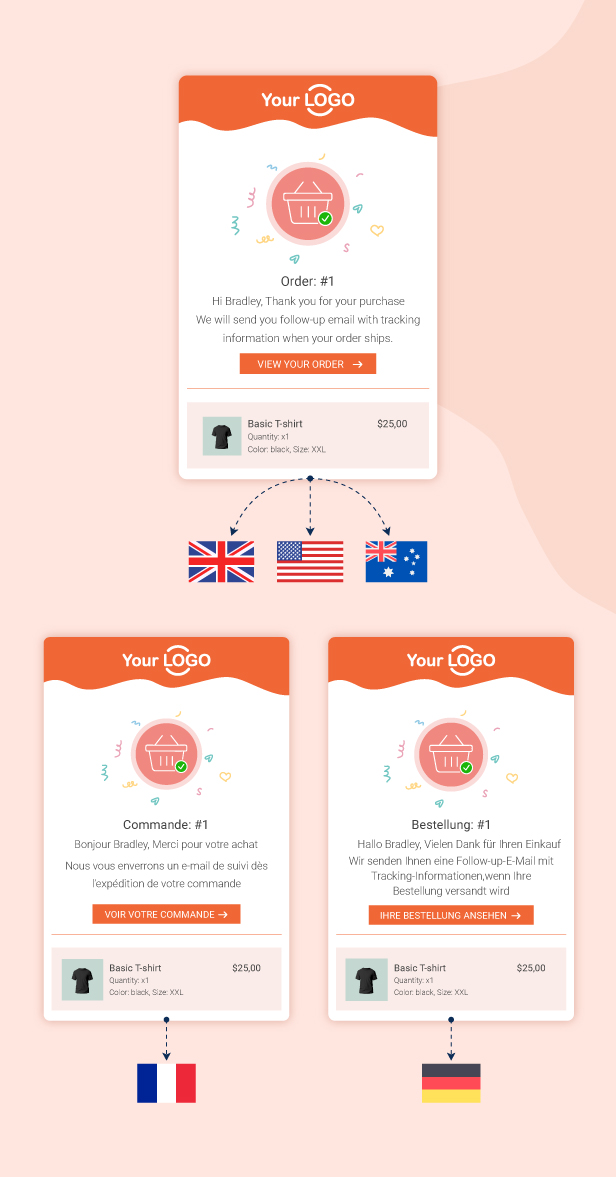
Send specific emails based on custom rules to reach the right customers at the right time. You can create conditions to control when and to whom each email is sent, and also write emails in the native language of your customers to improve clarity and engagement.
Email Rules
Email sent based on your rule
Comprehensive Email Template Management System
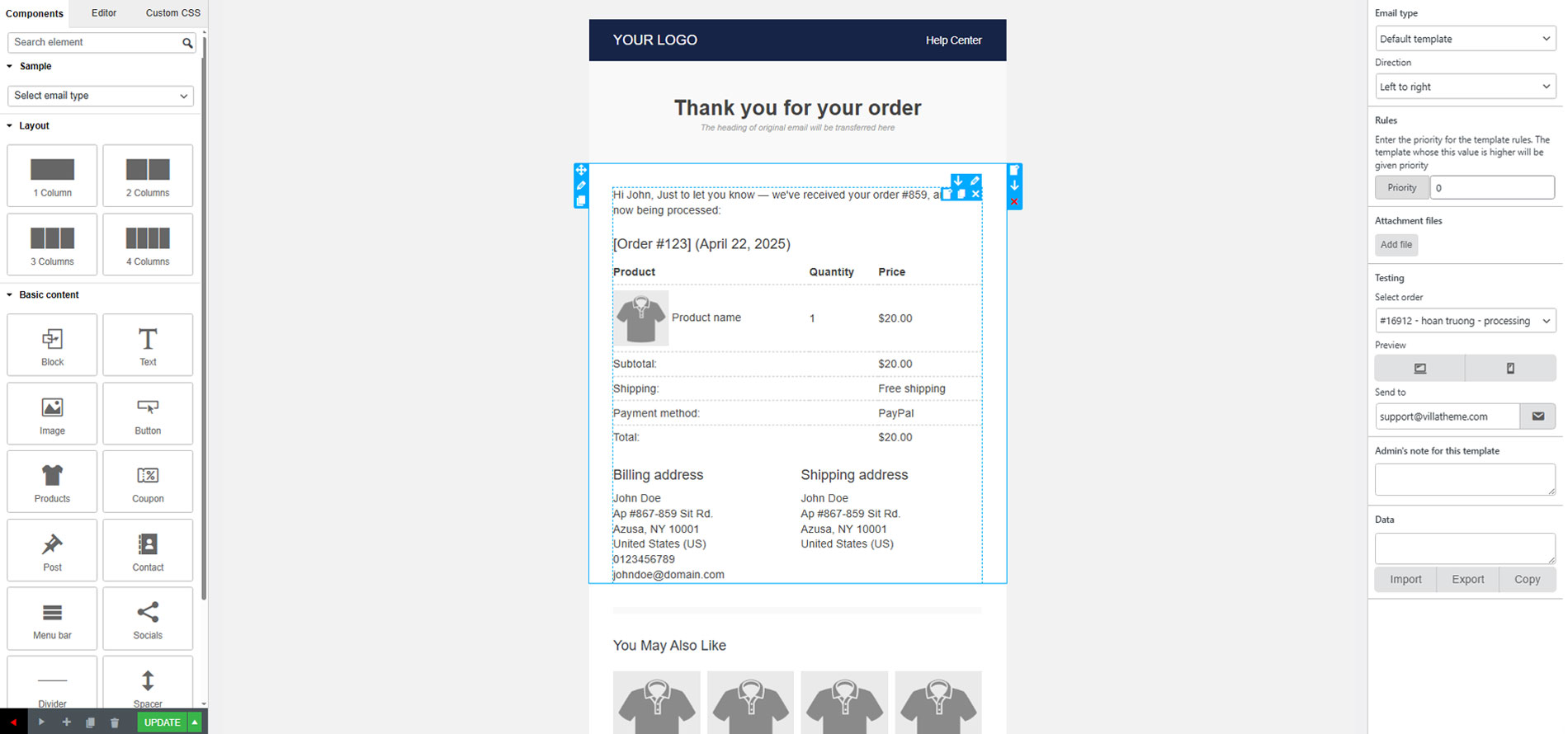
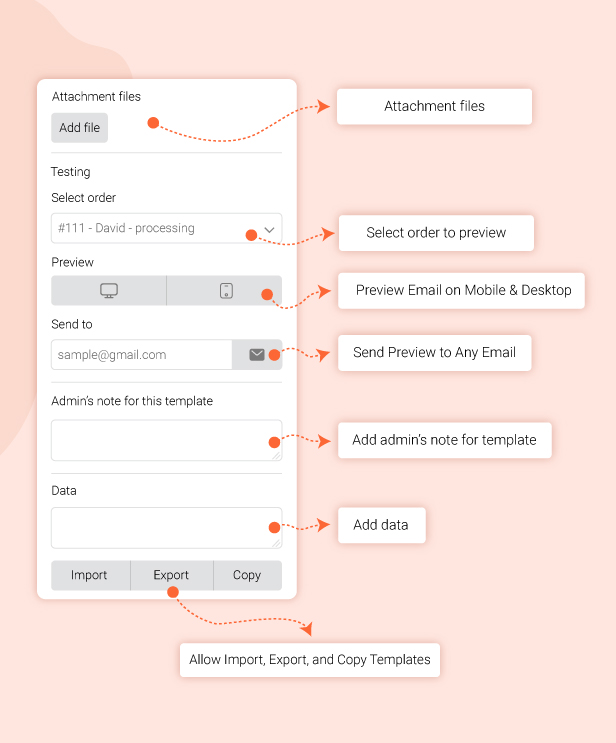
Manage your email templates with full flexibility, including file attachments, email testing, and real-time preview before sending. You can also easily import and export templates, helping you organize, reuse, and transfer designs quickly across different projects or stores.
Full RTL (Right-to-Left) Language Support
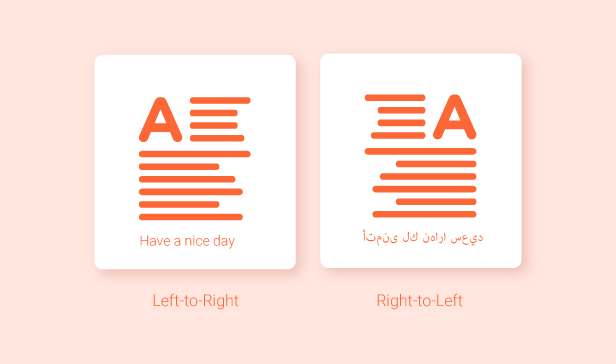
Supports both Left-to-Right and Right-to-Left text directions, allowing you to create and design emails in multiple languages seamlessly. This ensures your emails display correctly for RTL languages such as Arabic, improving readability and user experience for all customers.
Fully Responsive Email Design
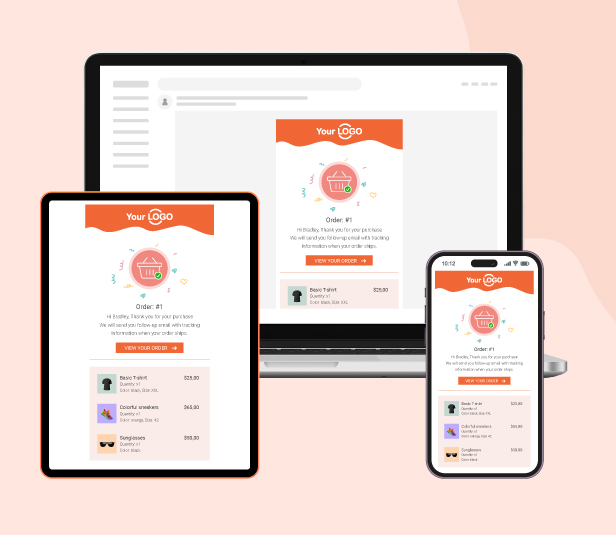
Ensure your emails look perfect on all devices, including desktop, tablet, and mobile. All templates are fully responsive, automatically adjusting layout, images, and text for the best reading experience on any screen size.
WooCommerce Email Template Customizer offers the following features:
Create and customize WooCommerce emails with provided elements.
Rearrange elements within templates using a simple drag-and-drop interface.
Apply rules to each template.
Attach files to emails for sending.
Test emails before sending them to ensure accuracy.
Preview emails in both Desktop and Mobile versions before sending.
Choose the direction for language compatibility (LTR or RTL).
Import and export templates between sites where the plugin is installed and activated.
Create customizable blocks and add them to any template.
Ensure responsive design across devices with the responsive point feature.
View reports on customer interaction with suggested products, including clicks and orders.
Customize WooCommerce emails with Basic elements
The plugin provides Basic elements that you can use to customize WooCommerce emails with:
Text: Add content with text element to the template and customize the element with: the text color, font size, alignment, border width, insert/edit link, insert/edit image, shortcode, info icon, social icon, border style, border color, background color, text padding, and text margin.
Divider: Add a single line divider to the template and choose a style for the divider. Similar to text, the admin can customize the style, width, height, color, alignment, margin, and padding of the divider.
Socials: Add social icons to customize WooCommerce emails, and enter your URL links in the placeholder.
Image: Add an image to the email template and adjust its size and alignment, border style, border color, background color, text padding, and text margin.
Button: Add and customize the button: Name, the link of a button, style the border, alignment, background, and padding.
Menu bar: Add and customize the menu bar or name the navigation bar that includes links to the most important sections of the site for instance Home, Shop, Contact…
Contact: Display contact information with icons in the email template.
Spacer: Add a space between elements and customize its height, borders with style and color, and the background color.
Customize WooCommerce emails with WooCommerce elements
Order detail: This element displays the full details of orders with customization of the color, size, and alignment of the heading and details separately. Also, customize the borders, background color, padding, and margin.
Order total: This element displays the total amount of orders. The admin can customize the color, size, and alignment of the heading and details separately as well as the borders, background color, padding, and margin.
Order subtotal: This element helps you display specific components of orders: including Subtotal, discount, shipping, payment method, and order fully refunded, …then, you can customize the color, size, and alignment of the heading and details separately. Also, customize the borders, background color, padding, and margin.
Shipping method: This element helps you display the shipping method, you can customize the borders, background color, padding, and margin.
Payment method: This element helps you display the payment method of the order, you can customize the borders, background color, padding, and margin.
Billing address: Displays the billing details in the email with customization of the color, size, and alignment of the heading and details separately. Moreover, customize the borders, background color, padding, and margin.
Shipping address: Displays the shipping details in the email and customizes the color, size, and alignment of the heading and details separately as well as the borders, background color, padding, and margin.
Products: Helps you recommend some products and redirects the customers to the single product page in your store when they click on a particular suggested product
Coupons: This helps you display a coupon that customers get. Then, customers can copy the coupon code and apply it to their orders.
Post: Helps you customize WooCommerce emails with your posts, then redirect the customers to those posts in your store when they click on the posts in the email.
Customize WooCommerce emails with WC Hook that can be dragged and dropped to change position
Customize WooCommerce emails with the WC Hook Element that allows you to insert content from a 3rd plugin at points wherever the hook is run.
Customize WooCommerce emails with Advanced options
In addition, WooCommerce Email Template Customizer is integrated with some advanced options that allow you to set rules and send an email if the order matches the rules. For example, you want to send a current email template to a customer in the United States – Shoe category if the order hits a specific amount. By setting the rules, you can manage emails that will be sent to each customer’s group as you want.
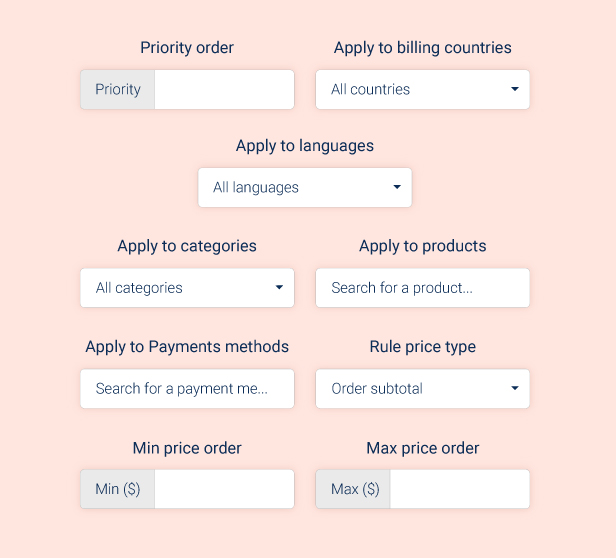
Priority: The plugin checks rules from top to bottom of the Email template list to find a matching template. When filtering email templates by type on the email list, templates with higher priority rules will be arranged to the higher position and are applied first. Go to each email template editing page to add priority for each one.
Important note: If a template includes multiple rules, for example: products, categories, and language rules…. set it with a higher priority than the templates which is applied to the global cases.
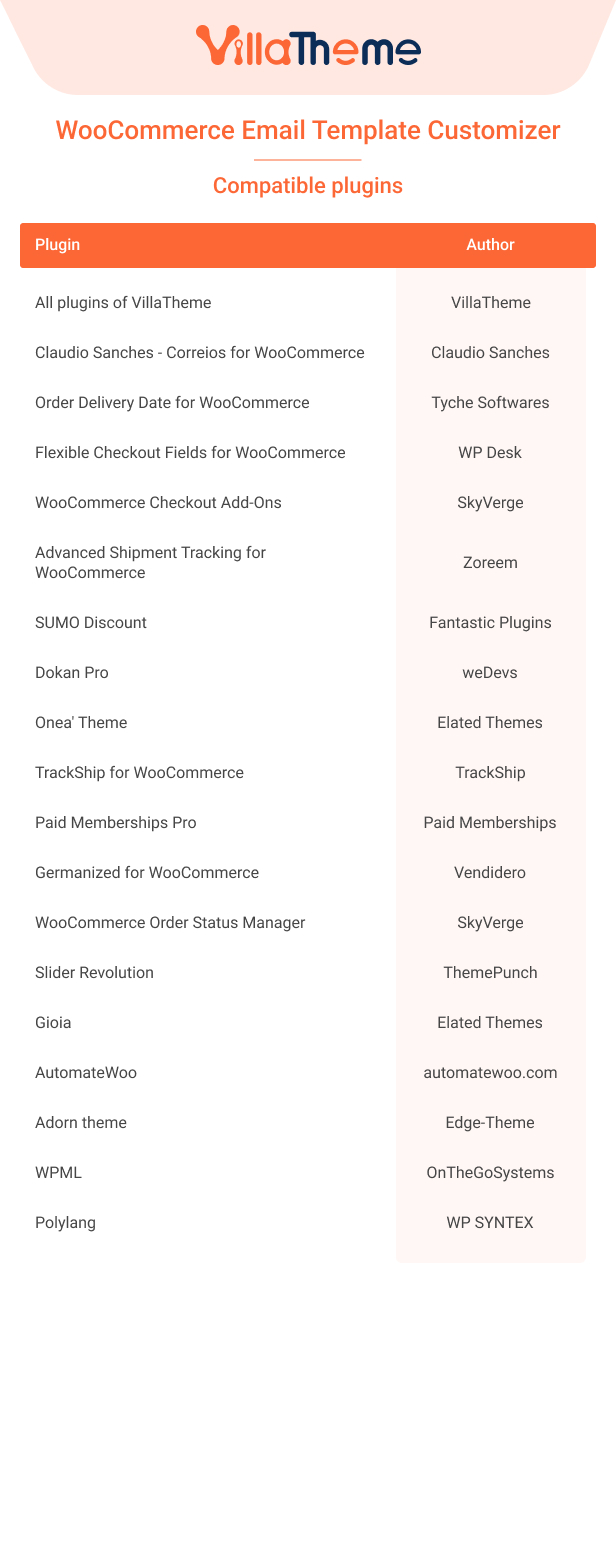
Apply to language: This option becomes available when using a multilingual plugin like WPML, Polylang, or TranslatePress. It allows you to create different email template templates for multiple languages and assign them to specific languages. You can view our guide video on how to send multilingual email notifications with WPML for a better view.
Apply billing countries: Select countries to which this email template is applied.
Apply to categories: Select categories to which this email template is applied.
Apply to products: Select products to which this email template is applied. The Product Categories rule also works with variations.
Apply to payment methods: Select the payment methods to which this email template is applied.
Choose the price type that is applied to min/max price orders: Select the price type to apply this template, they can be Order subtotal, Order total.
Apply to min price order: Add the minimum order. Once the order reaches this minimum amount or higher, the template will be sent.
Apply to max price order: Enter the maximum amount for the order. The template will be sent to when the user makes an order with the price lower or equal to this value.
With Advanced options, the admin can not only set the rules, but also select the email type, change direction (this option is helpful when you use the RTL languages), preview on different devices, and send a test email, as well as add a note for the template.
And see this video guide for How to install and use WooCommerce Email Template Customizer, to customize WooCommerce emails.
Additional information
License Time
12 months for 1 website, 6 months for 1 website
*** WooCommerce Email Template Customizer Premium Changelog ***
2026.08.20 - version 1.3.3
- Updated: Compatible with WP 7.1
- Updated: Compatibility check with WC 11.0
- Updated: Update support class
2026.06.19 - version 1.3.2
- Updated: VillaTheme support
2026.06.04 - version 1.3.1
- Fixed: Errors from customers' feedback
- Updated: Compatible with WC 10.8
2026.05.22 - version 1.3.0
- Updated: Compatible with WP 7.0 and WC 10.7
- Updated: Compatible with PixelYourSite
2026.01.23 - version 1.2.18
- Updated: VillaTheme support
2025.11.28 - version 1.2.17
- Updated: Add a “NOT” condition for the filter of billing countries, categories, and products
- Updated: Change the name of the ‘Use order download table’ option to ‘Show download link’
- Updated: Compatible with PHP 8.2 and WC 10.3
2025.10.03 - version 1.2.16
- Fixed: RTL on real send email
- Updated: Edit the "Cancelled Order" email for customers
2025.09.11 - version 1.2.15
- Fixed: Can not set the class/id to the WC hook component
- Fixed: Errors from customers' feedback
2025.06.26 - version 1.2.14
- Added: Title in the Shipping Address component
- Fixed: Errors from customers' feedback
2025.06.19 - version 1.2.13
- Fixed: Errors from customers' feedback
- Added: Option to set up the class/id per layout/ component
- Added: Exclude products in the Products component
- Added: Suggest special products in the Products component
2025.04.16 - version 1.2.12
- Added: Social icon of Discord
- Added: Option to send a mail test using the actual title
- Added: Shortcode {order_date_time} to display both the date and time created of the order
- Updated: Added ALT text to product images and social media images
- Updated: Only show the shipping address information when it's needed for the order
2025.02.20 - version 1.2.11
- Fixed: Include the attachment chosen for email sent via wp_new_user_notification_email
- Fixed: Display downloadable product links in the order items details
- Updated: Update priority for filter which replaces subject title to max
- Updated: Use the default template for the changed password email and the email of the changed email if the 9MAIL is not activated
2025.01.09 - version 1.2.10
- Fixed: Border not rounding
- Updated: Display correctly for multi-columns per row on Outlook (classic)
2024.12.20 - version 1.2.9
- Fixed: The price display in the cross-sell section of the emails for product on discount
- Updated: Display correctly for order items on Outlook (classic)
- Updated: Compatible with WC 9.5
2024.11.22 - version 1.2.8
- Updated: Compatible with WC 9.4 and WP 6.7
- Updated: Add an additional variable $order to the filer 'viwec_find_email_template_id_with_rule_order'
2024.10.18 - version 1.2.7
- Updated: Remove [“”] from the content rendered by shortcode wec_order_meta_subject for the string value
- Fixed: Display WC's special currency symbols in the subject.
2024.09.19 - version 1.2.6
- Fixed: Errors from customers' feedback
2024.09.18 - version 1.2.5
- Added: Added param array_key for shortcode [wec_order_meta_subject] to get array value by key
- Updated: Product Categories rule work with variation
- Updated: Compatible with WC 9.3.1 and WP 6.6.1
- Updated: File support
- Fixed: Resolved issue with automatically duplicating templates
2024.04.23 - version 1.2.4
- Fixed: Language rule not work with TranslatePress
- Added: Added param array_key for shortcode [wec_order_meta] to get array value by key
- Updated: Product rule work with variation
- Updated: Compatible with WC 8.7 and WP 6.5
- Updated: Compatible with plugin "Germanized for WooCommerce" verification email
- Updated: File support
2024.01.05 - version 1.2.3
- Updated: Compatible with WC 8.4
- Fixed: Fixed Dokan verification link
- Updated: Update new twitter icon
2023.10.13 - version 1.2.2
- Fixed: Fixed order price rule
- Updated: Compatible with WC 8.2
2023.10.10 - version 1.2.1
- Updated: Updated order price rule and payment methods
2023.07.10 - version 1.2.0
- Fixed: Fixed Product Category and Product Rule
- Updated: Compatible with HPOS -WC 7.9
2023.06.20 - version 1.1.20
- Updated: Compatible with WC 7.8
- Updated: Compatible with Adorn theme By Edge-Theme
- Updated: Updated column rule name in page email list
- Fixed: Fixed rule Product Category not translating with WPML
- Fixed: Fixed rule Language with polylang
2023.05.04 - version 1.1.19
- Updated: Updated get post and suggest product by language
- Updated: Updated email rule by products
- Updated: Compatible with WC 7.6.0
2023.03.23 - version 1.1.18
- Updated: Compatible with WC 7.5.0 and WP 6.2
- Updated: Compatible with 'TrackShip for WooCommerce' plugin by TrackShip
- Updated: Updated separate shortcode subject and content with [wec_order_meta_subject key=""]
- Updated: Updated filter hook to remove link in billing and shipping detail. 'viwec_remove_billing_phone_link', 'viwec_remove_billing_email_link', 'viwec_remove_shipping_phone_link'
2023.03.08 - version 1.1.17
- Fixed: Fixed shortcode not working in subject
- Updated: Compatible with 'Onea' theme by Elated Themes
- Updated: Add filter hook suggest product image 'viwec_suggest_product_thumb' - Accepts any registered image size name, or an array of width and height values in pixels (in that order). Default 'woocommerce_thumbnail'
- Updated: Add filter hook hidden subtotal when empty discount 'viwec_hidden_subtotal_epmty_discount'
2022.12.24 - version 1.1.16
- Updated: Compatible with plugin Paid Memberships Pro
- Fixed: Image full width in outlook 2016
2022.12.21 - version 1.1.15
- Fixed: Fixed with style WooCommerce
- Updated: Compatible with WooCommerce Order Status Manager
- Updated: Compatible with plugin Germanized for WooCommerce
2022.11.18 - version 1.1.14
- Updated: Option priority for rule
- Updated: Add parameter 'meta_customer_order' for shortcode '[wec_order_meta ]' to get user meta. Allowed value : meta_customer_order='yes'
- Updated: Compatible with WC 7.1.0
2022.10.28 - version 1.1.13
- Updated: Add {viwec_download_product_link_style} to style button download product
- Updated: Add {viwec_download_product_link_text} to set title for button download product
- Updated: Compatible with WP 6.1.0
- Fixed: Fixed PHP Notice: Array to string conversion
- Fixed: Fixed NONCE_SALT
2022.10.18 - version 1.1.12
- Updated: Compatible with WC 7.0.0
- Updated: Compatible with 'SUMO Discount' by Fantastic Plugins
- Updated: Add {applied_coupon} to coupon code
- Updated: Add {order_edit_url} for email send to admin
- Updated: Add {order_number_with_url_edit} for email send to admin
- Updated: Add {view_order_url} for email send to customer
2022.09.17 - version 1.1.11
- Updated: Compatible with 'Slider Revolution' by ThemePunch
- Updated: Compatible with 'Gioia' theme by Elated Themes
- Updated: Email subject can run shortcode
- Updated: Compatible with WC 6.9.2
- Fixed: Shipping/Billing address font size not being recognized on Outlook
- Fixed: Fixed email template disable setting working not correct
- Fixed: Fixed email template not working in outlook with AutomateWoo
2022.08.04 - version 1.1.10
- Update: Filter shortcode by email type
- Update: Compatible with AutomateWoo
- Update: Compatible with Dokan pro verification email
2022.05.28 - version 1.1.9
- Fix: Tik tok icon is missing
- Fix: Minify html content
- Update: Remove duplicate product attributes on WooCommerce 6.4
- Update: Option remove shipping address if same billing address
- Update: Include both language rules & billing country rules
2022.03.31 - version 1.1.8
- Fix: class WP_Upgrade not found
- Fix: shortcode ignore 9mail
2022.03.30 - version 1.1.7
- Fix: Select type control
- Updated: Minify email content
- Updated: tiktok & telegram social icons
- Updated: VillaTheme_Support
2022.03.23 - version 1.1.6
- Fix: Change capability_type
- Updated: Add {set_password_url} to new account email
- Updated: html tab for text element
- Updated: VillaTheme_Support
2021.22.12 - version 1.1.4
- Updated: Compatible with Dokan pro when generate coupon
- Fixed: Display font-family on left control panel
2021.10.25 - version 1.1.3
- Fixed: Active error
2021.10.22 - version 1.1.2
- Fixed: Social distance on mobile view
- Fixed: Show shipping phone
2021.10.14 - version 1.1.1
- Fixed: Display order note to customer
2021.10.06 - version 1.1.0
- Fixed: Generate coupon with amount 0
- Updated: Template blocks
2021.09.21 - version 1.0.3.1
- Fixed: Color of link
2021.09.17 - version 1.0.3
- Fixed: Send email with wc_mailer
- Fixed: Style of default template with outlook
2021.09.09 - version 1.0.2
- Updated: Add do shortcode
- Updated: Order detail template overridable
- Updated: Font-family
- Updated: Center on mobile option for text element
- Updated: Fix button on outlook
- Updated: Show custom css on preview
- Updated: Remove product link in order detail
- Updated: Add shortcode {from_email}
2021.06.08 - version 1.0.1.6
- Fixed: Remove duplicate heading in default template
- Updated: Add shortcode {customer_phone_number}
2021.05.03 - version 1.0.1.5
- Updated: RTL support
- Updated: Disable from WC email list
- Fixed: Remove 3rd argument form subject hook
2021.03.10 - version 1.0.1.4
- Fixed: Align image in Text Editor
- Updated: Width of template
- Updated: Order detail - Image width of horizontal style
- Updated: Responsive point
- Updated: Hide shipping address if shipping method is local pickup
- Fixed: Keep format of note to customer
- Updated: Add Attachment files
- Updated: Order subtotal component option: hide shipping row when shipping is free
2021.02.21 - version 1.0.1.3
- Fixed: custom CSSadmin
- Fixed: cache replace shortcode
2021.02.08 - version 1.0.1.2
- Updated: Add custom URL for image element
- Fixed: Image width in mobile view
- Fixed: Change priority of wp_new_user_notification_email hook
- Fixed: Strip html tag in subject
- Fixed: WPML for new account template
- Fixed: Search product for coupon
2020.12.26 - version 1.0.1.1
- Fixed: Clear Woo style
2020.12.25 - version 1.0.1
- Fixed: Display item meta
- Fixed: Get coupon expire date
- Updated: Design for default template
- Updated: Copy, paste element, row feature
- Updated: Language rule for WPML & Polylang
2020.11.24 - version 1.0.0.7
- Fixed: hook woocommerce_email_customer_details
- Fixed: missing padding when edit on Firefox
- Fixed: Clear template after render message
- Updated: Report order & clicked from suggestion product in email
- Updated: Add more social icons & social icon width
- Updated: Display product's SKU
2020.10.31 - version 1.0.0.6
- Updated: Add hook woocommerce_email_order_meta to WC Hook element
- Updated: Compatible with Flexible Checkout Fields
- Updated: Compatible with Order Delivery Date for WooCommerce (Lite version)
2020.10.24 - version 1.0.0.5
- Updated: Default template
- Updated: Admin note
- Fixed: replace some shortcodes
- Updated: Compatible with Claudio Sanches - Correios for WooCommerce
2020.10.19 - version 1.0.0.4
- Fixed: Activate samples
2020.10.17 - version 1.0.0.3
- Updated: Email new_account support Wordpress register form
- Updated: WC Hook element
- Updated: Hooks for 3rd party plugin make compatible
- Updated: Order note element
- Updated: Add 'add to cart' to suggest products.
2020.10.06 - version 1.0.0.2
- Updated: Search elements feature
- Fixed: Some shortcodes
2020.09.24 - version 1.0.0.1
- Fixed: Auto update
- Added: Language files
- Updated: Notice compatible with WC 4.5.1, Wordpress 5.5.1
2020.09.23 - version 1.0.0
~ The first released.